Self-Hosting Changedetection.io for OSINT: Another one in the Why and How Series

In OSINT, what changes is often more telling than what's there. A scam site quietly swapping its wallet address. A target's bio losing a key phrase. A news outlet stealth-editing a quote three hours after publication. A vendor on a marketplace going dark for a week and then reappearing. These signals are invisible to anyone not actively watching, and "actively watching" doesn't scale past a handful of targets when you're checking by hand.
Changedetection.io fixes that. It's a self-hosted website-change monitor that polls pages on whatever schedule you set, diffs against the last capture, and notifies you when anything you care about shifts. Drop a URL in, walk away, get pinged when something interesting happens. Not to mention the screenshot features and may other useful additions.
This post walks through why it matters for OSINT specifically and how to set up a production instance behind real authentication. But don't get me wrong, this is not only for OSINT adicts. This is useful in so many ways.
Why Changedetection.io Matters for OSINT
1. Change detection is the actual signal
Static evidence (what's on a page right now) is what you get from a single search or scrape. That's a useful snapshot but it's exactly that: a snapshot. The actual signal in most investigations is the delta: what changed, when, and why.
A scam project changes its team page from "based in Singapore" to no location at all. A vendor's pricing page hides three items. A government department quietly removes a press release. A target's LinkedIn bio loses "currently at" their employer. A Company Registration ID number changes. None of these surface in normal search results. None get archived by Wayback unless someone manually requests it. They're observable only if someone was watching when the change happened, with a record of the prior state.
Changedetection.io makes you that someone, at scale.


2. Coverage of sites that don't expose feeds
Most OSINT-relevant targets don't have RSS, don't have an API, and aren't on Wayback frequently enough to catch fast-moving changes. Personal sites, small forums, regional news outlets, scam project pages, dark market mirrors, NGO publications, government press rooms. Changedetection turns any URL into a watchable feed regardless of whether the site cooperates.
You can also scope a watch to a CSS selector if you only care about part of the page. Watch the headline of an article but ignore the comment count. Watch the price field of a listing but ignore the "you might also like" carousel that changes constantly. This dramatically reduces false-positive notifications.
3. JavaScript-rendered content stays in scope
A lot of modern sites render their actual content client-side. A simple HTTP fetcher gets back an empty shell. With the optional Playwright browser companion container, Changedetection runs a full headless Chromium for each watch, gets the rendered DOM, and diffs against that. Single-page apps, dynamic dashboards, Cloudflare-protected pages, sites that load content lazily after the initial response, all watchable.
The Playwright container also enables visual diffs and screenshots, which matters for evidence integrity. A textual diff tells you content changed. A screenshot shows you exactly how the page looked at the moment of capture, which holds up better as evidence than text alone.
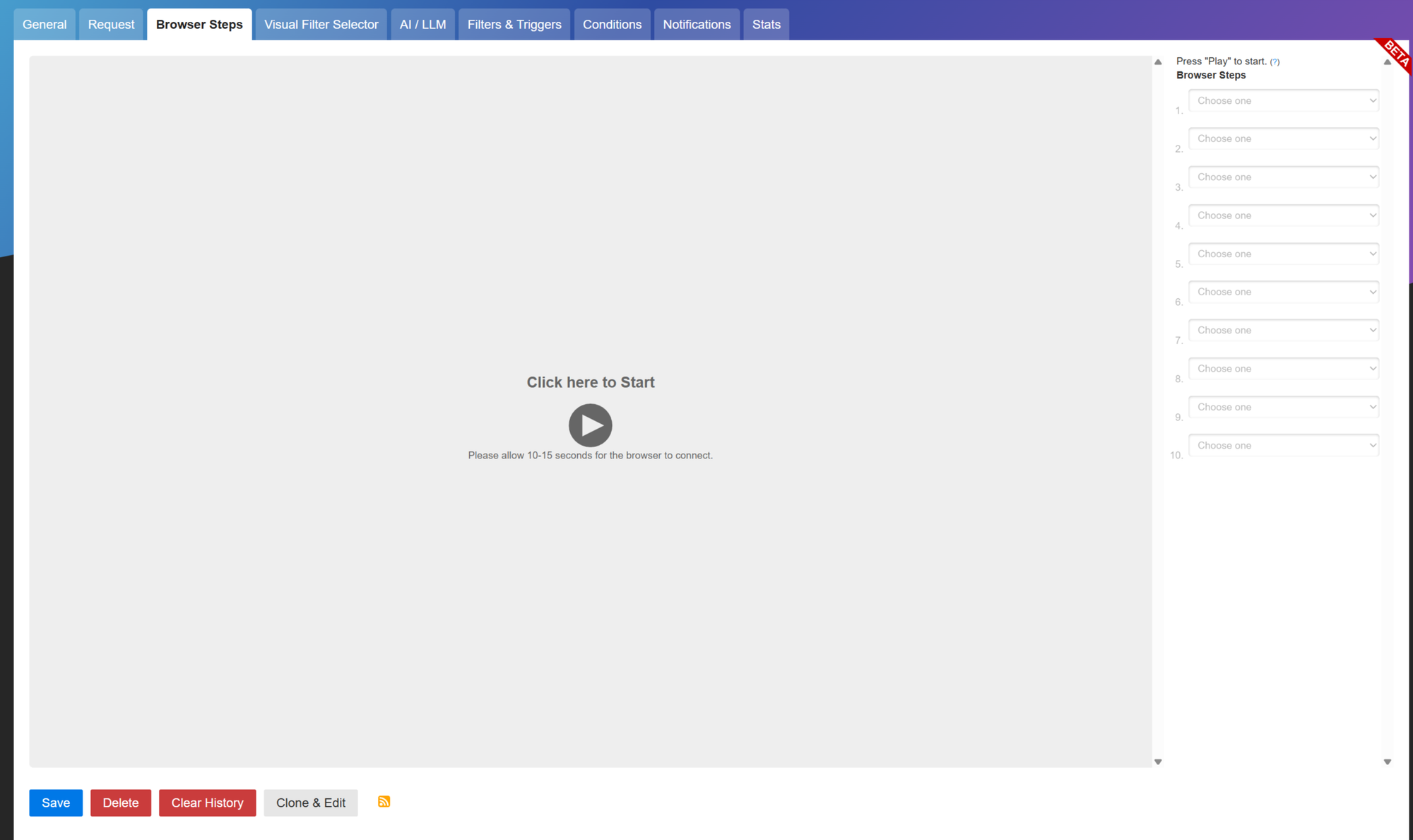
4. Browser Steps for content behind interaction
Some content isn't reachable by URL alone. A forum thread behind a login. A search results page that requires submitting a form. A product page that requires accepting a cookie banner first. Changedetection's Browser Steps lets you record a click-and-fill sequence that runs before each watch, so the page being diffed is the page you actually want to watch.
For OSINT, this opens up sites that traditional scrapers struggle with. Account-gated forums where you've created a sock puppet, sites with cookie walls, product pages that require interacting with a dropdown to reveal stock status.
5. Notifications that route where you actually live
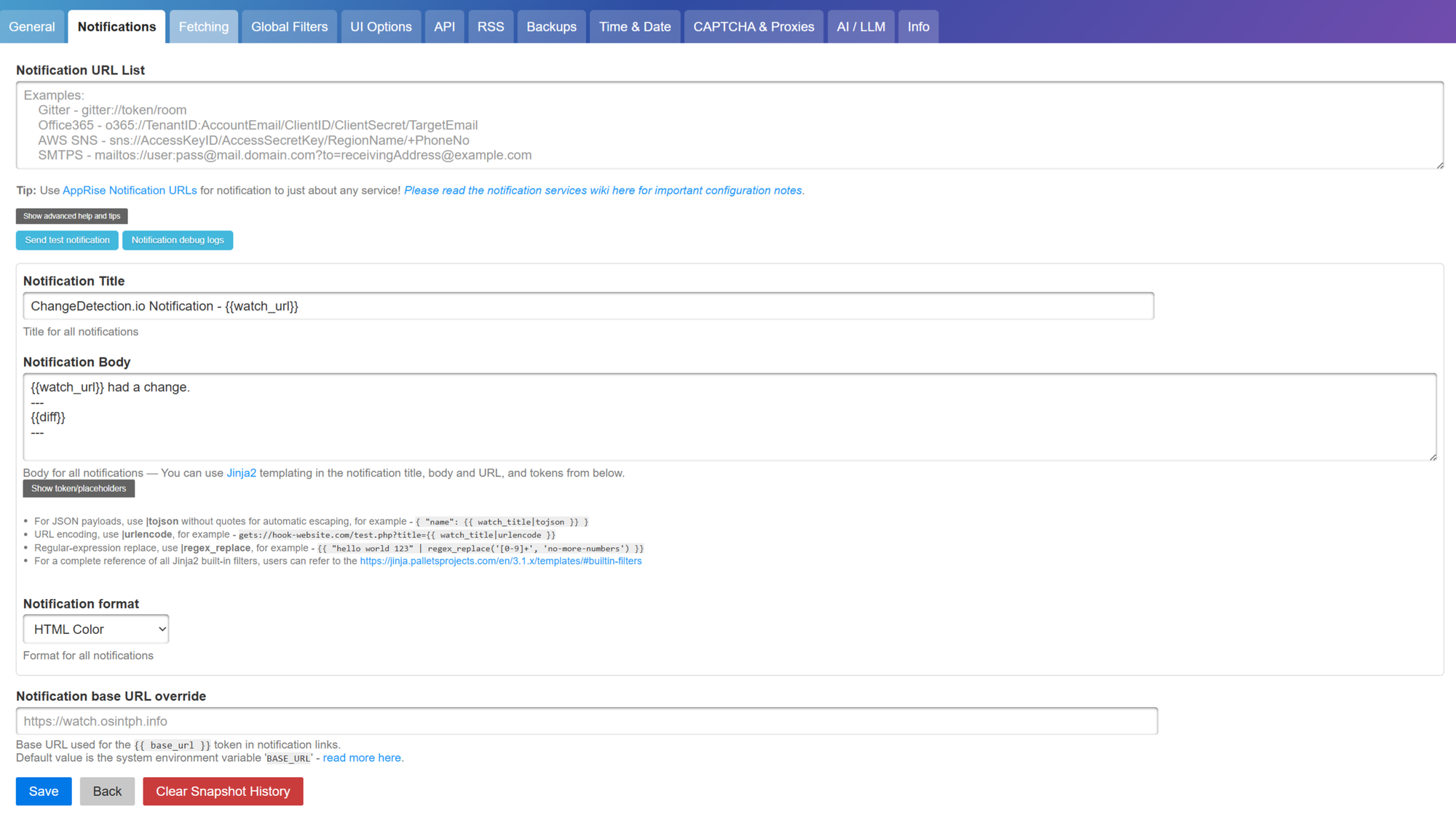
Watches don't matter if you don't know they fired. Changedetection ships with Apprise integration, which speaks 70+ notification services: Telegram, Discord, Slack, ntfy, Pushover, Mattermost, Matrix, generic webhooks, email, and so on. For OSINT, the right channel matters. Email is sluggish. Telegram and ntfy are fast and reach mobile. Webhooks let you fire into n8n or your own automation for follow-up actions.
You can set notification rules per-watch, so high-priority targets ping your phone while low-priority watches log to a Discord channel you scroll through weekly.
6. Restock and price detection for marketplace OSINT
Changedetection has built-in price extraction for product pages. It pulls structured data (JSON-LD, OpenGraph, microdata) from listings and tracks the price field specifically. For OSINT against marketplaces, gray markets, and any commerce-adjacent investigation (gun shows, ticket reselling, second-hand luxury, dark-market mirrors), this turns a generic monitor into a price-aware tracker. Set a threshold and only get alerted when something crosses it.
7. Per-watch proxies for sensitive surveillance
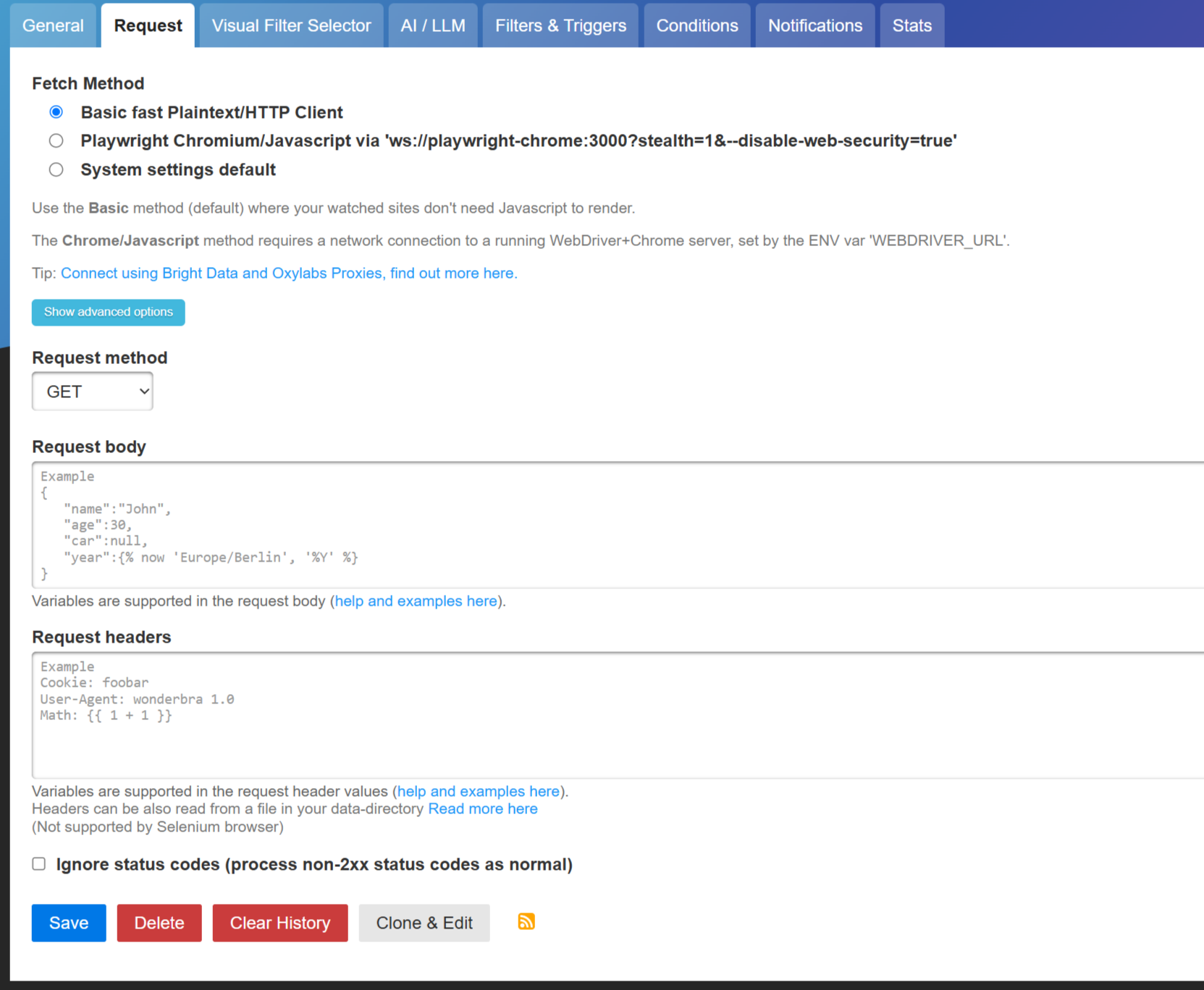
Some OSINT targets bot-detect aggressively and will flag a single datacenter IP polling them on a schedule. Changedetection supports per-watch proxy configuration directly in the watch's Request tab. Pair that with a rotating residential proxy provider (same vendors and ethical caveats I covered in the SearXNG writeup) and high-sensitivity watches can route through different residential exits each fetch while low-sensitivity watches stay on the direct VPS path. Mix-and-match is the right model: budget residential bandwidth where it matters, not everywhere.
 Sigmund
 Sigmund
This is particularly relevant for targets you suspect are monitoring inbound IPs (scam operators often are), for high-frequency watches where polling cadence would otherwise flag the source, and for geo-restricted targets where the residential IP needs to be in a specific country.
The Setup
The whole thing fits in a Docker Compose file, a Caddyfile, and a few minutes of UI configuration. Everything below assumes a fresh Debian or Ubuntu VPS with a domain you control.
If you read my SearXNG writeup, the infrastructure here will look familiar. The auth and reverse proxy patterns are identical, and you can run both side by side on the same VPS without issue. In fact, in the writeup I already mention changdetection running on the same host:

Prerequisites
- A VPS with at least 2GB RAM (1GB for Changedetection itself, 1GB headroom for the Playwright browser when actively fetching)
- A domain or subdomain pointing at the VPS (
watch.yourdomain.com) - Docker and Docker Compose installed
- Ports 80 and 443 open
The same provider-choice argument from the SearXNG post applies. For OSINT tooling, host on a non-US provider for consistency with your privacy posture. I run all my OSINT workloads on OVHcloud, and I wrote up the rationale here. Hetzner and Scaleway are equivalent European choices.
Sigmund


If Docker isn't on the box yet:
curl -fsSL https://get.docker.com | sh
sudo usermod -aG docker $USER
newgrp docker
Step 1: Create the project directory
sudo mkdir -p /opt/changedetection
sudo chown -R $USER:$USER /opt/changedetection
cd /opt/changedetection
Step 2: Create the Compose file
/opt/changedetection/docker-compose.yml:
services:
  changedetection:
    image: ghcr.io/dgtlmoon/changedetection.io:latest
    container_name: changedetection
    restart: unless-stopped
    volumes:
      - changedetection-data:/datastore
    environment:
      - BASE_URL=https://watch.yourdomain.com
      - PLAYWRIGHT_DRIVER_URL=ws://playwright-chrome:3000?stealth=1&--disable-web-security=true
    ports:
      - "127.0.0.1:5000:5000"
    networks:
      - watch

  playwright-chrome:
    image: dgtlmoon/sockpuppetbrowser:latest
    container_name: playwright-chrome
    restart: unless-stopped
    environment:
      - SCREEN_WIDTH=1920
      - SCREEN_HEIGHT=1024
      - SCREEN_DEPTH=16
    networks:
      - watch

volumes:
  changedetection-data:

networks:
  watch:
Change BASE_URL to your actual domain. BASE_URL matters because Changedetection uses it for notification URLs (a Telegram message saying "this watch changed" needs to link back somewhere).
Binding to 127.0.0.1:5000 is intentional. The only public surface is your reverse proxy on 443.
The Playwright service is technically optional, but include it from day one. Without it you can't diff JavaScript-rendered pages and you don't get screenshots. For OSINT use, both are essential.
Step 3: Set up Caddy as reverse proxy
If you don't already have Caddy installed:
sudo apt install -y debian-keyring debian-archive-keyring apt-transport-https curl
curl -1sLf 'https://dl.cloudsmith.io/public/caddy/stable/gpg.key' \
  | sudo gpg --dearmor -o /usr/share/keyrings/caddy-stable-archive-keyring.gpg
curl -1sLf 'https://dl.cloudsmith.io/public/caddy/stable/debian.deb.txt' \
  | sudo tee /etc/apt/sources.list.d/caddy-stable.list
sudo apt update && sudo apt install -y caddy
Create or extend /etc/caddy/Caddyfile:
watch.yourdomain.com {
    reverse_proxy 127.0.0.1:5000
    encode gzip zstd
}
Validate and reload:
sudo caddy validate --config /etc/caddy/Caddyfile
sudo systemctl reload caddy
Step 4: Start the stack
cd /opt/changedetection
docker compose up -d
docker compose logs --tail 30
The Playwright browser image is around 1.5GB on first pull, so the initial start takes a minute. Wait for both containers to settle, then hit https://watch.yourdomain.com in a browser. You should see the Changedetection dashboard.
Step 5: Lock down the dashboard immediately
By default, anyone who hits watch.yourdomain.com lands in your admin dashboard with full access to your watches and settings. Fix that before doing anything else.
In the Changedetection UI: top-right gear icon → Settings → "General" tab → scroll to "Require login to access the dashboard" → set a strong password → Save.
This built-in auth is single-factor and basic. For real-world deployments behind a public URL, layer something stronger in front (see the next section).
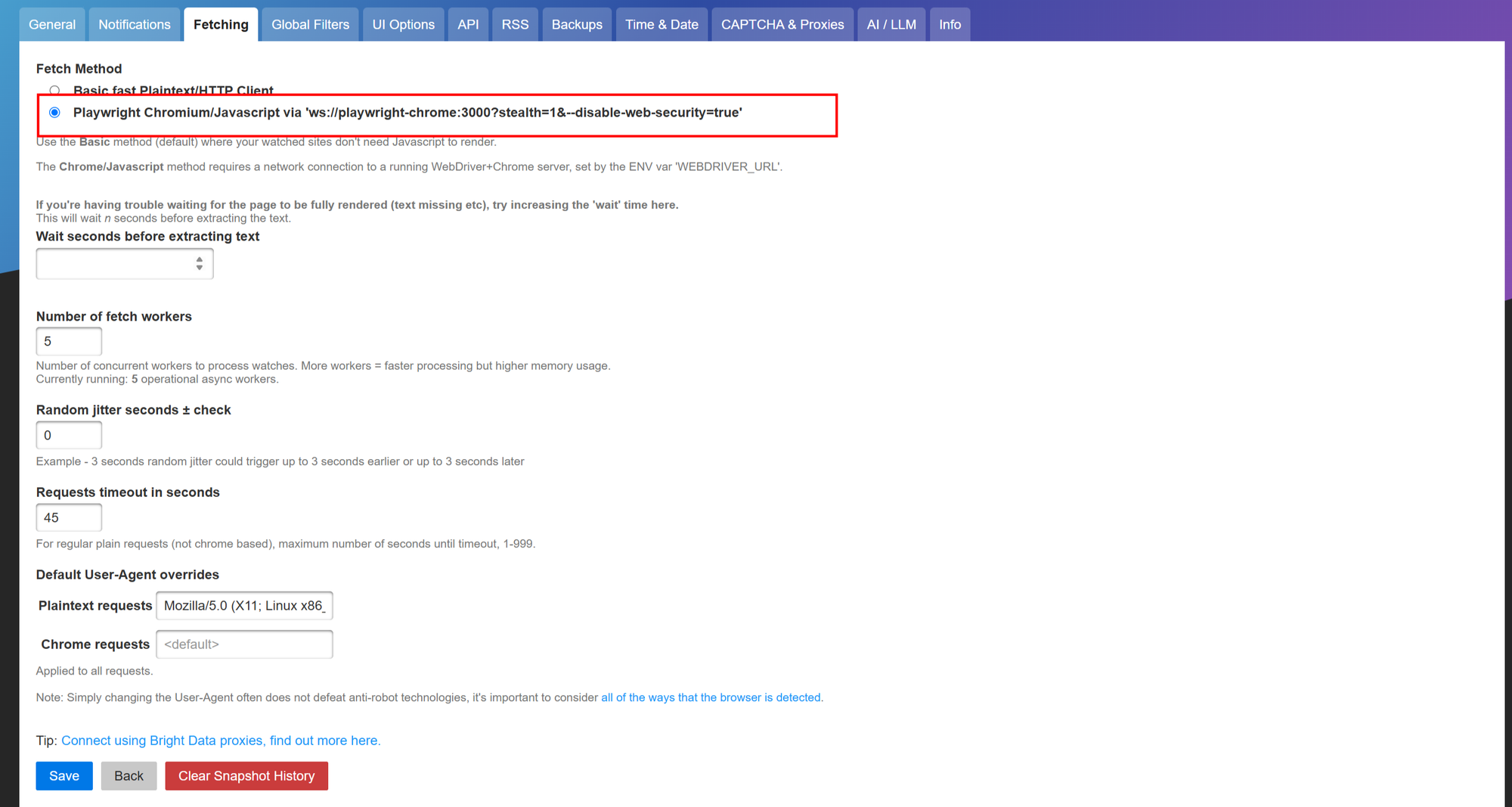
Step 6: Make Playwright the default fetcher
Settings → General → scroll to "Fetching" → set Default fetcher to the Playwright option. Save.
This applies to all new watches automatically. Existing watches keep their current fetcher unless you edit them individually or bulk-edit from the dashboard.
Step 7: Wire up notifications
Settings → Notifications. Drop one or more Apprise URLs in the field. A few that work well for OSINT use:
- ntfy:
ntfy://ntfy.sh/hard-to-guess-topic(use a random-string topic so nobody else accidentally subscribes; install the ntfy app on your phone) - Telegram:
tgram://botToken/chatId - Discord:
discord://webhook_id/webhook_token - Generic webhook:
json://yourserver.example.com/webhook
Layer multiple if you want. I run ntfy for personal alerts and a separate webhook into n8n for automated follow-up actions on specific watches.
Locking Down Access (Optional but Recommended)
Same logic as the SearXNG writeup: a public dashboard URL is discoverable via certificate transparency logs regardless of whether you publicize it, and Changedetection's built-in single-factor password is not what you want sitting in front of an investigation tool. The argument for real authentication is arguably stronger here than for SearXNG, because the dashboard exposes not just queries but the watches themselves, which is to say an inventory of the targets you're tracking.
Slightly oder but still relevant write up:
Sigmund
Why this matters for Changedetection specifically
Your watch list is itself sensitive intel. A list of URLs you're monitoring reveals what you're investigating. If your dashboard is reachable, anyone with the URL can browse your case list.
Configuration exposure is worse than for SearXNG. SearXNG without auth leaks UI configuration and search-engine selection. Changedetection without auth leaks every target you're watching, the cadence you're checking at, the notification endpoints you're using, and (depending on watch settings) the historical text of every page diff.
Notification endpoints are credential-adjacent. If your watch is wired to a webhook with a secret in the URL, that secret is visible in the dashboard. Same for Telegram bot tokens, Discord webhooks, and so on.
Modifying watches is destructive. A logged-out drive-by visitor can delete or alter watches. With no auth in front, you can lose a year of monitoring history to one bored stranger.
Your options
Same set as the SearXNG post:
- Cloudflare Access with your existing IdP. Easiest if you're already on Cloudflare DNS.
- IP allowlist in Caddy if you only access from a few fixed IPs.
- HTTP Basic Auth in Caddy for a simple shared password without MFA.
- Self-hosted forward auth (Authelia, Authentik) for MFA-capable open-source auth.
- Tailscale or WireGuard to remove the public surface entirely.
The Cloudflare Access setup is identical to the SearXNG version: proxy the DNS record, create a Zero Trust application for the hostname, attach a policy that includes your email, save. If you're using Google Workspace as your IdP with MFA enforced, you get MFA on the Access prompt automatically.
The Cloudflare cert renewal trap (Let's Encrypt HTTP-01 challenge can't get through Access) applies here too. Solution is the same: generate a Cloudflare Origin Certificate with 15-year validity, drop it on the VPS, point Caddy at it with tls. Skip the per-step retread if you've done this for your SearXNG instance already, the procedure is exactly identical.
Practical OSINT Workflows
A few patterns that pay off once Changedetection is set up.
Scam infrastructure monitoring
For crypto scam investigations, the highest-value watches are usually:
- The scam project's landing page. They swap wallet addresses, change founder names, or quietly pivot positioning when wallets get flagged. The diff captures the moment.
- Their official social profiles (Twitter/X, Telegram channel pages). Bios and channel descriptions shift before content does.
- Any associated paste sites or anonymous forum posts they've made. These tend to disappear when authorities or platforms catch on, and the deletion itself is an evidentiary moment.
- WHOIS or RDAP pages for their primary domain. Owner changes, renewal dates, and nameserver updates often correlate with operational pivots.
Scope each watch to a CSS selector so you only diff the meaningful content, not navigation menus and cookie banners.
Article integrity monitoring
For accountability journalism or fact-checking work, watch the article body itself. News outlets occasionally stealth-edit articles post-publication: a quote gets softened, a number gets corrected without a correction notice, a paragraph gets removed. Changedetection captures the pre-edit version, and a side-by-side diff is highly defensible as source.
Set a 30-minute initial recheck cadence (most stealth edits happen within hours of publication) and back off to 6 hours after the first day.
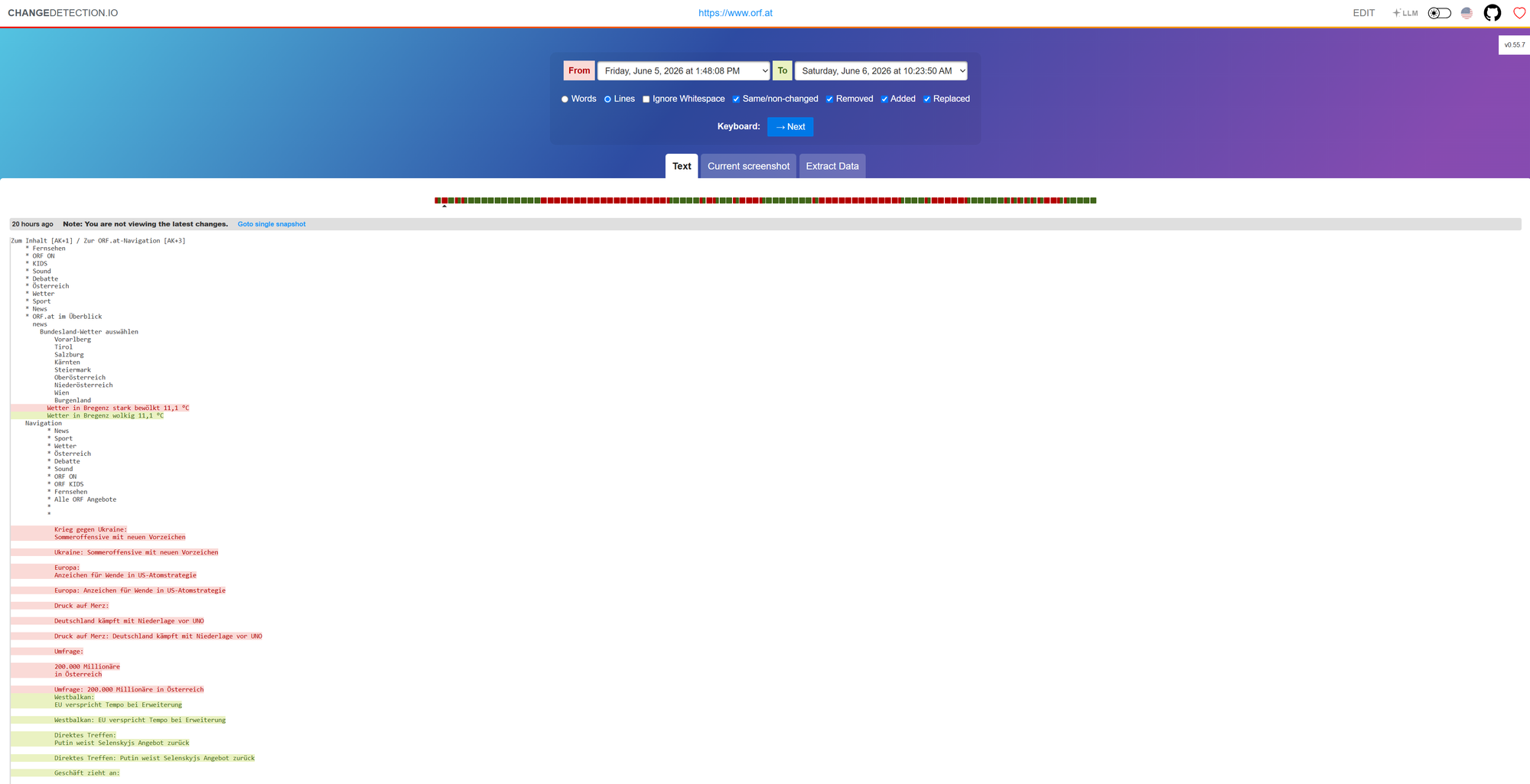
Example of Monitoring just to show how changes look:
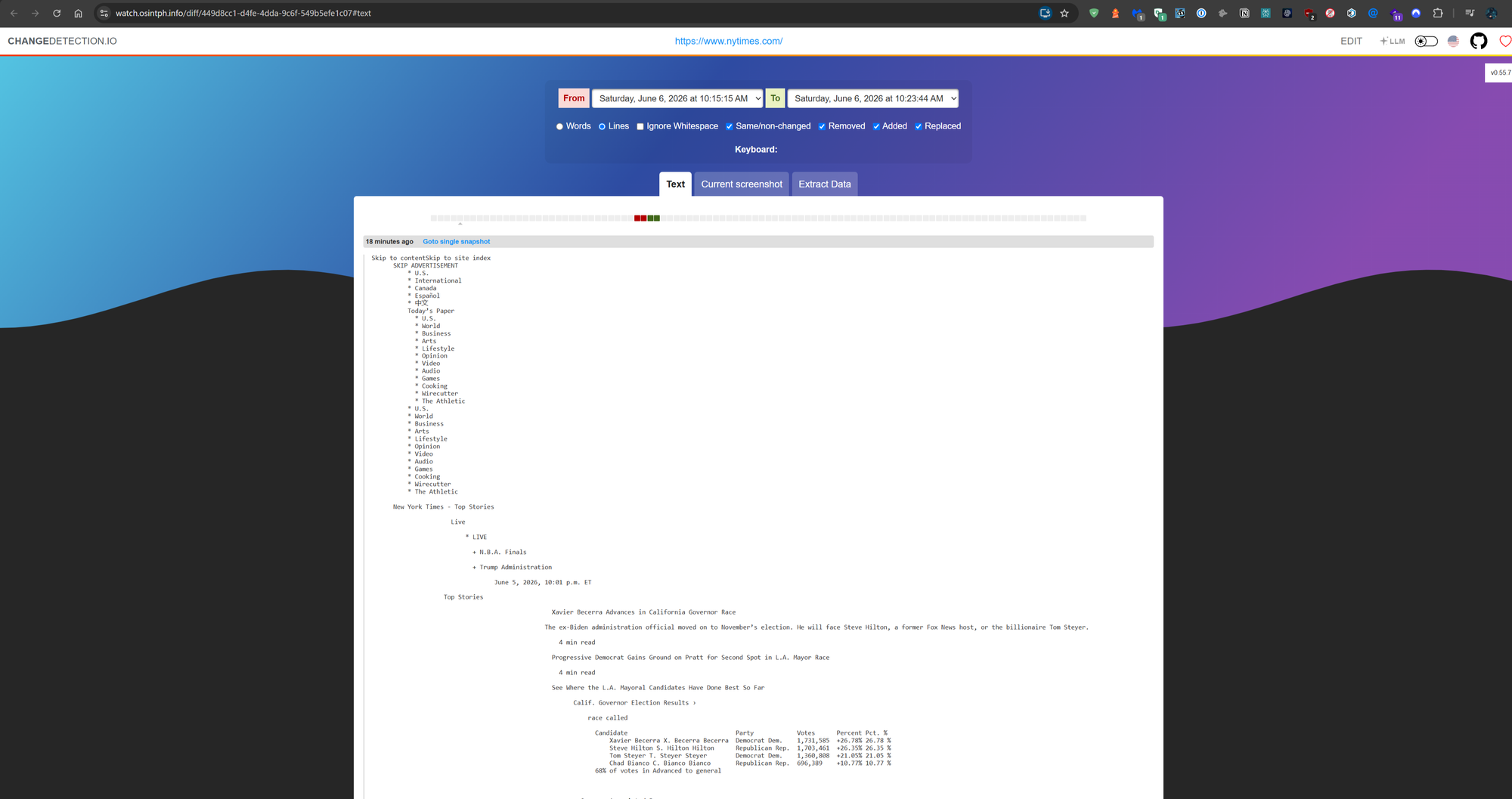
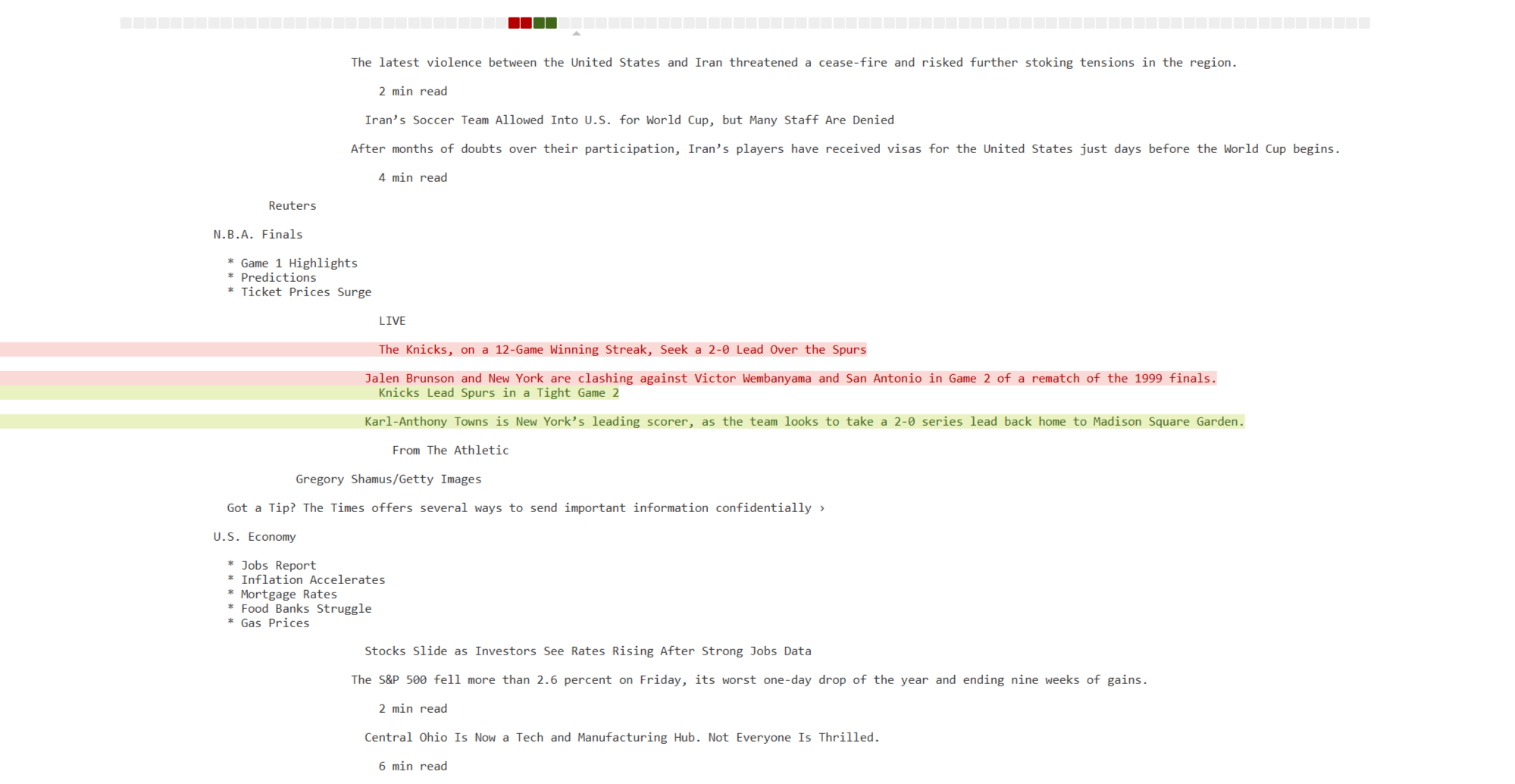
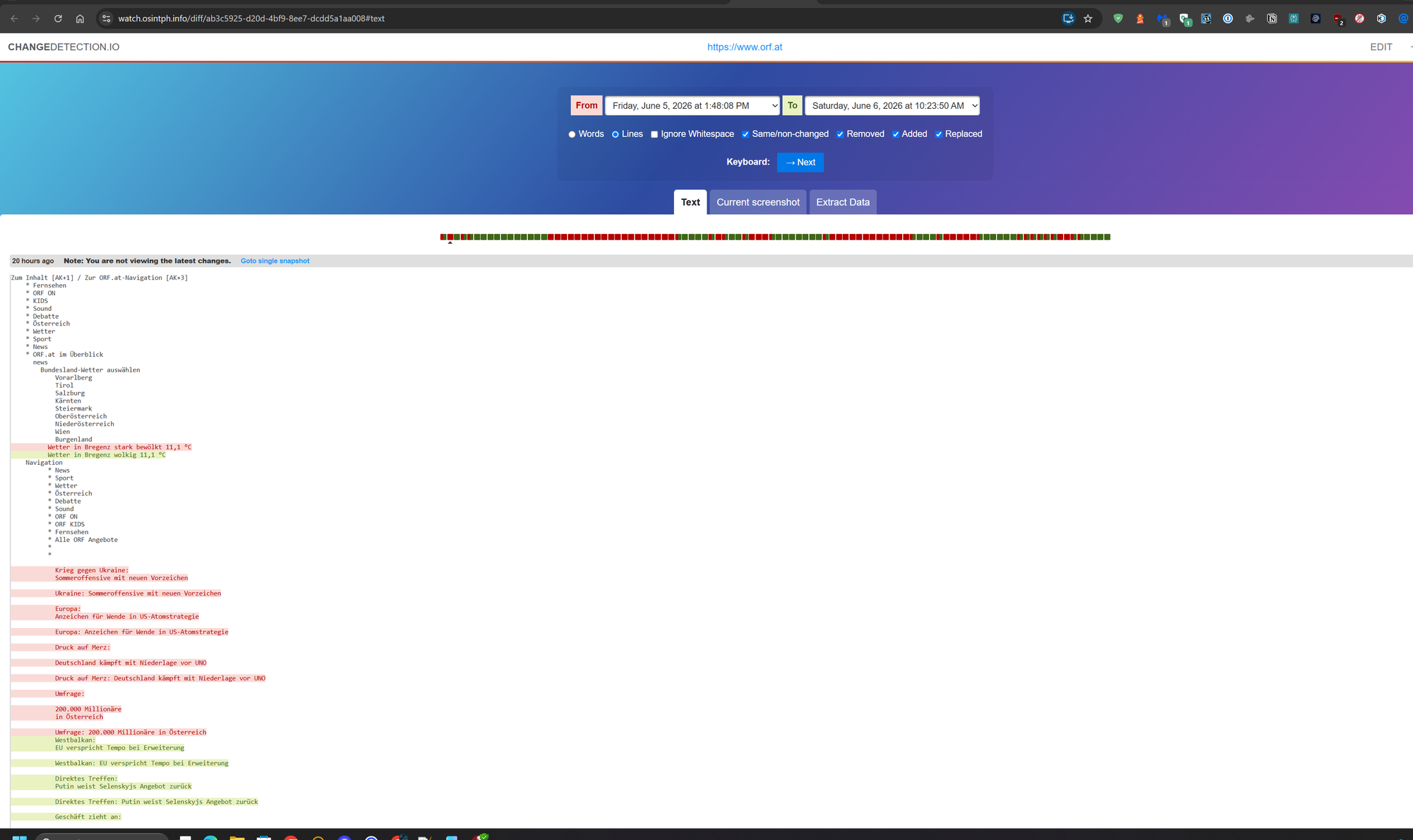
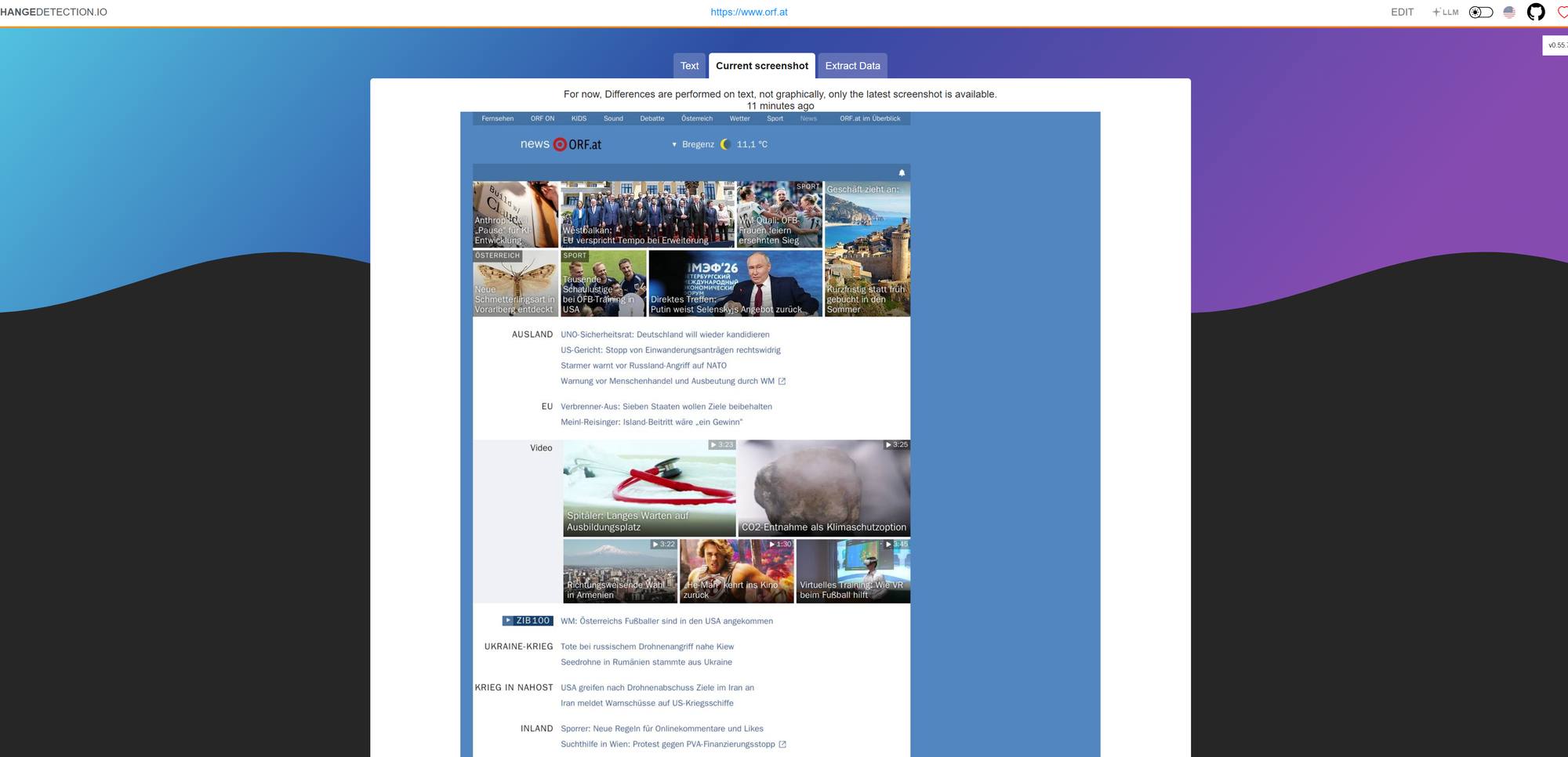
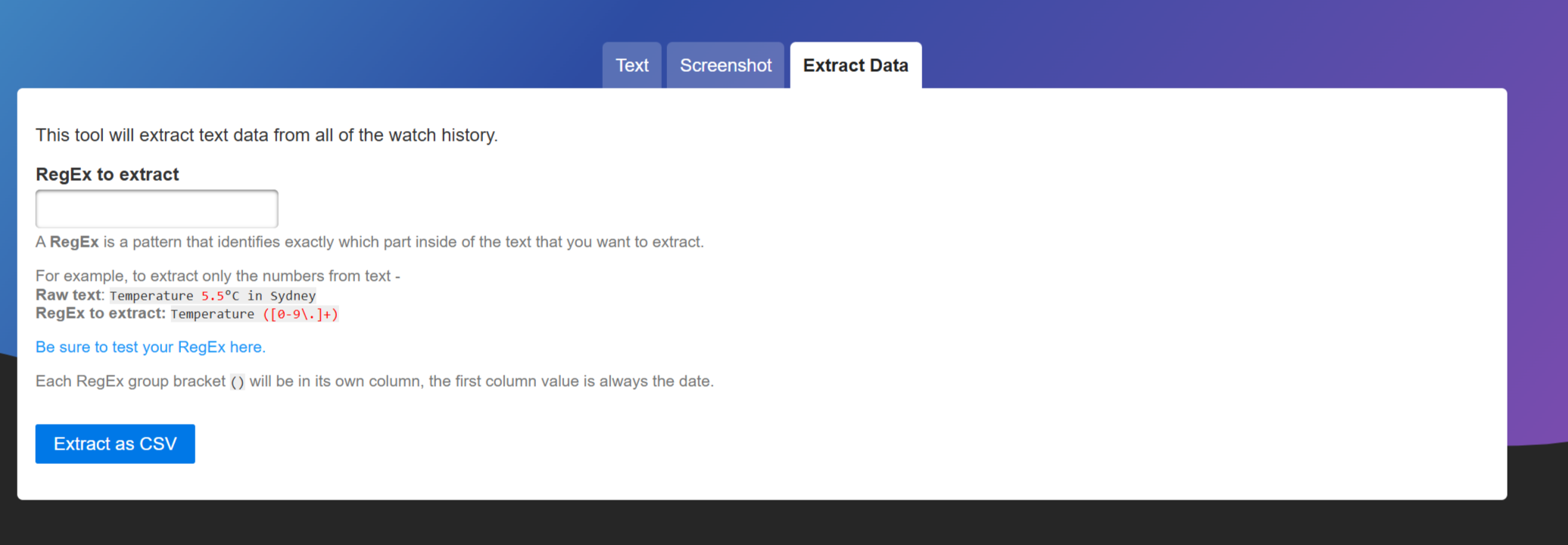
Also a nice feature to mention, the regex based extraction:
Marketplace listing surveillance
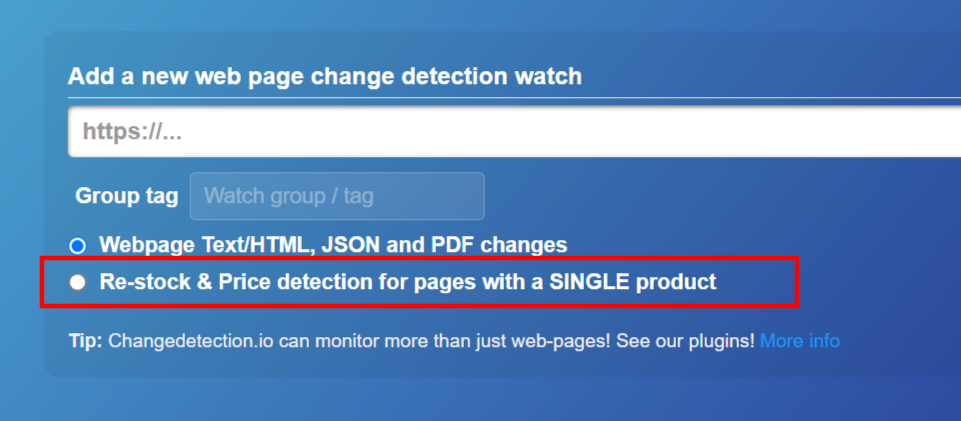
Use the built-in restock and price detection on product pages. For OSINT against gray markets and dark-market mirrors:
- Watch vendor pages for new listings. New items added without explanation indicate operational activity.
- Watch specific items for price drops or disappearances. Price drops can indicate operator urgency to liquidate, disappearances can indicate seizures.
- Watch vendor reputation pages for sudden negative reviews. This often precedes a vendor going dark.
Sock puppet target monitoring
If you've identified target accounts on a platform, set watches on their profile pages. Use the Playwright fetcher with Browser Steps if needed to log in via a sock puppet first. Diff the bio, follower count, post count, and "last active" indicators. Bio changes are often the leading signal of a target moving operations to a new platform or rebranding.
JSON endpoints as structured watches
If a target site has a JSON API (even an undocumented one used by their own frontend), watch the API endpoint directly with a JSONPath filter. Reliable, low-bandwidth, and you get structured data instead of HTML diffs. Particularly useful for blockchain explorers, exchange status pages, and any commercial site with a backing API.
Notification chaining via webhooks
Wire a generic webhook notification into n8n or your own automation. When a watch fires, trigger downstream actions: snapshot the page to ArchiveBox for permanent record, query a domain against VirusTotal, post a structured summary to your case notes. This turns Changedetection from a notification system into an event-driven OSINT pipeline.
Maintenance
Mostly hands-off after setup, but a few things to know.
Updates. docker compose pull && docker compose up -d periodically. Once every couple of weeks is fine. The project moves at a steady pace and updates rarely break existing watches.
Watch hygiene. Periodically review old watches. Targets get archived, scams collapse, investigations end. Stale watches still consume fetch slots and add noise to your dashboard.
Browser container memory. The Playwright container memory tends to drift up over time with heavy use. A scheduled docker compose restart playwright-chrome weekly via cron resets it. Not strictly necessary but cleaner.
Backups. Your Changedetection data volume (changedetection-data) contains all your watch history, settings, and notification configs. Worth snapshotting to off-host storage periodically. The mount point inside the container is /datastore, and the entire contents are useful to back up.
Closing
The OSINT work that produces the strongest signal is rarely the work of finding what's there. It's the work of noticing what's no longer there, or what's changed since last week, or what a target swapped in when they thought nobody was looking. Doing that at scale by hand is impossible. Doing it with a self-hosted Changedetection instance behind your own auth, on infrastructure you control, is a Sunday afternoon of setup.
Set it up once, point watches at the things you actually care about, and your investigations will start surfacing signals you wouldn't have caught otherwise.
Reach out if you have questions or comments or what to collaborate
Session Messenger: 059db238ab37c3d92615c5cc24b694da29c598cc13e27886053722404118e14271