Certificate Transparency as a Timeline Source: Reading CT Logs Like a Forensic Notebook

When most people learn about Certificate Transparency, it gets framed as a browser-trust mechanism. CAs log every certificate they issue, browsers verify the proof, misissuance gets caught. That framing is correct but it buries the lead for OSINT work.
For an investigator, CT is the single best chronologically ordered, publicly auditable, timestamp-rich record of internet infrastructure that exists. It is a notebook of what someone built, when they built it, and what they named the pieces. Every TLS certificate ever issued for a publicly trusted domain is in there, with timestamps that are signed by an independent log operator and cannot be quietly edited later.
Most posts about crt.sh stop at "use it to enumerate subdomains." That is the most basic thing you can do with CT and arguably the least interesting. This post is about reading CT logs as a timeline, with worked examples on how to use that timeline to date infrastructure rollouts, catch staging environments weeks before they go public, and produce a defensible chronology you can drop into a report.
What CT actually logs, in one paragraph
A CA, before issuing a certificate, submits the precertificate to one or more append-only logs. Each log signs a Signed Certificate Timestamp (SCT) which gets embedded in the final certificate. The browser sees the SCT, verifies the log's signature, and trusts that the certificate has been publicly disclosed. The logs themselves are run by independent operators (Google, Cloudflare, DigiCert, Sectigo, Let's Encrypt until February 2026, and others). They are sharded by half-year now, so you will see names like solera2026h1 or xenon2026h2. As of Chrome 148 (May 2026), SCTs delivered via stapled OCSP are no longer accepted, which pushes everything toward the embedded SCT path that ends up in the certificate itself.
For our purposes, the two facts that matter are: every certificate is logged, and every log entry carries a verifiable timestamp.
The two timestamps that matter
A CT log entry gives you several time fields. Most investigators only ever look at one and that is a mistake.
not_before is when the certificate becomes valid. This is set by the CA and is almost always backdated by a few minutes or hours to account for clock skew. It is the closest thing to "when the certificate was actually requested."
not_after is when the certificate expires. Useful for filtering out noise, less useful for timeline work.
entry_timestamp (sometimes called the log's "ingestion time") is when the log received the entry. This is the SCT timestamp, signed by the log, and impossible to forge or backdate. For establishing a verifiable lower bound on when a name existed in someone's plans, this is the field you cite in a report.
The pattern to internalize: not_before tells you when the certificate started working. entry_timestamp tells you the earliest moment a third party (the log operator) can attest that the name existed. The two are usually within minutes of each other, but on a contested timeline question, the log timestamp is the one with provenance.
Reading crt.sh chronologically
The default crt.sh result page sorts by certificate ID. That is not chronological. The first thing to do on any investigation is to flip the view into something you can actually read on a timeline.
A quick note on demo targets before any commands. Every CT tutorial on the internet uses example.com. Over the years this has poisoned it as a test target. crt.sh has tens of thousands of historical entries for example.com, the unfiltered query times out, and the exclude=expired path has been hitting 502s on it for months because of ongoing backend issues at Sectigo. If you copy a tutorial query verbatim with example.com substituted in, you will hit a wall that has nothing to do with the technique. For the examples below I am using osintph.info, which is small enough to return cleanly and real enough to show interesting patterns. Substitute your own target.
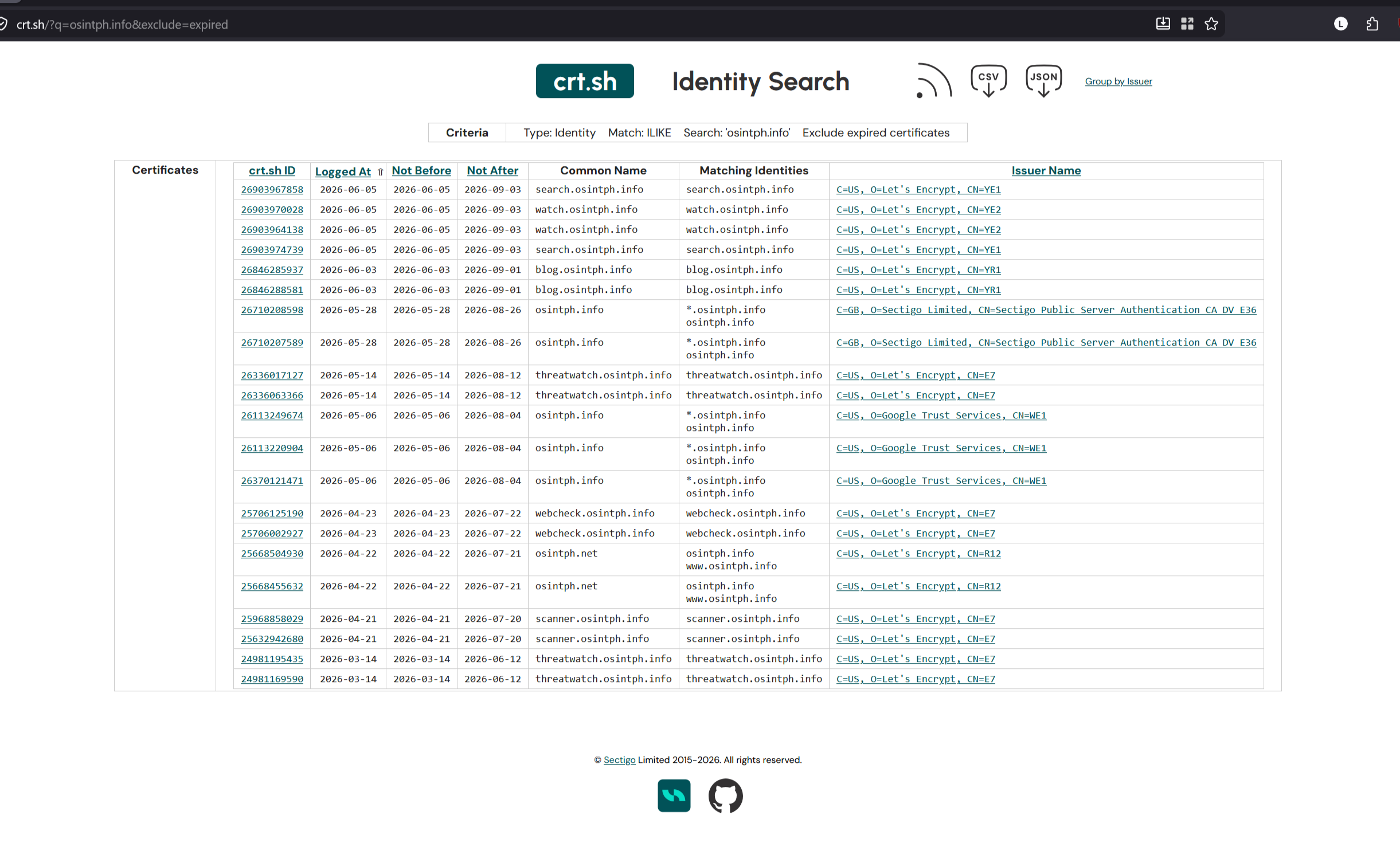
https://crt.sh/?q=osintph.info&exclude=expired
The advanced search at https://crt.sh/?a=1 lets you tick "Exclude expired certificates" which is the only filter that consistently helps on medium-to-large domains. There is a quiet 10,000 row cap on result sets, and for high-volume domains like facebook.com or appspot.com you will not see recent certificates at all if you do not exclude expired ones. This is a known limitation and not a bug you can work around in the UI, although the JSON output gives you more flexibility.
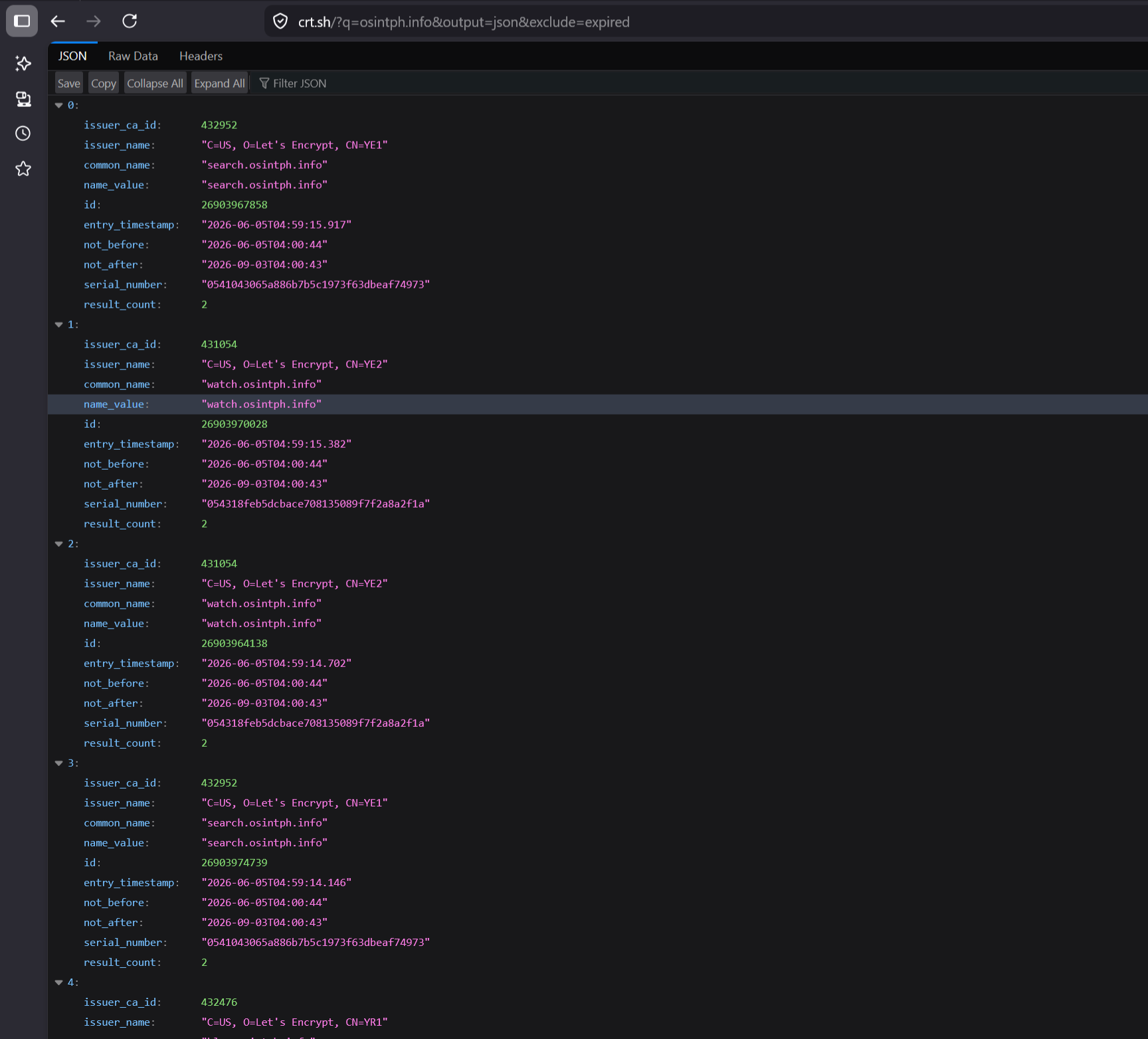
For chronological work, switch to JSON:
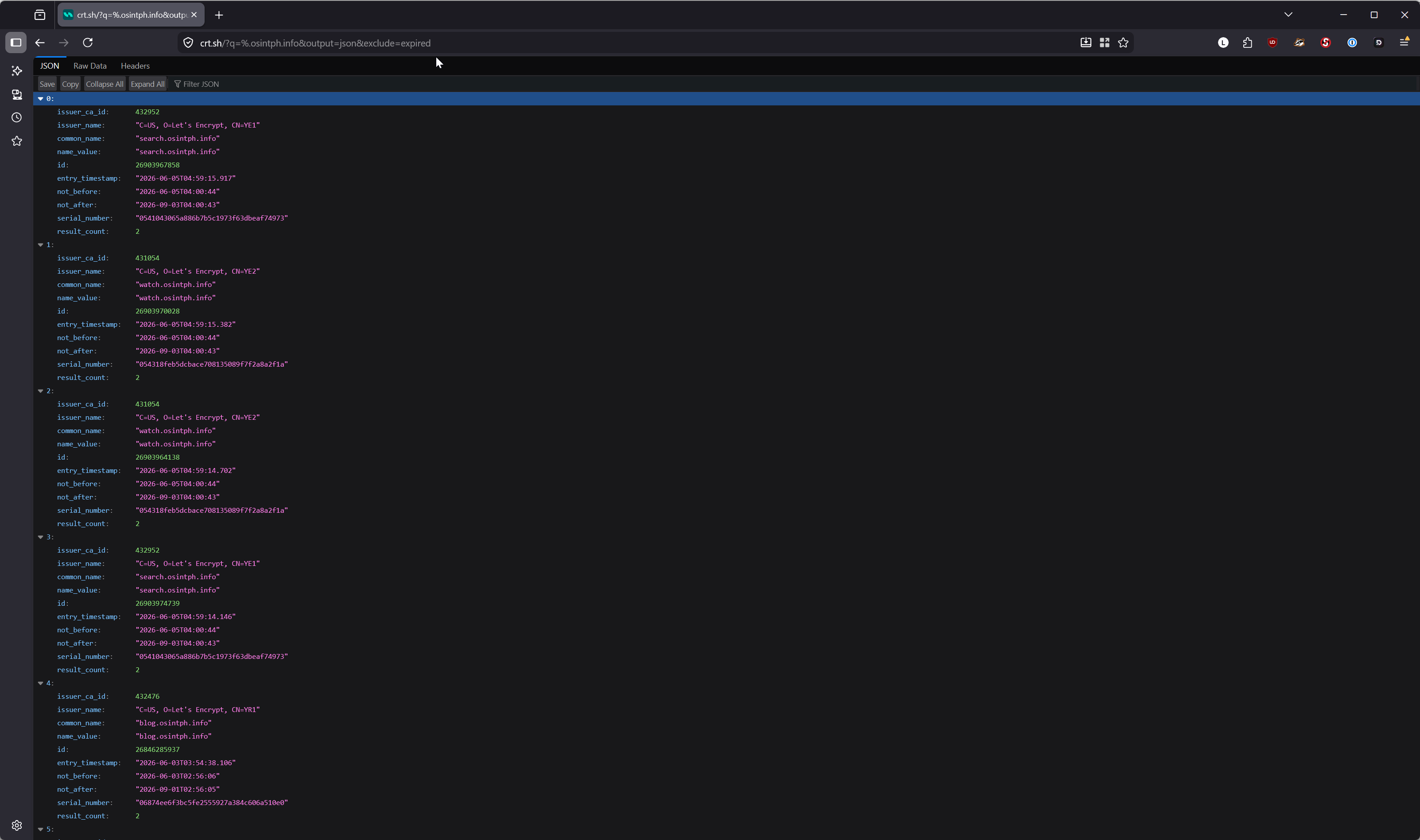
https://crt.sh/?q=osintph.info&output=json&exclude=expired
Pipe it through jq and you have something useful:
curl -s 'https://crt.sh/?q=osintph.info&output=json&exclude=expired' \
  | jq 'sort_by(.not_before) | .[] | {name: .name_value, issued: .not_before, issuer: .issuer_name}'
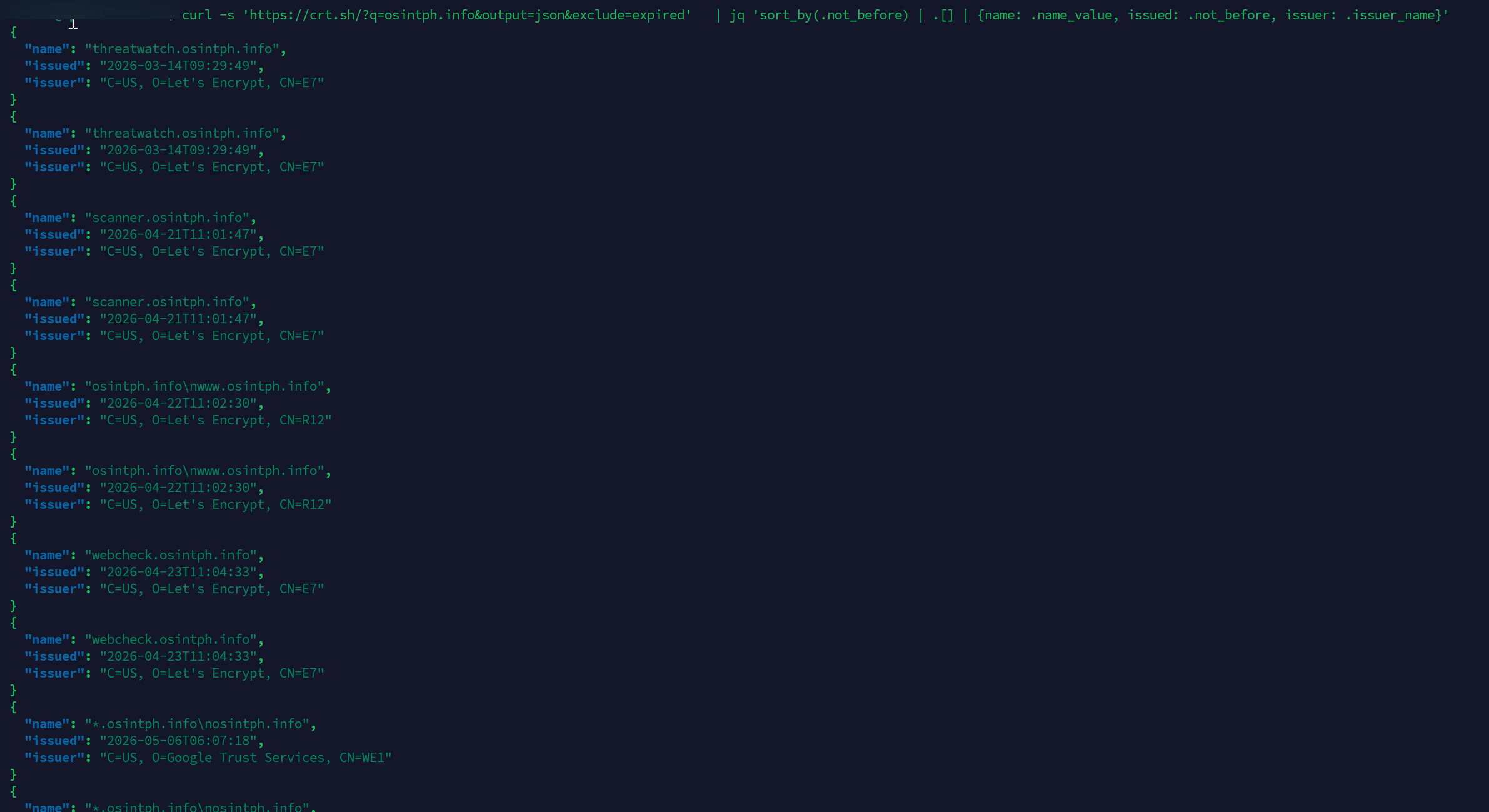
You now have a chronological feed of every name that has appeared on a certificate for that domain, oldest first, with the issuer for each one. This is the raw material you build a timeline from.
For wildcard discovery, the leading dot wildcard is the syntax that actually works:
https://crt.sh/?q=%.osintph.info&output=json&exclude=expired
Older crt.sh queries supported arbitrary %api%.target.com patterns. Those are gone now and will return "unsupported use of %." Leading dot only.
What a new wildcard cert actually tells you
This is the section that most introductory CT posts skip entirely.
When you watch a target's certificate history over time, the issuance pattern itself is intelligence. A few examples of what specific patterns mean in practice.
A new *.target.com wildcard appearing after a long history of single-name certs means someone moved to a load balancer or CDN that needs to serve many subdomains under one cert, or someone deployed a service mesh, or someone got tired of managing individual certs and consolidated. Any of those imply an infrastructure project that was probably in planning for weeks before the cert dropped. Cross-reference the date against the target's blog, press releases, or job postings and you often find the project name.
A new *.dev.target.com or *.staging.target.com wildcard is louder. It tells you a non-production environment got formalized to the point where it needed its own wildcard. That happens when there are more than a handful of services in the environment, which means the team is past the prototype stage. It is one of the clearest "this is being built" signals you can get without insider access.
A shift in CA is a procurement signal. If a target has issued exclusively through Let's Encrypt for years and suddenly shows DigiCert OV or EV certs, somebody made a budget decision and bought into a commercial CA, probably because of an audit requirement or a compliance certification effort.
A burst of new certs in a short window usually means a migration. Either they are moving to a new platform that re-issues, or they are rotating after a compromise or a key disclosure. The burst pattern combined with the names involved tells you which.
EV certificates still get issued, although their browser treatment has been flattened. Seeing an EV cert on a corporate domain confirms identity verification at the time of issuance, which is occasionally useful when you need to prove that an entity asserted a legal name on a specific date.
The skill being developed here is reading the diff between two snapshots of a target's CT history and inferring what changed in their stack.
Catching staging environments before they go live
This is where CT earns its keep on red team and threat intelligence work.
When a company spins up a new product, the rollout almost always looks like this: build the product on an internal staging environment, hook up a domain like betarollout.target.com, get a TLS certificate for the domain (which goes into CT), test internally for weeks, then announce. The certificate exists publicly the entire time. The announcement is the last step.
If you are monitoring CT for that target, you see the staging name appear on the day they hit "request certificate" in their IaC. From there it is a question of probing the name to see if a service is actually reachable (often yes, behind an auth wall but with a TLS handshake that confirms the cert is in use), and then watching what name patterns appear next.
The workflow:
- Identify your target's apex domain and any known second-level domains they use.
- Subscribe to a CT monitoring service that emails or webhooks you on new certificates. Cert Spotter from SSLMate is the standard choice and the free tier covers most legitimate research use. Censys also offers paid alerting if you need higher volume or programmatic delivery.
- When a new name appears, capture the SCT timestamp. That is your earliest provable "this name existed" date.
- Probe the name with
curl -I -k https://<name>anddig <name>to see if it resolves and serves. Many staging environments DNS-resolve to a public load balancer with auth in front. - Record what you find, watch for related names, and keep the timeline updated.
The legitimate uses here are extensive. Brand protection teams use this to catch phishing infrastructure that imitates their own naming patterns. Threat intel teams use it to catch C2 infrastructure being staged. Competitor analysts use it to catch product launches. Defenders use it to catch shadow IT inside their own org spinning up internet-facing services without going through the security team.
The illegitimate uses also exist and this is why responsible disclosure matters when you find something interesting. If you discover a staging environment for an unreleased product, do not write a teardown blog post about it. That is not OSINT, that is being a leaker. Note the date, file it, and move on.
Beyond crt.sh: Censys, Cert Spotter, and direct log access
crt.sh is the most accessible CT interface but it is not the most complete and it is not the most reliable.
Censys indexes CT and pairs it with active scanning of the internet, so you get the certificate history alongside everything else they know about the IP and the service. The free tier is rate-limited and gives you a starter view. Serious investigative use needs paid access, which is not cheap but is justifiable for professional work. The query language is more powerful than crt.sh, particularly for cross-referencing across services.
Cert Spotter / SSLMate is the operational monitoring service. They run their own ingestion of the CT log ecosystem, which means they catch certificates that crt.sh has dropped because of the 10,000 row cap. For watching a list of domains in real time, this is the canonical tool.
Direct log access is for the cases where you actually need to verify against the raw log. Every CT log exposes a small HTTP API (the get-entries, get-sth, and friends from RFC 6962). For chain-of-custody work where you need to demonstrate that a specific certificate was logged by a specific log operator at a specific time, you sometimes have to go straight to the log and pull the entry yourself. The Chrome and Apple CT log lists at https://www.gstatic.com/ct/log_list/v3/log_list.json and the equivalent Apple URL tell you which logs are currently qualified.
For most investigations, crt.sh plus a Cert Spotter feed is the right combo. Reach for Censys when you need to cross-reference with infrastructure data. Reach for the raw logs only when the timeline is going into evidence.
A quick CLI workflow for triage
For triage on a new target, a shell function is enough. Drop this into your ~/.bashrc and you have a one-call summary for any domain.
ct_quick() {
  local target="$1"
  echo "=== All names (chronological) ==="
  curl -s "https://crt.sh/?q=%.${target}&output=json&exclude=expired" \
    | jq -r 'sort_by(.not_before) | .[] | "\(.not_before)\t\(.name_value)\t\(.issuer_name)"' \
    | sort -u
  echo
  echo "=== Wildcard certs only ==="
  curl -s "https://crt.sh/?q=%.${target}&output=json&exclude=expired" \
    | jq -r '.[] | select(.name_value | contains("*")) | "\(.not_before)\t\(.name_value)"' \
    | sort -u
  echo
  echo "=== Issuer breakdown ==="
  curl -s "https://crt.sh/?q=%.${target}&output=json&exclude=expired" \
    | jq -r '.[] | .issuer_name' \
    | sort | uniq -c | sort -rn
}

ct_quick osintph.info
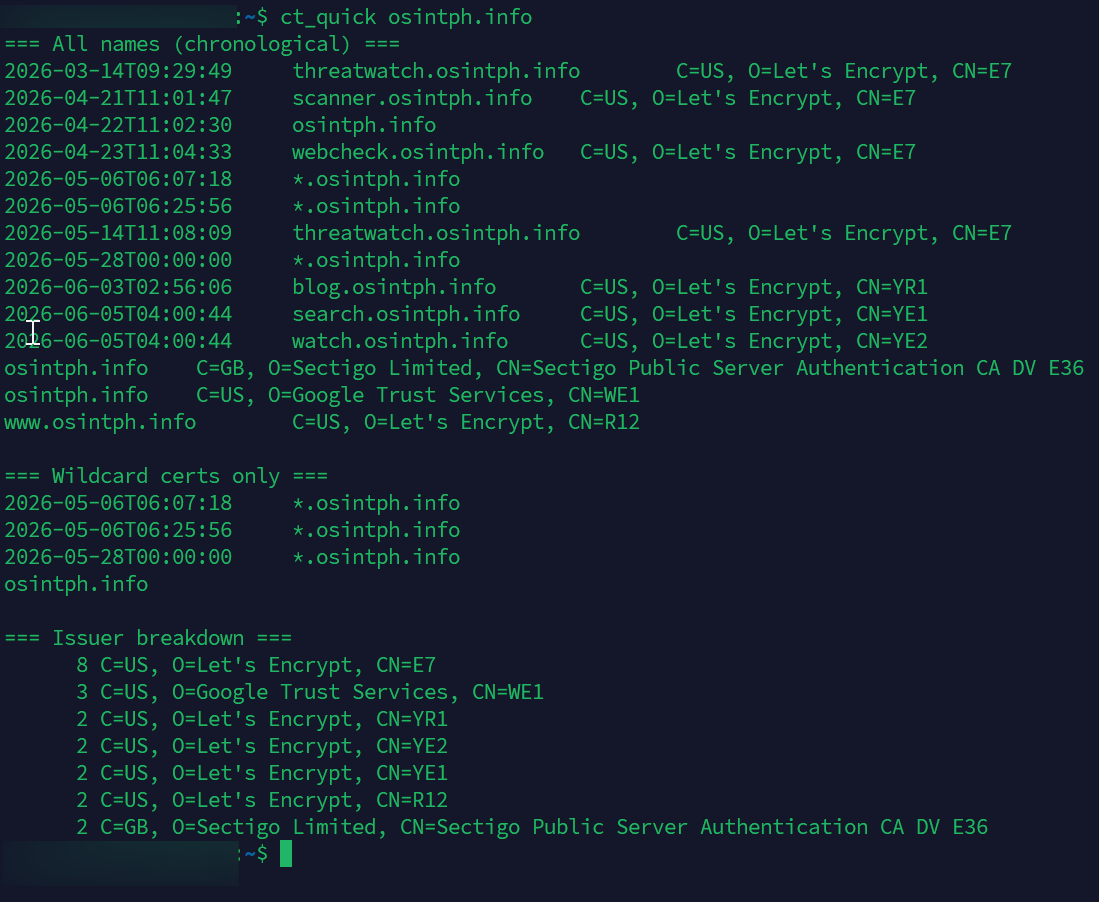
What this gives you in one pass:
- A chronological feed of every name that has ever been on a publicly trusted certificate for the target.
- A separate list of just the wildcard certificates, which is usually where the interesting infrastructure shifts show up.
- A frequency count of which CAs the target uses, which is your procurement and stack signal.
For deeper work, the same JSON feeds into anything: a Maltego transform, a CrimeWall script, or a custom Python pipeline. The point of starting in jq is to keep your investigation reproducible. Anyone reading your report can rerun the curl command and get the same data.
From shell function to forensic report
The bash workflow is enough for triage. For anything that needs to leave your terminal (an investigation handover, a client deliverable, a case file attachment), the format matters as much as the data. Nobody wants to read a terminal dump as evidence.
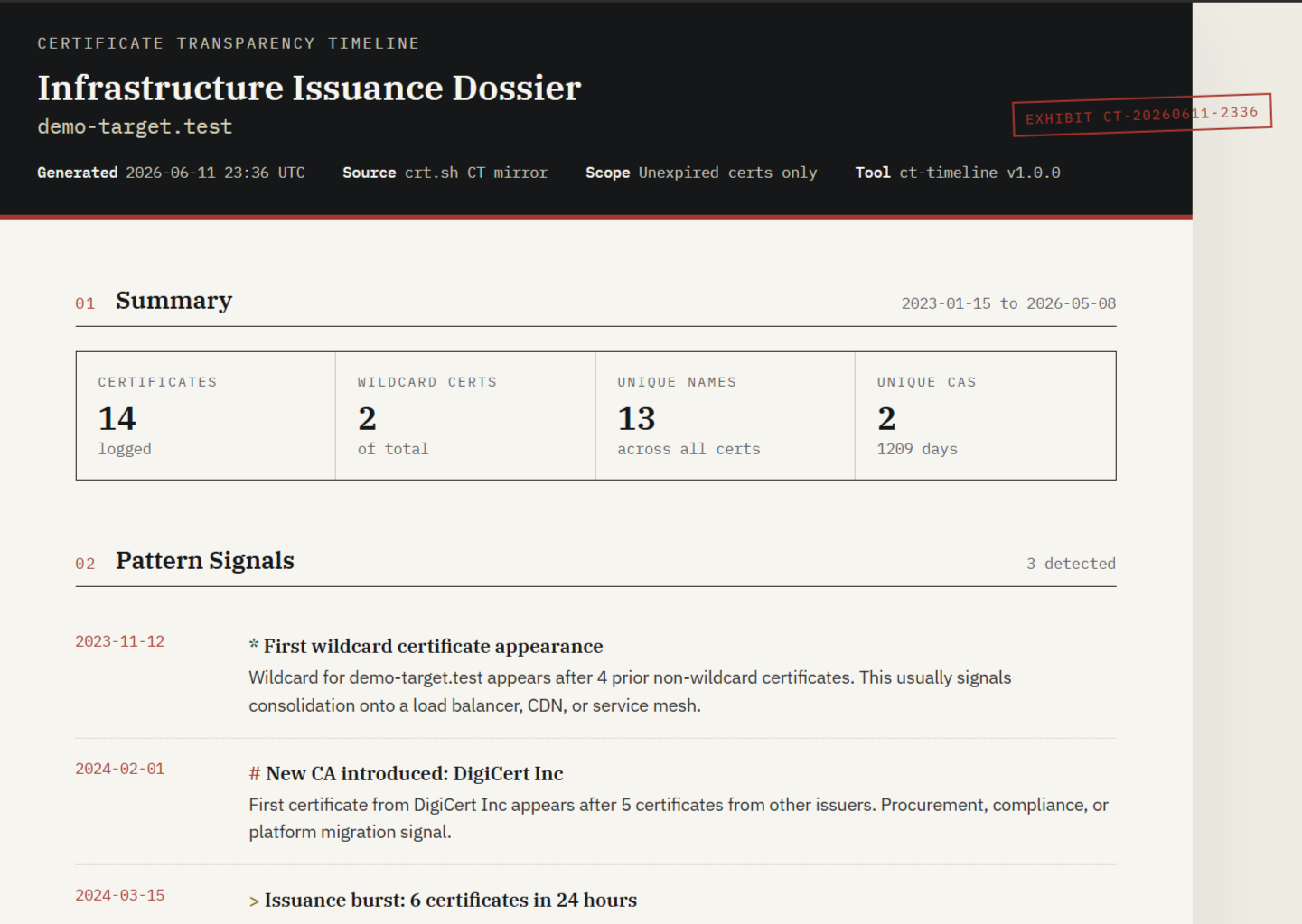
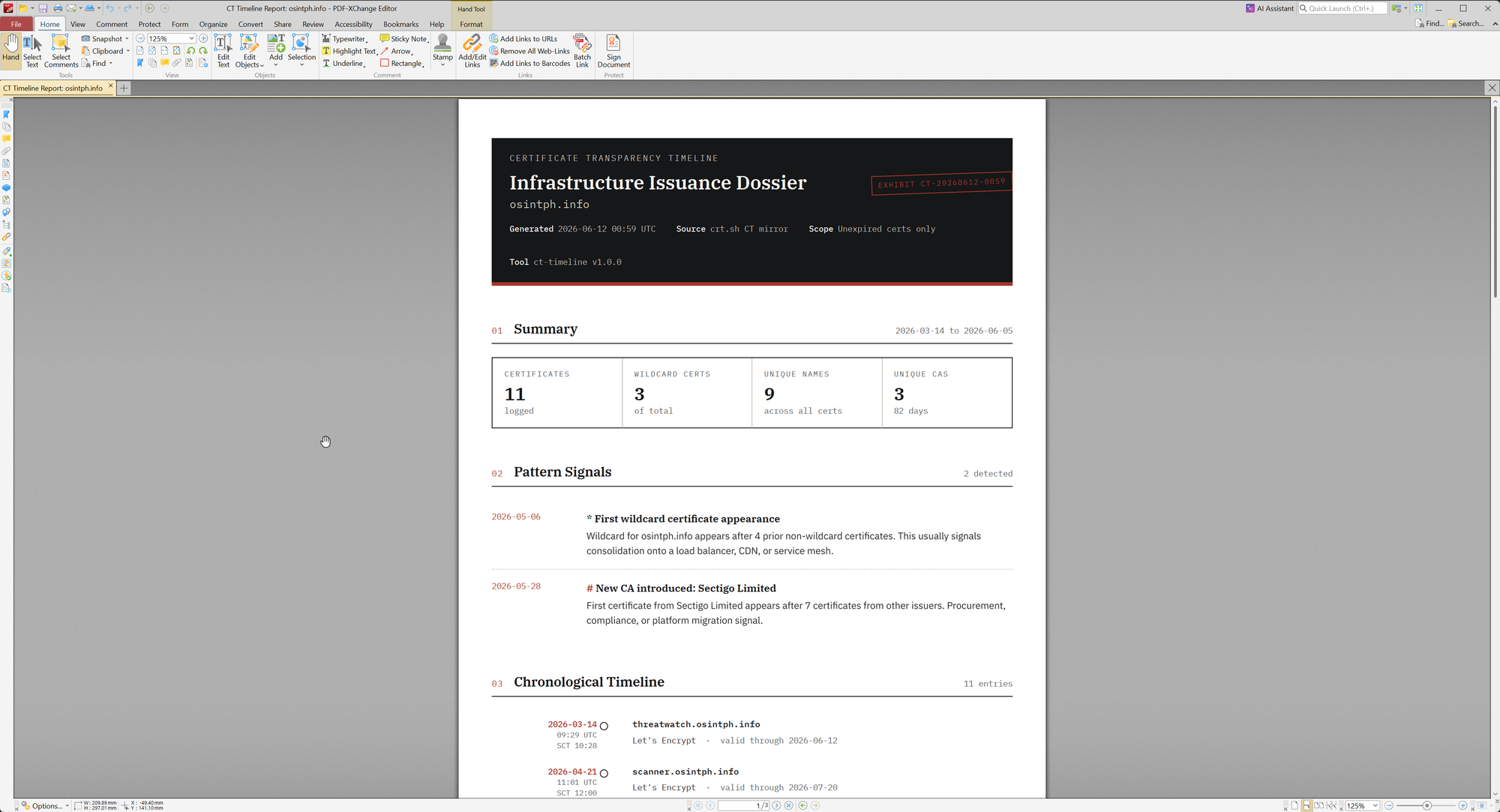
I wrote a Python script that wraps the crt.sh JSON endpoint, deduplicates the precert and cert pairs that crt.sh returns separately, runs pattern detection over the timeline, and produces a self-contained HTML report styled as a forensic dossier. It is on GitHub at github.com/osintph/ct-timeline. Standard library only, no dependencies, single file.
 osintph
Basic usage:
python3 ct_timeline.py osintph.info --open
The --open flag launches the generated report in your default browser when the run finishes. The report itself is one self-contained HTML file with embedded CSS, no external JavaScript, suitable for emailing as an attachment or committing into a case folder.
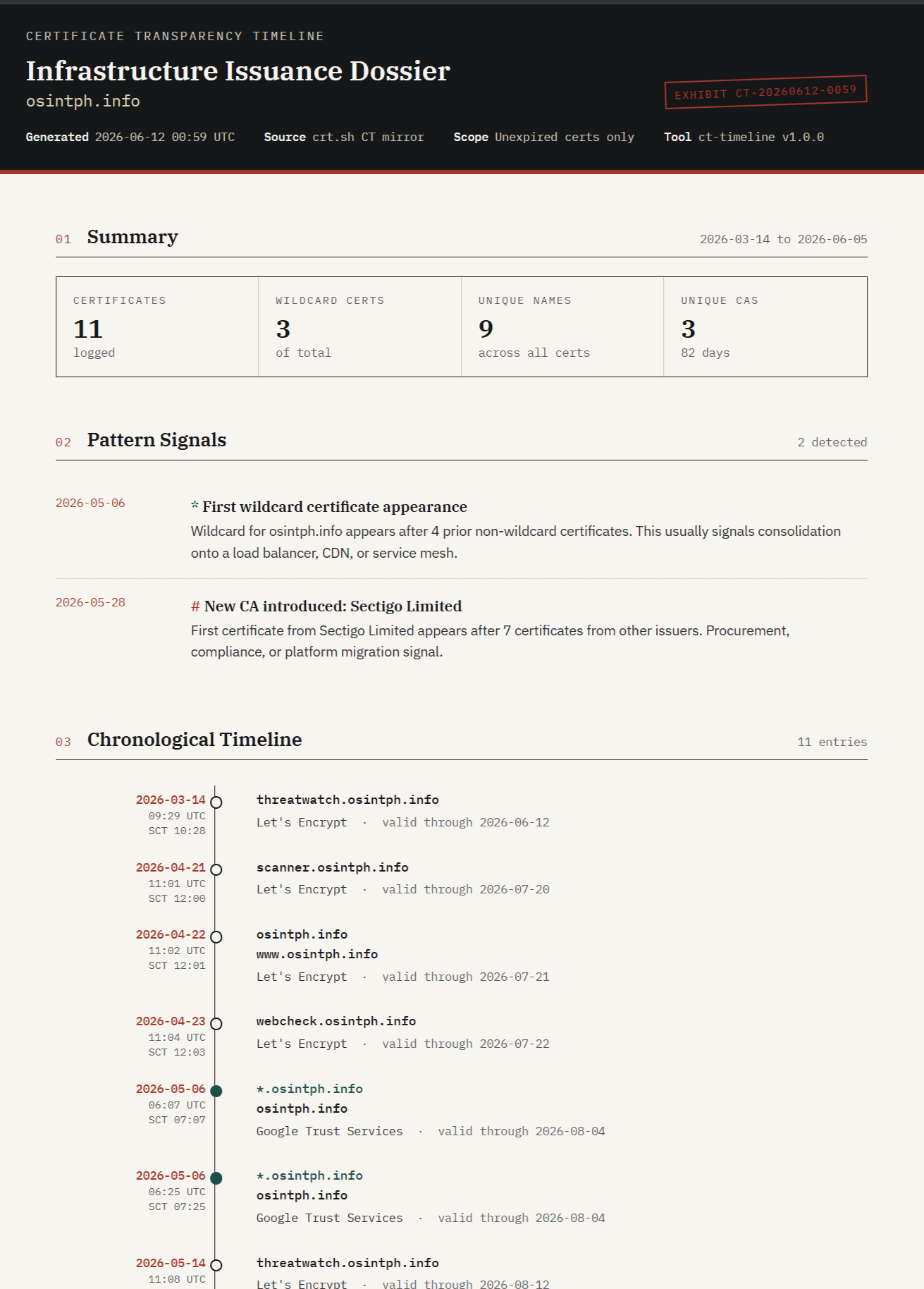
What the script does that the bash function does not:
- Deduplicates correctly. crt.sh returns multiple rows per certificate (one for the precert, one for the leaf, sometimes multiple for different log entries). The script collapses by serial number plus issuer plus
not_beforeand keeps the earliest signedentry_timestampit has seen for each unique certificate. - Detects three pattern signals. First wildcard appearance, CA migration, and issuance bursts of 5 or more certs in 24 hours. These are the patterns that earlier sections of this post argued you should look for. The script surfaces them automatically at the top of the report.
- Renders a timeline view. Each certificate is plotted against a vertical rule with the
not_beforedate and SCT log timestamp shown as a Bates-style stamp on the left and the SAN names plus issuer on the right. Wildcards are visually distinguished. - Prints cleanly to PDF. The report uses proper
@pageand print stylesheets. Open it in any browser, print to PDF, and you get an A4 document that looks like something you can drop into a case file or send to a client without further work.
The pattern detection is conservative by design. It will not fire on noise. If the report surfaces a signal, it is worth at least one minute of investigation.
For evidence work, the report footer includes the query parameters used, the total entry count, the generation timestamp, and a note on CT timestamp semantics. That is the minimum provenance you need to defend the report later if someone challenges what was queried and when.
The limits and gotchas
CT is genuinely good evidence, but treat it the way you would treat any single source.
crt.sh is not authoritative and is currently slow. It is a community-funded mirror operated by Sectigo. As of mid-2026 the front-end has been running on underprovisioned storage and queries that used to return in under a second now routinely take 30 seconds or longer, with intermittent 502s on busy queries. For most investigative purposes it is still the most accessible tool, but if a result is contested or the service is down, verify against the log directly or against Cert Spotter's index.
The 10,000 row cap matters. On high-volume domains you will silently miss recent certificates. Always exclude expired certs on big targets, and consider running queries against subdomains separately to stay under the cap.
Some logs have been retired. Let's Encrypt's Oak log went read-only and is shutting down in February 2026. Older Google logs (Argon, Xenon, Pilot) have been retired across various windows. Certificates that were only logged to retired logs still exist in CT history but the audit chain depends on the log being reachable. For very old certificates this is occasionally a concern.
Backdated not_before is real but bounded. CAs commonly set not_before a few minutes to a few hours before the actual issuance. For minute-precision timelines this matters. For day-precision timelines, ignore it. The SCT entry_timestamp is the harder constraint.
Pre-2018 coverage is patchy. CT was not universally required until October 2018 when Apple's policy came in. Anything before that may or may not be in CT. If your investigation reaches back into 2017 or earlier, do not expect CT to be complete.
Internal-only certs are not in CT. Anything issued by a private CA for an internal name will not appear. CT only covers publicly trusted certificates. If a target uses a private CA for their internal services, you will see the gateway certs but nothing behind them.
Where this fits in a broader timeline
CT is one data source. It pairs well with everything else covered in the series.
The RDAP and WHOIS post gave you registrar and registrant timestamps for the apex domain. CT gives you the issuance timestamps for every name under that apex. Combined, you have "when the domain was registered" plus "when each piece of infrastructure under it came online." Passive DNS layered on top tells you "when each name first resolved to an IP." Wayback gives you "when each name first served public content."
Stack those four sources and you have a defensible timeline that does not rely on any single provider's data being accurate. That is the standard for serious attribution work.
Next post in the timeline series will be on passive DNS, which fills in the resolution side of this picture. If you have not subscribed to the feed yet, the link is at the top of the page.
If you spot an error in this post or want to add a real-world example from your own work, get in touch at the contact details on the About page. Corrections get noted in the published version with a date.
Reach out if you have questions or comments or what to collaborate
Session Messenger: 059db238ab37c3d92615c5cc24b694da29c598cc13e27886053722404118e14271