The Checkbox Facebook Hopes You Skip: What Lives Inside Data Logs

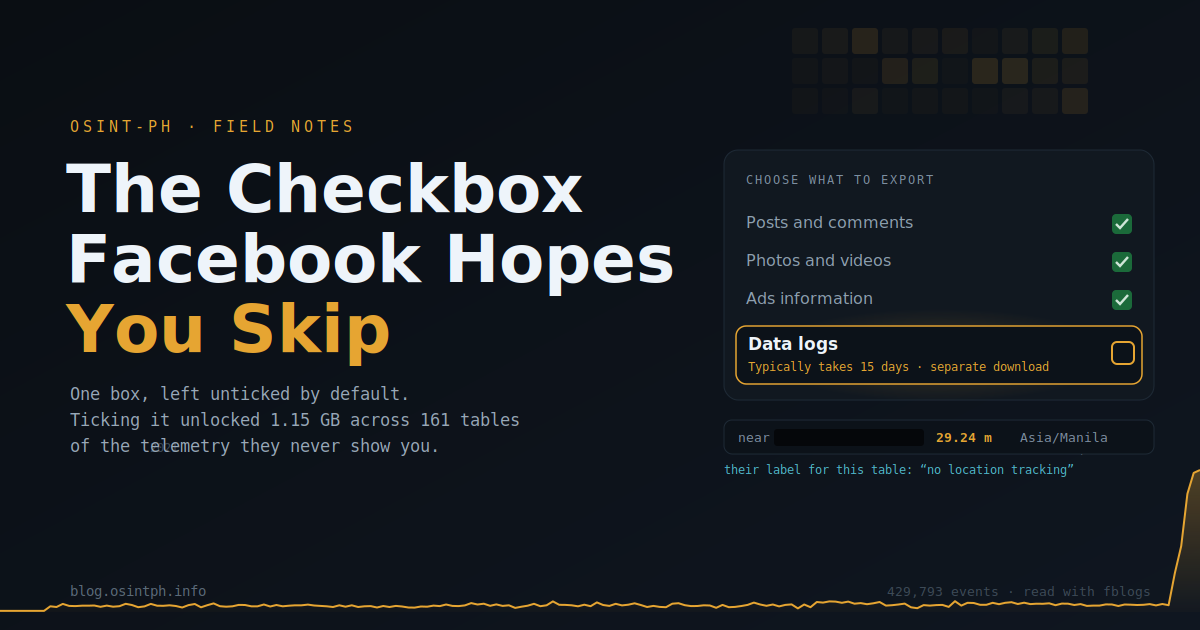
Everybody knows you can download your Facebook data. Fewer people notice that the download screen is quietly two products stacked into one.
How to get the data:
Go to:
https://accountscenter.facebook.com/
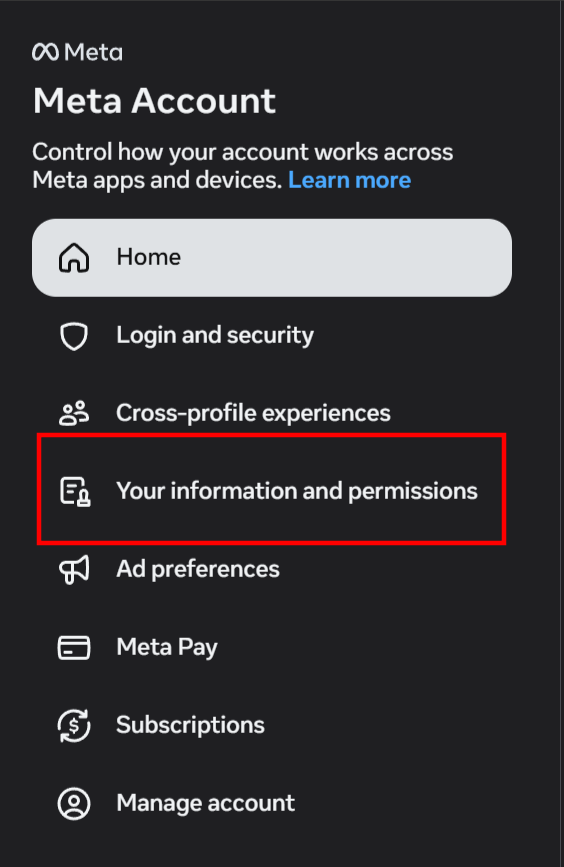
Choose "Your information and permissions" and there "Export your Information"
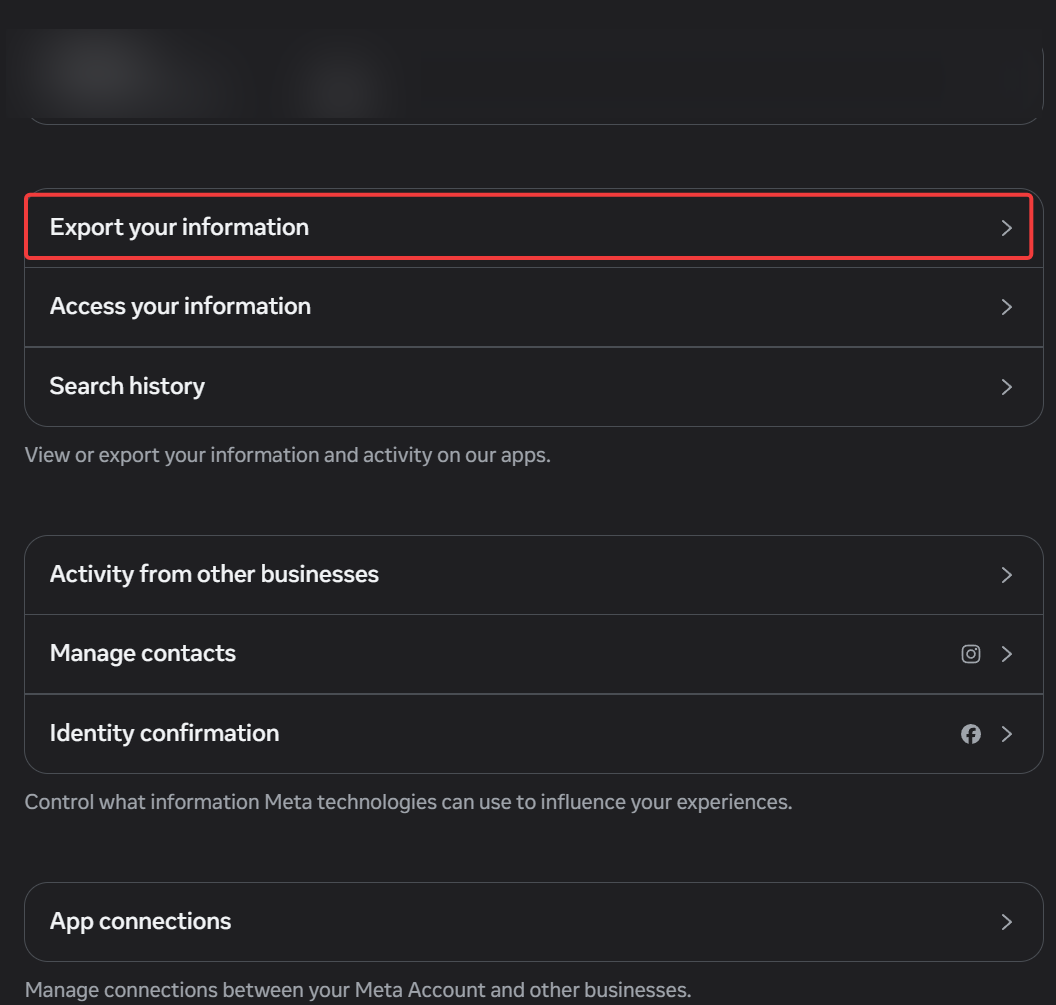
Then you can choose "Create export"
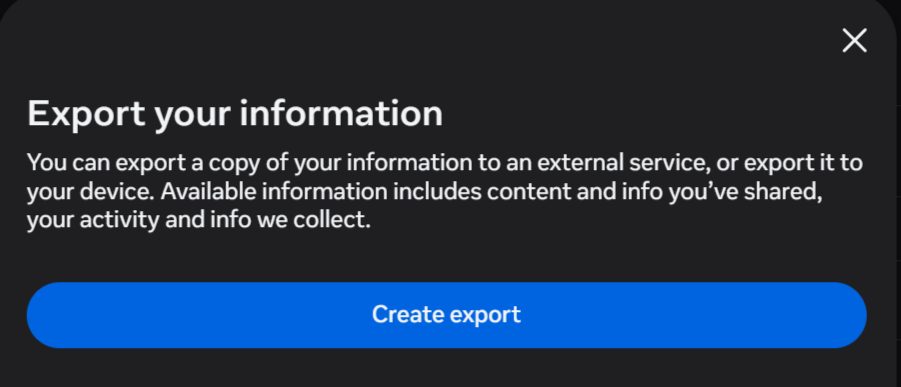
Be sure to click "Customize information" here:
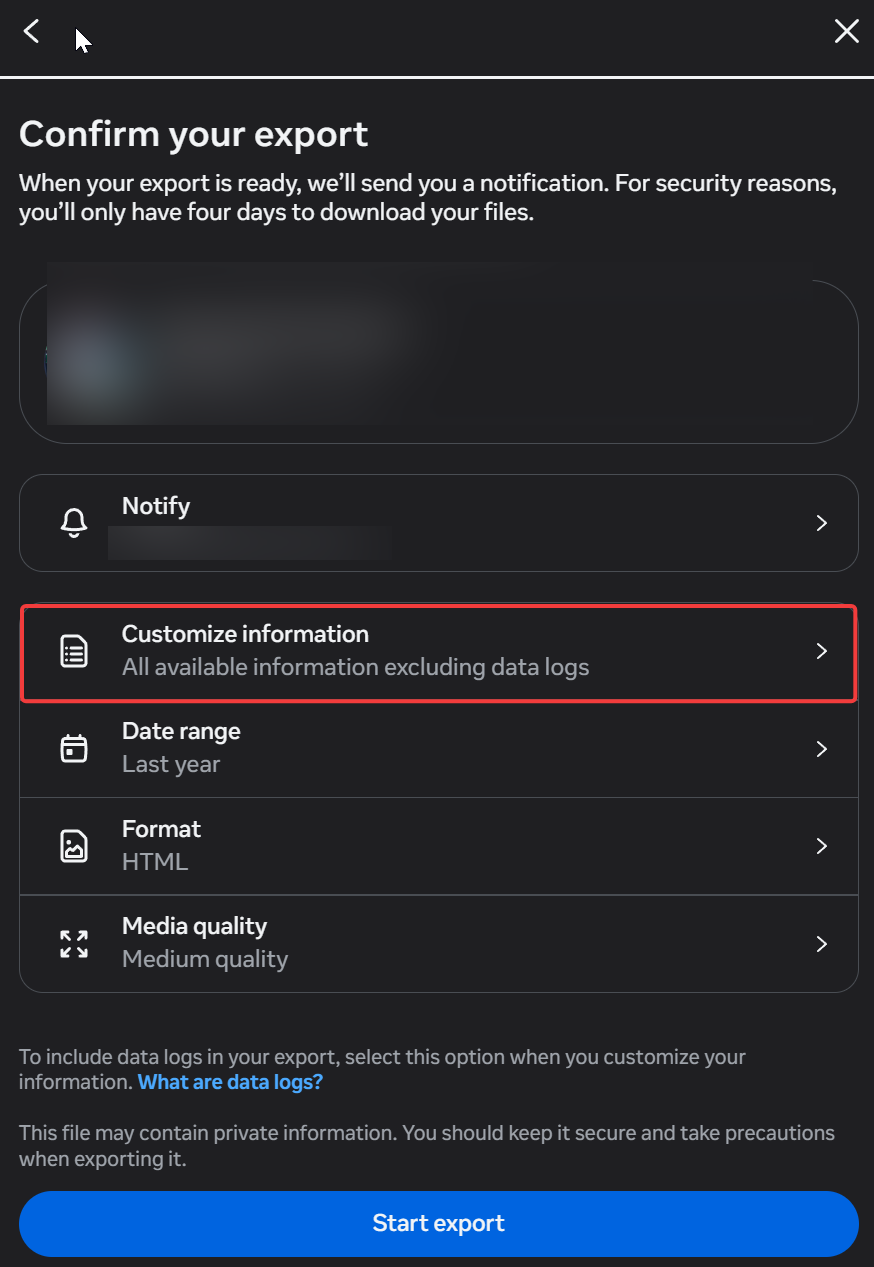
Almost everything is selected by default, except for the one thing that you REALLY want to get:
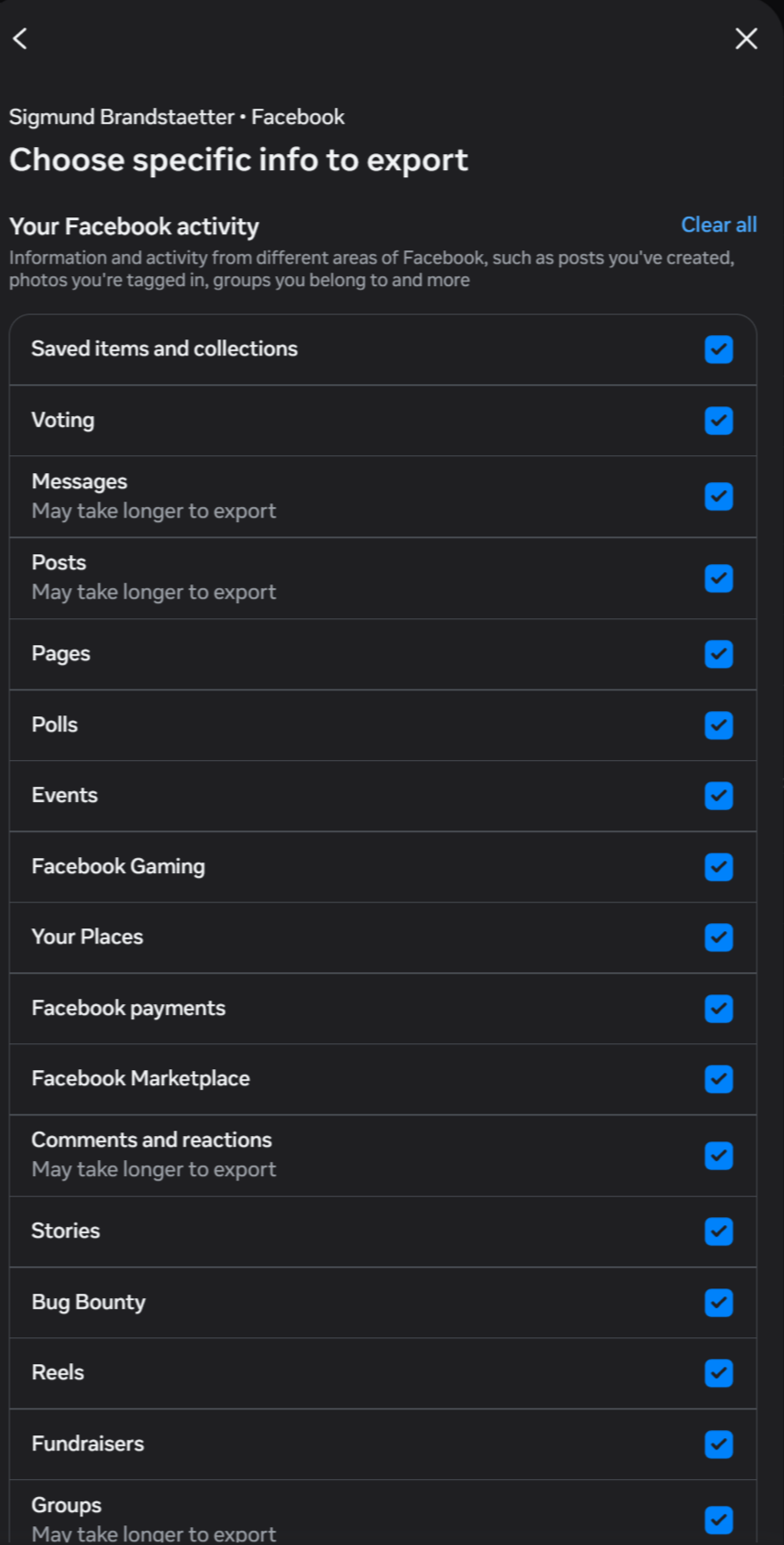
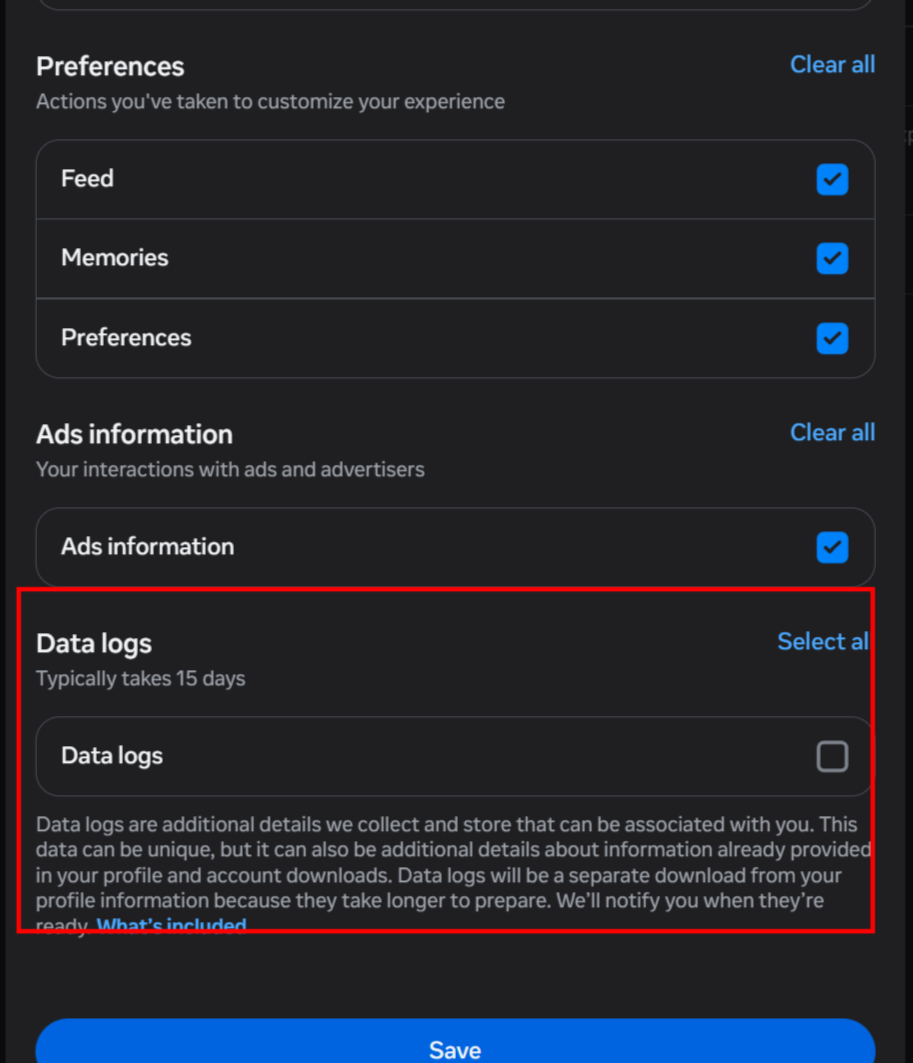
Scroll to the very bottom of "Choose specific info to export" and you reach a section called Data logs. Every other category above it, your posts, your reactions, your places, your payments, arrives pre-checked. Data logs does not. It sits there unticked, labelled "Typically takes 15 days," with a note that it will be a separate download because it "takes longer to prepare."
Fifteen days. Separate file. Off by default. When a platform makes you wait two weeks for a thing it hopes you will not tick, that thing is worth ticking. It actually took nearly a month.
I ticked it. What came back was 1.15 GB across 1,079 JSON files, and it is a different animal from the profile export. The profile download tells you what you did. The data logs tell you what Meta observed, inferred, and passed on. This post is a walk through the interesting rooms, with the raw JSON included so you can see the shape of it yourself. I have redacted anything that points at where I sleep or names a real person, and I will show you exactly which fields to blur if you publish your own.
Meta's own readme sets the tone:
"You can think of data logs as the more granular details of the data Meta collects and stores in our backend systems."
Backend systems. Let us look at that backend.
First, the shape of the file
The export is 13 top-level categories. Here is the weight distribution, because the size alone tells a story:
   474.7 MB   device_and_connection_information   (15 tables)
   322.7 MB   content_and_social_interactions     (89 tables)
   156.8 MB   search_and_navigation_interactions  (11 tables)
    76.0 MB   account_and_profile_interactions     (15 tables)
    30.2 MB   ads_interactions
    29.7 MB   location_data                        (1 table, 23k rows)
    26.7 MB   recommendations
    16.3 MB   data_shared_with_third_parties
     9.7 MB   transaction_and_shopping_interactions
     3.9 MB   custom_audience_information           (10.5k rows)
     ...
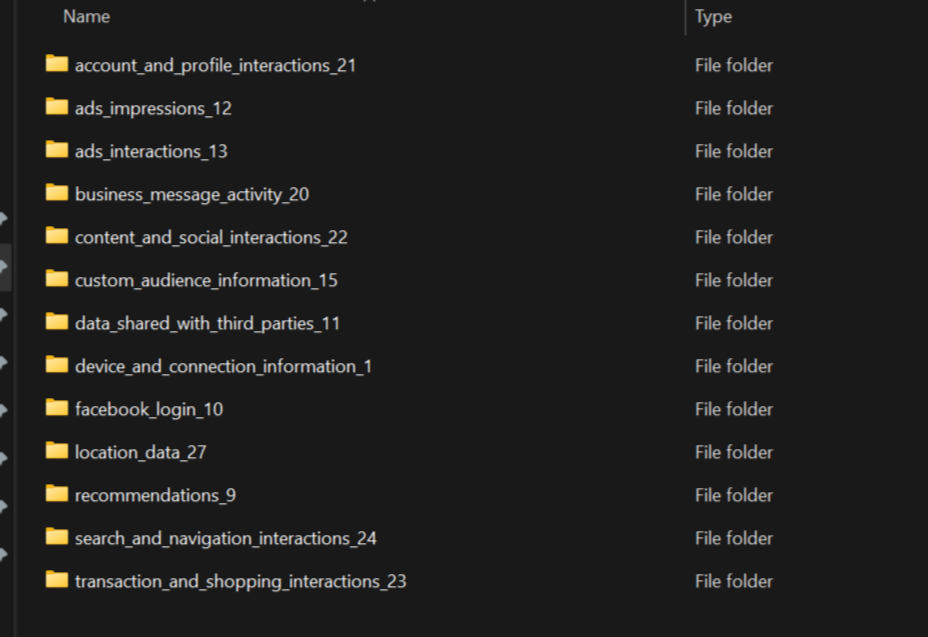
The single biggest bucket is not your content. It is telemetry about your device and connection. That is the tell of a log built for Meta's benefit, not yours.
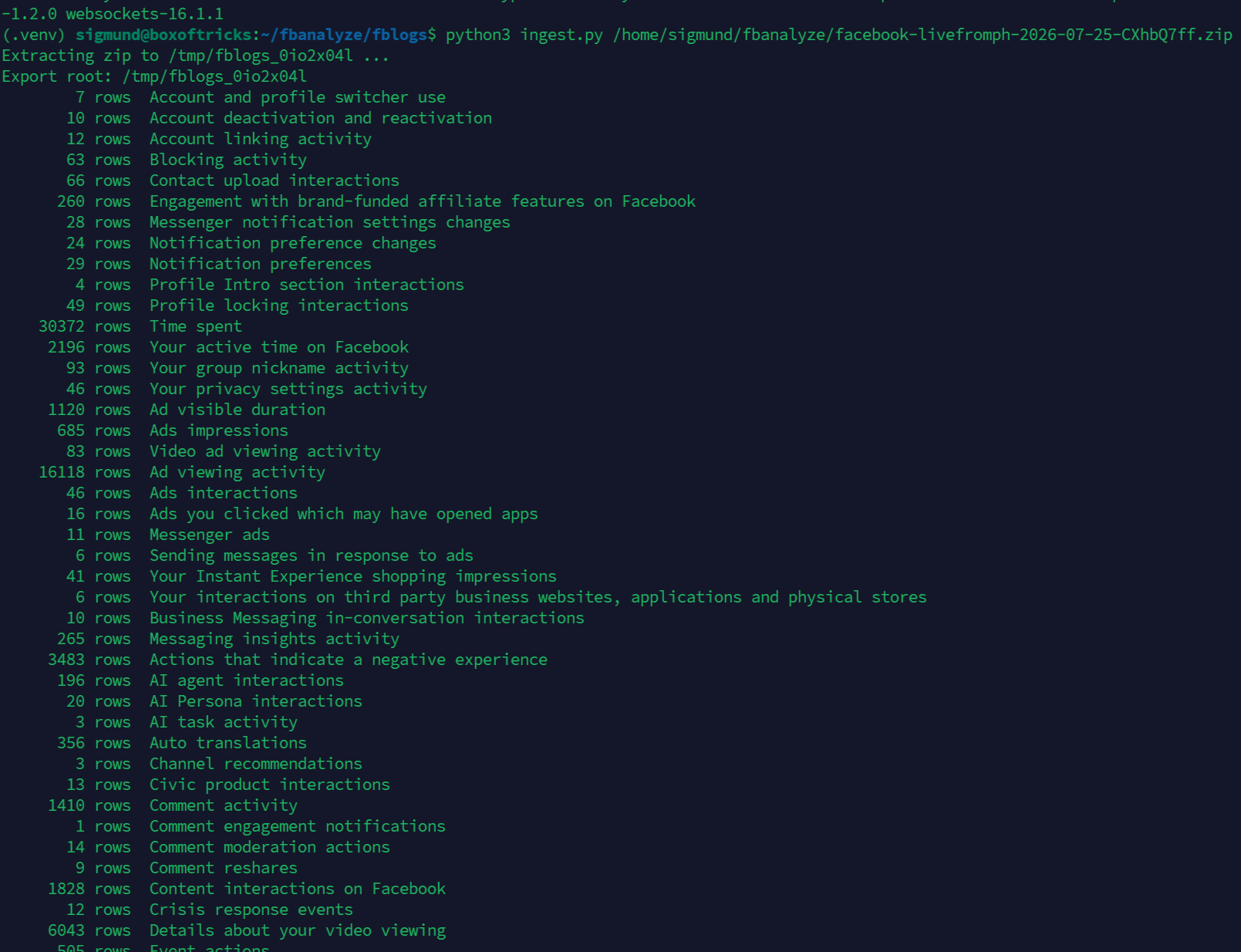
Every table follows the same schema: a list of pages, each row carrying a Unix timestamp and an array of label_values (label, value, description). Once you write a five-line parser for that shape, the whole export opens up.
How far back does it go?
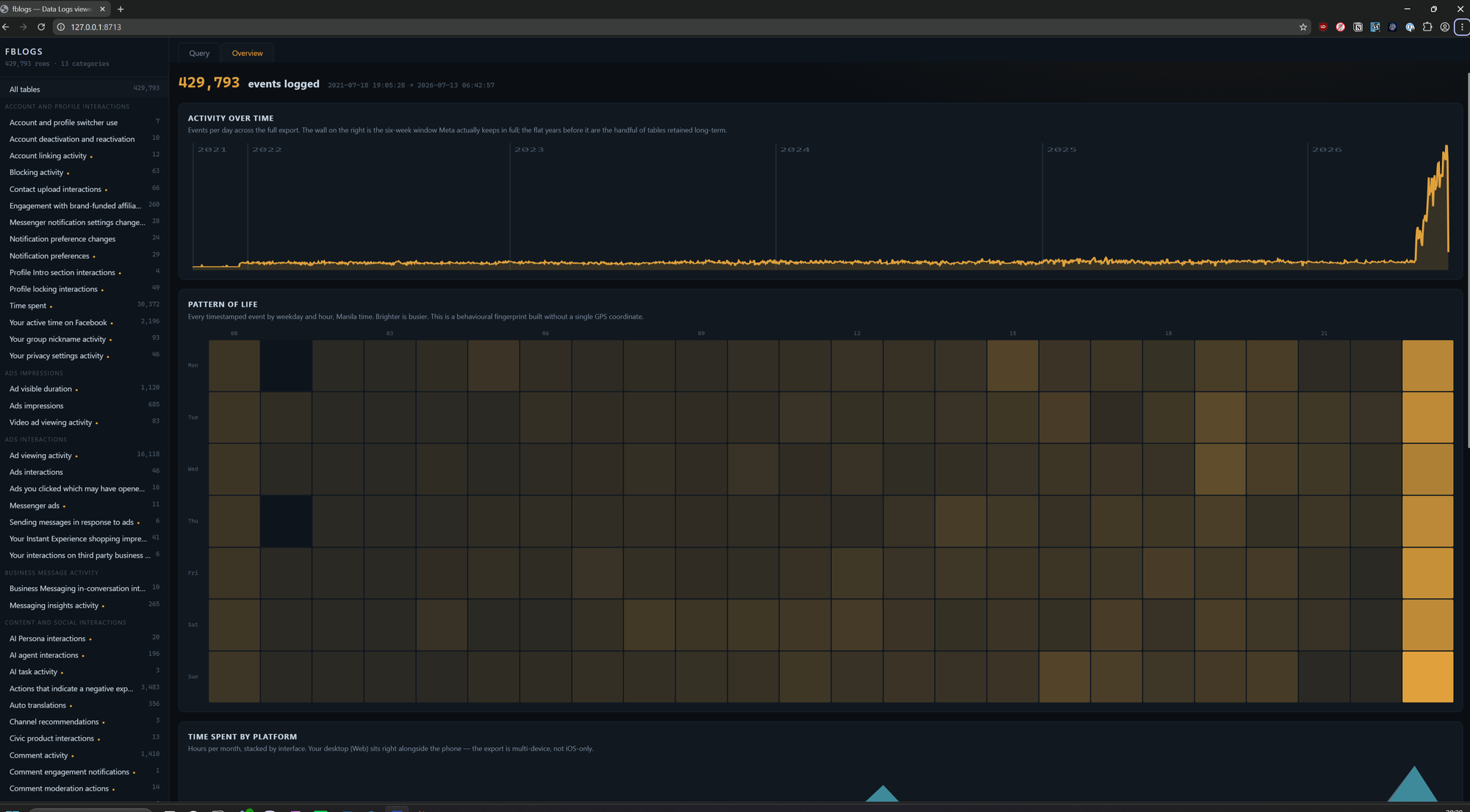
The full export in my case was covering 2021-07-18 to 2026-07-12, so at the extreme it reaches back almost exactly five years. But that headline number is misleading, and the way it is misleading is the interesting part.
Retention is wildly uneven across the different sections / log types. Only two tables have the deep history:
2021-07-18 .. 2025-11-27   Information about your Facebook Logins   (280 rows)
2021-12-20 .. 2026-07-12   Time spent                             (30,372 rows)
Below those sits a second tier from 2023 to 2024, third-party app access from May 2023, comment and post activity, outbound clicks. And then the cliff: 145 of the roughly 161 tables only begin in 2026, most of them covering just the last six to eight weeks before I hit export.
Tables by their earliest record:
  2021:   2 tables
  2023:   5 tables
  2024:   5 tables
  2025:   4 tables
  2026: 145 tables   <- the overwhelming majority
So the honest framing is not "Facebook keeps five years of everything." It is that Meta keeps a short rolling window of granular telemetry (most event streams look like 30 to 90 days) while holding a tiny number of durable logs for years. And look at which two they choose to keep longest: the record of every third-party site you logged into with Facebook, and your lifetime time-spent history.
That is not an accident of storage. The two tables retained the longest are the two most useful for identity resolution and pattern-of-life, which is to say the two most useful to an analyst profiling a person. The granular stuff expires because it is cheap to re-collect. The identity graph persists because it is the asset.
Room 1: your device, fingerprinted
The your_device_information table is small and precise. This is one row, lightly trimmed:
{
  "Time": "July 13, 2026 05:24:43 AM PST",
  "Mobile device": "Yes",
  "Device brand": "Apple",
  "Device model": "iPhone17,2",
  "Operating system": "iOS",
  "Operating system version": "26.5.2",
  "User agent": "Mozilla/5.0 (iPhone; CPU iPhone OS 26_5_2 like Mac OS X) ...",
  "Screen width": "[REDACTED]",
  "Screen height": "[REDACTED]",
  "Pixel density": "[REDACTED]",
  "Touch device": "Yes",
  "ASN carrier name": "IPG-AS-AP - Philippine Long Distance Telephone Company, PH",
  "App": "[REDACTED]",
  "App version": "[REDACTED]"
}
Nothing here is secret on its own. Together it is a fingerprint: exact hardware model, OS build to the patch level, carrier, screen geometry, pixel density. The screen dimensions plus pixel density plus user agent are the classic browser-fingerprinting triplet, and Meta is storing them server-side against a named account. That is the part that matters. Fingerprinting is usually framed as an anonymous tracking technique. Here it is bolted to an identity.
One thing to be clear about before we go further: this particular table is a snapshot of a single device, the phone, so it reads as if that is all Meta sees. It is not. The export logs every device you use, and for me that includes a Windows PC on Chrome and an Android handset alongside the iPhone. I am using the iOS records as the running example through this post because they are the cleanest to show, but assume the same depth exists for each of your devices. I will point out the desktop equivalent as we hit it, and come back to the full multi-device picture another time.
This is a very good example of how fringerprinting is done, based on device detail and screen size, settings, and resolution, together with other details, they become a clear identifiable fingerprint even if you use a VPN. Keep that in mind. a VPN is NOT the answer to all questions, it is only one small piece of your OPESC.
Room 1b: the dossier, and the 100,000 request logs behind it
The clean device table above is the polite version. Two rooms deeper into the same category sit the things Meta does not put on the marketing page.
First, a table blandly named profile_and_device_interaction_information. It is 34 rows and it is a full identity dossier. I am not going to paste mine, but here is the field list, with values replaced by their type so you can see the shape without me doxxing myself:
{
  "Birth day": "[DD]", "Birth month": "[MM]", "Birth year": "[YYYY]",
  "Gender": "[REDACTED]",
  "Full name": "[REDACTED]", "First name": "[REDACTED]", "Last name": "[REDACTED]",
  "Username": "[REDACTED]",
  "Hometown": "[REDACTED]", "Primary country": "[REDACTED]",
  "Mobile phone number": "[REDACTED]",
  "Primary mobile carrier": "[REDACTED]",
  "Primary phone device model": "[REDACTED]",
  "Primary tablet model": "[REDACTED]",
  "GMT timezone offset": "[REDACTED]",
  "Registration time": "[REDACTED]",
  "Friend count": "[N]", "Subscriber count": "[N]",
  "7 day mobile activity": "[N]", "28 day web activity": "[N]"
}
Full legal name, birthday to the day, phone number, carrier, device model, hometown, timezone offset, and account age, in one row. Worth a small piece of good news: in my export the Current address, Current city, and ZIP code fields came back blank. So it is not literally your street. But everything else needed to resolve you as a person is present and filled in.
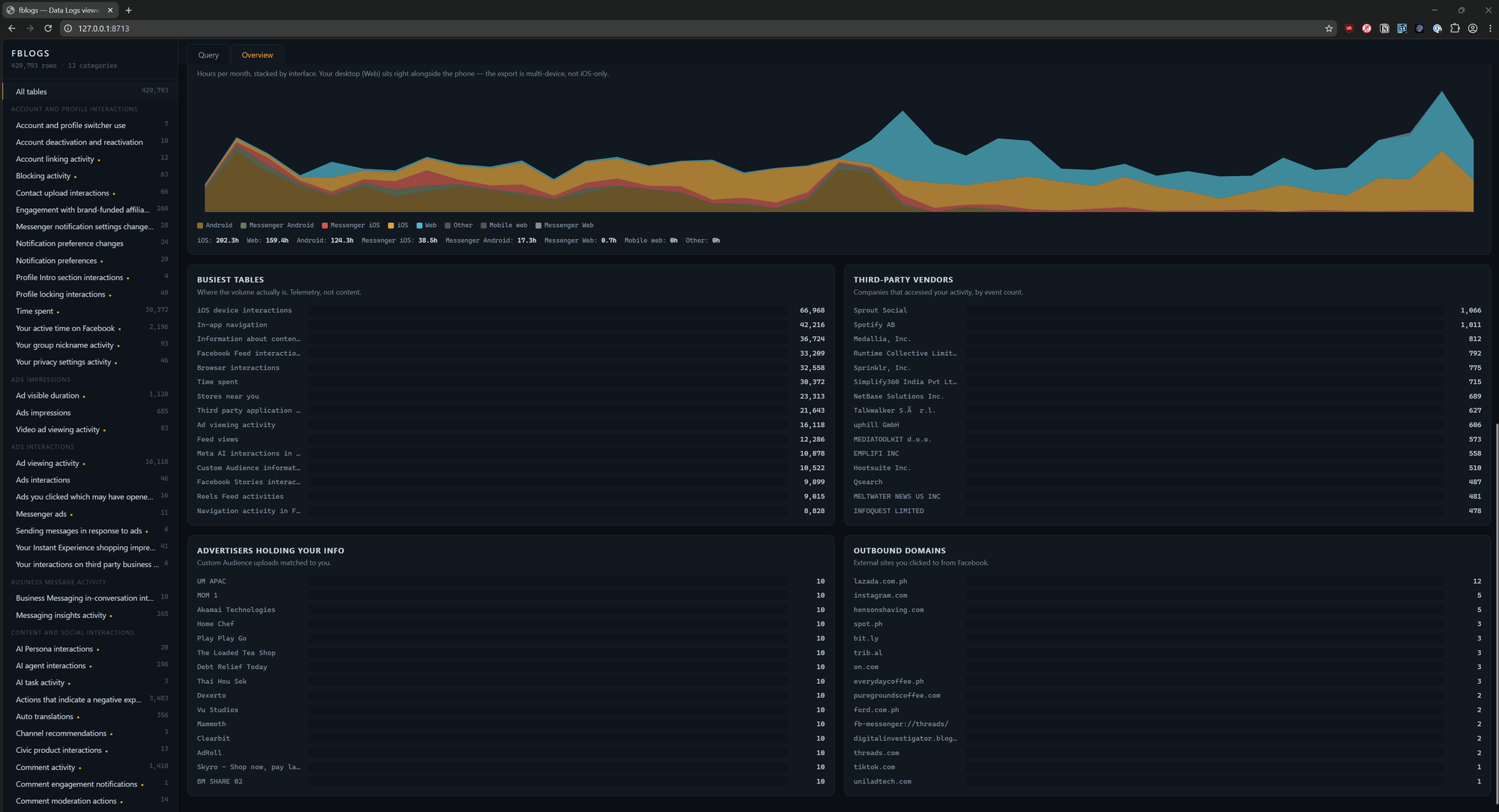
Then the two largest tables in the whole 1.15 GB export. Not your posts. Not your photos. Your request logs: iOS device interactions at 66,968 rows and Browser interactions at 32,558 rows. That second table is the desktop side of the same coin, almost every row is Chrome on Windows, so your PC sessions are logged at exactly this depth too. Roughly a hundred thousand records across the two in a six-week window. A row is web-server plumbing bound to your name:
{
  "Time": "[timestamp]",
  "Country from IP address": "PH",
  "URI": "[the endpoint you hit]",
  "User Agent": "[REDACTED - fingerprint]",
  "Session creation time": "[timestamp]",
  "App associated with access token": "[REDACTED]",
  "Cookies": "[present]",
  "GET parameter names": "[present]",
  "POST parameter names": "[present]",
  "HTTP request header": "[present]",
  "X-Forwarded-for header": "[present]"
}
Read those last five fields again. Cookies, GET parameters, POST parameter names, request headers, X-Forwarded-For. That is the level of detail a web server keeps in its access log, retained per-account, at a hundred thousand rows a month. There is a companion table, mobile_network_request_logs, that adds IP address, "Current location," and bytes sent and received per request. Network-layer detail most people assume only their telco holds.
And quietly underneath it all, a 250-row table called fr cookie that logs your raw FR Cookie ID over time. The FR cookie is Meta's primary cross-web tracking identifier, the one that rides along on every Like button and Meta Pixel across the internet. Here it is, written down, versioned, in your own export.
Room 2: "No Location Tracking," and other jokes
Here is the table Meta most wants you to trust. stores_near_you is 23,313 rows and it opens with a disclaimer so defensive it deserves to be read in full:
"The raw distance data is further processed to create aggregated views... It does not reveal or track your actual location, and is processed to protect your privacy and uphold Meta's commitment to No Location Tracking."
A row looks like this:
{
  "Time": "July 13, 2026 05:00:00 AM PST",
  "Nearby business or organisation": "[REDACTED - a bank branch]",
  "Distance in meters": "FIVE_HUNDRED",
  "City": "Data unavailable",
  "Country": "Data unavailable",
  "Timezone": "Asia/Manila"
}
Notice they null out City and Country. That is the "privacy protection." But they leave in the business you are within 500 metres of, thousands of times, timestamped.
I redacted the business names in the JSON above because that is the sensitive part. When I ran the frequency counts on the un-redacted file, the businesses I am "near" most often are a tight cluster of the same bank branches, the same barbershop, the same restaurants, all within a few blocks of each other. Any analyst who pulls the top 15 by frequency and drops them into a map gets my neighbourhood, correct to the block, from data Meta swears reveals no location. City: Data unavailable is meaningless when the proximity anchors resolve it for you.
This is the single most important finding in the export, and it is the one Meta most explicitly denies is happening.
Room 3: the 188 companies reading over your shoulder
third_party_application_access is where the export stops being about you and starts being about the industry that consumes you. 21,643 events. 188 distinct third parties.
You would assume these are apps you logged into. A handful are. The overwhelming majority are social-listening and marketing-intelligence platforms you have never heard of and certainly never authorised:
 1066  Sprout Social
 1011  Spotify AB              <- an actual OAuth login I made
  812  Medallia
  792  Runtime Collective (Brandwatch)
  689  NetBase (Quid)
  668  Socio
  627  Talkwalker
  606  Fanpage Karma
  558  Emplifi
  510  Hootsuite
  487  Qsearch
  481  Meltwater
  ...  Sprinklr, Synthesio, Pulsar, Brandwatch,
       Radarly, Sotrender, Keyhole, Buzzmonitor,
       Mandala, WISESIGHT, SemanticForce ...
Spotify is legitimate. I clicked a "Log in with Facebook" button once and the OAuth handshake is logged, fair enough. Everything else on that list is monitoring infrastructure. Categories of data shared for these rows reads:
{
  "Date": "2026-07-11",
  "Third party": "NetBase Solutions Inc.",
  "Application": "Consumer Research",
  "Categories of data shared": "Your activity and information you provide"
}
"Your activity and information you provide," handed to 188 companies. Most people's mental model of the FB data economy stops at "advertisers." This table shows the tier below that: the vendors who ingest, index, and resell social activity in bulk, with your public actions flowing through their pipes.
Room 4: 1,068 advertisers already hold your contact info
custom_audience_information, 10,522 rows. Meta's description is admirably blunt:
"Historical data on advertisers using your information... businesses or organisations who added you to a Custom Audience."
A Custom Audience is an advertiser uploading a list, emails, phone numbers, device IDs, and Meta matching it to you. So every name here is a company that already had a piece of your contact information before it ever reached Meta. There are 1,068 distinct advertisers in mine.
{ "Date": "2026-07-05", "Business or organization": "Binance" }
{ "Date": "2026-07-05", "Business or organization": "DIRECTV" }
{ "Date": "2026-07-05", "Business or organization": "Clearbit" }
{ "Date": "2026-07-05", "Business or organization": "AdRoll" }
{ "Date": "2026-07-05", "Business or organization": "Foursquare City Guide" }
{ "Date": "2026-07-05", "Business or organization": "[REDACTED] - Shop now pay later" }
{ "Date": "2026-07-05", "Business or organization": "BM5 16975561" }
{ "Date": "2026-07-05", "Business or organization": "Au 11 - Au15 Tool 5" }
Look at those last two. BM5 16975561. Au 11 - Au15 Tool 5. Those are not brands. Those are the internal naming conventions of grey-market ad operators cycling audience lists between burner Business Manager accounts. When your identifier shows up in a Custom Audience named Au 11 - Au15 Tool 5, your contact details have been traded through the list-broker underworld, not just used by a clean advertiser. Clearbit and Foursquare in the same table are data brokers by trade. This is the data-broker economy rendered as a flat file with your name matched to every row.
There is a smaller sibling table too, service_provider_sharing, showing Meta handed my activity to two named processors (a marketing firm and a Singapore AI-solutions company) in early 2025. Different mechanism, same direction of travel.
Room 5: the login ledger links your identities
information_about_your_facebook_logins, 280 rows going back to 2021. Every site you ever used "Log in with Facebook" on, timestamped, with country:
{
  "Time": "November 27, 2025 03:21:40 PM PST",
  "Application": "Spotify",
  "Event": "User in consent interface",
  "Country from IP address": "PH",
  "Interface": "Web",
  "User Agent": "Mozilla/5.0 (Windows NT 10.0; Win64; x64) ..."
}
For an OSINT practitioner this is the room to sit with, because it is exactly the kind of linkage we build on targets. This table joins your Facebook identity to every third-party account you bootstrapped with it. Mine includes mainstream services and, further down, a couple of niche forums I would rather not have permanently welded to my real name in Meta's backend. Deleting a forum account does nothing to this record. The linkage lives on Meta's side.
Room 6: your daily rhythm, to the hour
The time_spent table is 30,372 rows and totals about 543 hours of tracked time, currently averaging roughly 80 minutes a day, split across iOS, Web, and Android. That last detail is itself a leak: three interfaces means Meta knows I run this account from more than one device even though the current device table only shows the phone.
Cross-referencing feed interactions by local hour produces a clean activity signature:
19:00  ##################################################  (peak)
20:00  ##########################
17:00  ######################
15:00  ########################
...
04:00  #####   (a pre-dawn tail)
02:00      (dead)
That histogram is a pattern-of-life. It says when I wake, when I am at a desk, when I wind down. Combine it with the location proximity data and you have a person's day mapped without a single GPS coordinate in sight.
Room 7: the AI is taking notes too
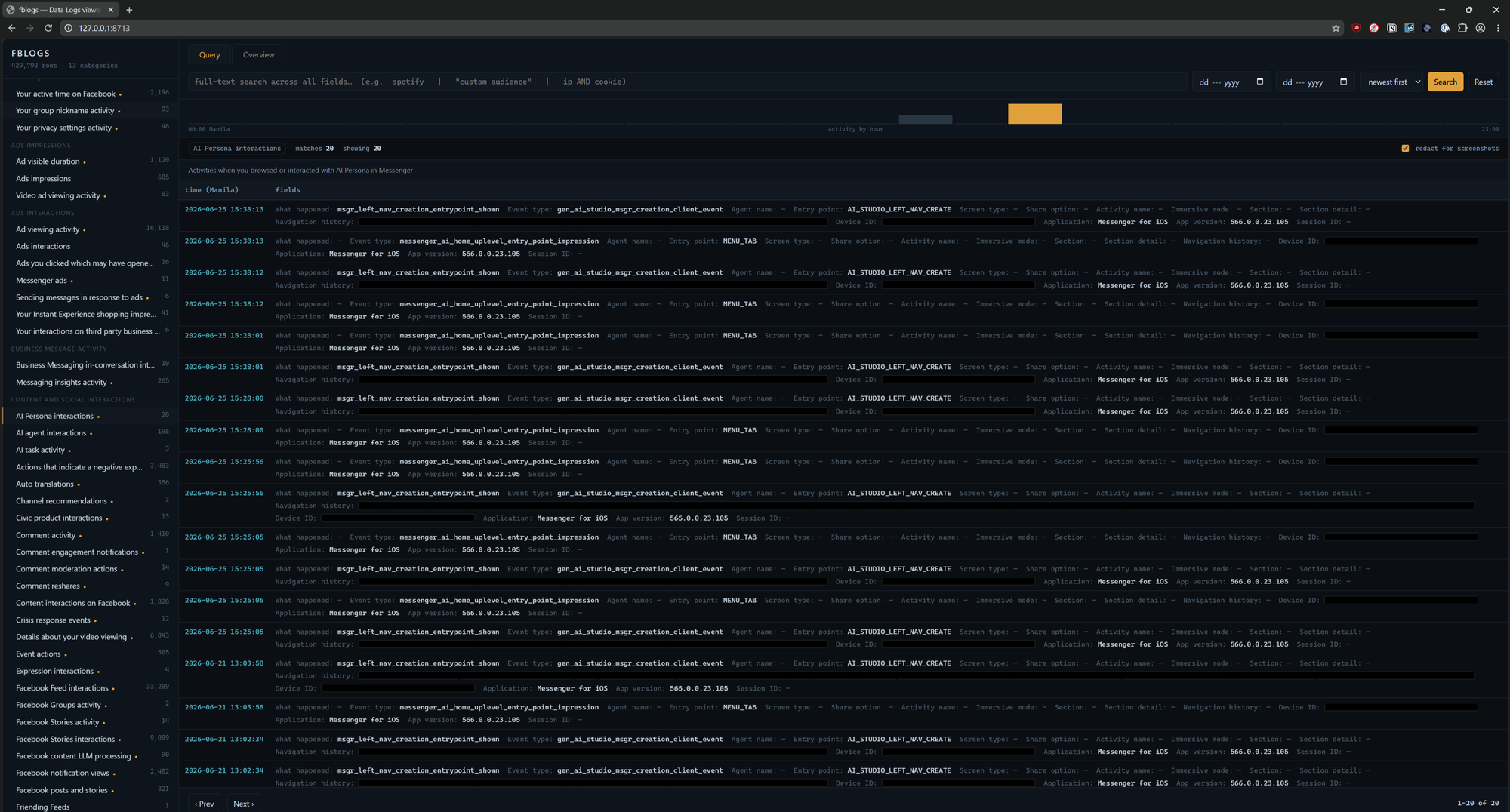
Newer than everything above, and growing fast: the export now has a cluster of tables logging your exposure to and use of Meta AI. Meta AI interactions in Facebook Feed alone is 10,878 rows in six weeks, every time an AI element appeared on content in your feed or you touched it.
Two smaller tables are the ones to notice, because they capture text you typed. meta_ai_writing_suggestions has a Prompt text field, along with the tone and dialect of the AI writing help. ai_task_activity carries a Prompt message. And facebook_content_llm_processing (90 rows) records your own posts being run through LLM processing, your content as model input:
{
  "Date": "[timestamp]",
  "Content": "[REDACTED - your post]",
  "Post text": "[REDACTED]",
  "Language": "[REDACTED]",
  "Profile type": "[REDACTED]"
}
The volume is still small next to the request logs, but the direction is the thing to clock. The AI features are being instrumented on day one with the same per-event, text-capturing granularity as everything else. Whatever you type into a Meta AI box is not ephemeral. It is a row.
What data logs contains that the profile export does not
If you have only ever pulled the default download, here is what you missed by leaving the box unticked:
- Your full identity dossier in one row: name, birthday, phone, carrier, device, hometown.
- Around 100,000 request logs in six weeks, with cookies, IPs, and HTTP headers attached.
- Your raw FR tracking-cookie ID, the identifier that follows you across the web.
- Device and connection fingerprints bound to your account (model, OS build, carrier, screen geometry, ASN).
- Proximity-based location dressed up as "No Location Tracking."
- The full third-party access ledger: 188 companies, mostly social-listening vendors.
- Custom Audience membership: the 1,000-plus advertisers and brokers holding your contact info.
- The cross-service login graph linking your FB identity to every OAuth site, retained for years.
- Granular time-and-activity telemetry fine enough to reconstruct your daily schedule.
- The text of your Meta AI prompts, logged per event from the feature's first days.
- A retention pattern that keeps the identity and pattern-of-life ledgers longest while the noisy stuff rolls off in weeks.
The default export is the museum gift shop. Data logs is the archive in the basement.
If you are going to publish your own
A quick redaction checklist, learned the practitioner way, so you do not dox yourself while making a point:
- Location table: redact every
Nearby business or organisation. Keep the disclaimer and the distance bucket. The businesses ARE your address. - Login ledger: redact sensitive
Applicationnames and everyUser Agent. - Device table: blur screen dimensions and pixel density; model and carrier can stay.
- Payments: the
Accessed asfield is your legal name; blur it unless it is already your byline. - Identity dossier (
profile_and_device_interaction_information): redact every value. Show labels only. It is fine to note which fields came back blank. - Request logs and
fr cookie: never show a realFR Cookie ID,X-Forwarded-For, cookie value, or full user agent. Show column headers and row counts instead. - AI tables: redact
Prompt textandPrompt messagevalues; the column names alone make the point. - Search tables: redact any query that is a person's name or a travel plan.
- Anything with a
Session ID, device ID, or account number: blur on sight. - Custom Audience / third-party lists: safe to show. Those are the recipients, not you. That is the whole point.
The move here is not "delete Facebook." It is: pull the file yourself, tick the box they hope you skip, and read what your own backend says about you. You will not look at the "we don't track your location" copy the same way again.
Then you decide.
The tool: fblogs
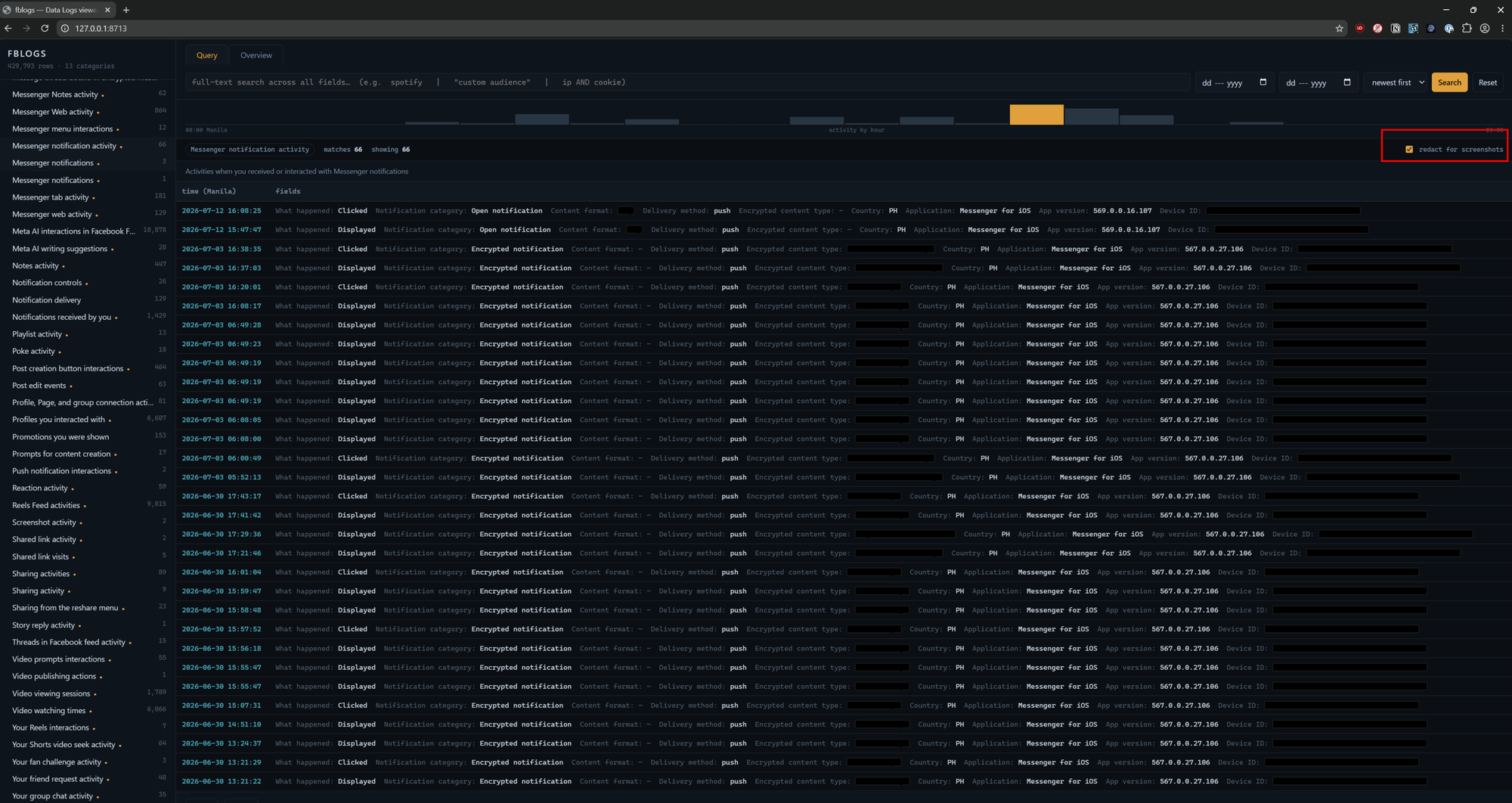
Reading 1.15 GB of JSON by hand is not a plan, so I built something to do it, and every screenshot in this post came out of it.
fblogs is a local, offline viewer for a Facebook Data Logs export. Point it at the zip, and it flattens all ~1,000 files into a single SQLite database with full-text search, then serves a one-page UI on localhost. No cloud, no upload, no external calls at runtime. Your export never leaves the box.
Runs as long as you have python abd SQLite.
Under the hood it is deliberately boring and auditable: Python standard library plus SQLite with an FTS5 index for the search, FastAPI to serve, and one hand-written HTML page with no external dependencies so it runs on an air-gapped host. It binds to 127.0.0.1 only. Two files of real logic, a schema, and a launcher.
What you can do with it: browse any of the 161 tables with live row counts, full-text search across every field at once (brandwatch, "custom audience", cookie), filter by date, and read an hour-of-day activity histogram that recomputes for whatever slice you are looking at. It is genuinely the fastest way I have found to answer "what does Meta actually have on me" from your own file.
If you want the tool, reach out. I might put it on github next week too.
A few screenshots from the tool:
I added a checkbox where you can enable redaction in case you want to use it to write about it.
Reach out if you have questions or comments or what to collaborate
Session ID: 059db238ab37c3d92615c5cc24b694da29c598cc13e27886053722404118e14271