The Tab That Asked Permission First - Breach Check

Every other tab in FalconEye runs on free data or uses API's that can be used commercially as long as paid for. Public RDAP, open certificate transparency logs, abuse.ch feeds, community-maintained YAML files, the free tiers of reputation APIs. That was a deliberate constraint from the first release: no paywall, mostly no API budget, nothing a reader can't replicate on their own box for nothing.
Breach Check is not the first tab that breaks that rule but it still is different. It runs on Have I Been Pwned, which costs money, and the story of how it got built is more interesting than the tab itself.

Why HIBP and not something free
There are free breach-lookup APIs. Some of them are good. None of them are Have I Been Pwned.
Troy Hunt has been running HIBP since 2013, initially as a side project after the Adobe breach, now as the reference implementation for what responsible breach disclosure looks like. Fifteen billion accounts. Verified and unverified breaches clearly separated. Sensitive breaches flagged so an adult-site leak doesn't get casually surfaced next to a shopping-site leak. Fabricated breaches called out as fabricated rather than quietly padding the numbers. Retired breaches removed when they turn out to be recycled data.
That editorial rigour is the product. Anyone can aggregate leaked credential dumps. Almost nobody does the unglamorous work of verifying them, categorizing what was actually exposed, and being honest about what's uncertain. When a client asks whether an email in their org appears in a breach corpus, "HIBP says yes, in these seven breaches, and here's what each one exposed" is an answer you can put in a report. Most alternatives are not.
He also gave the whole thing away for years. The Pwned Passwords corpus is free, unauthenticated, and downloadable in bulk. The k-anonymity API that powers half this tab costs nothing and never will. HIBP charges for the individual email-search API because the infrastructure costs real money, and the pricing starts at $4.39 a month. That is not a business trying to extract; that is a business trying to cover its bill.
So I paid for it.
The part where I read the terms
The API is licensed under CC BY 4.0, and the terms of use have a carve-out about third-party use. My reading was that it targeted resale and commercial exploitation, neither of which describes a free AGPL tool with no ads and no revenue. But "my reading of the terms" is not the same as "permission," and the difference matters when you are about to build a public feature on somebody else's data.
So I emailed and asked.
The reply came back within a day, from Bruce, HIBP's support bot, and it was better than most human support I have had from companies charging fifty times as much:
Your read is correct. The third-party restriction in the Terms applies specifically to domain search — monitoring domains on behalf of other organisations is what requires Pro. The email address API is different: any Core plan gives you programmatic access to query individual email addresses, regardless of whose addresses they are. Core 1 covers this use case.
Then, unprompted, three things I needed to know before building:
Attribution — the API is licensed under CC BY 4.0, which requires HIBP to be clearly identified as the source wherever breach data is displayed. Based on your description you're already planning this, but the attribution needs to be visible in the interface itself, not just in the code or docs.
Rate limit — Core 1 is 10 RPM. With aggressive caching you'll be well under that, but keep the retry-after header in mind for cache misses.
One ToU line worth knowing — the Terms prohibit using the API to build a competing service. A breach lookup tab in a free OSINT tool sits comfortably outside that, but worth knowing where the line is drawn.
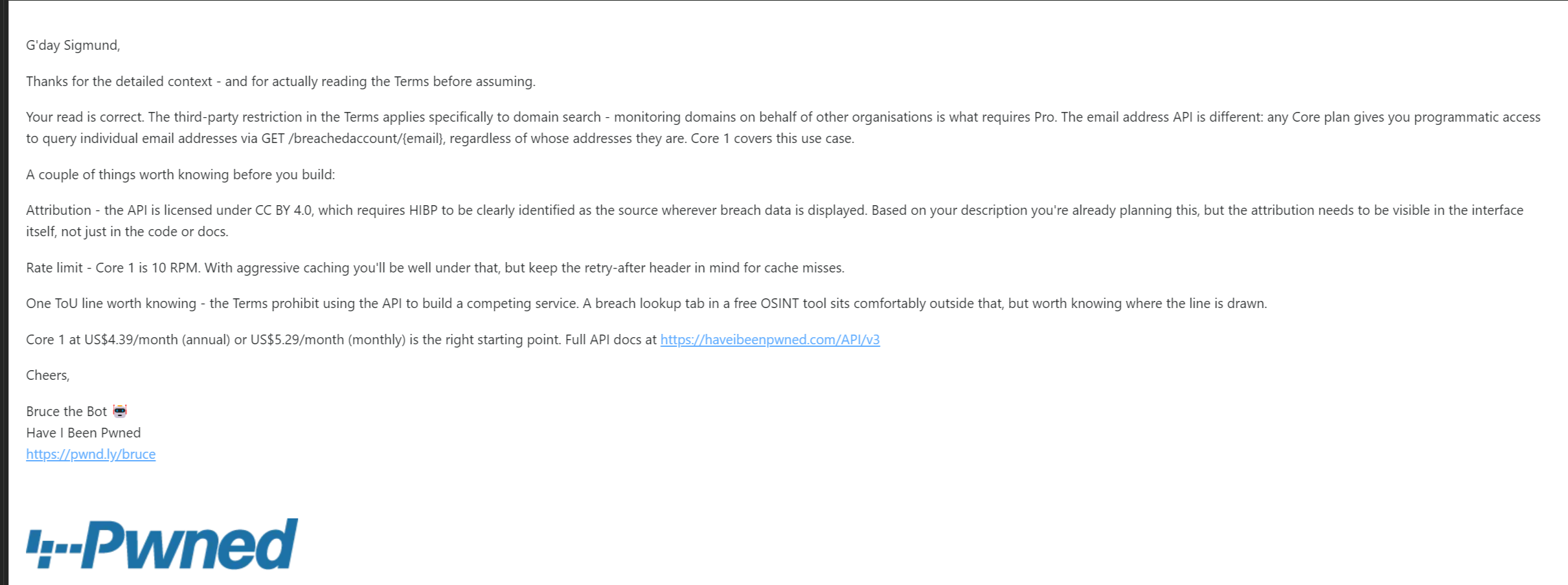
That is a support response that answers the question, anticipates the next three, and tells you where the boundary is so you do not wander over it by accident. It cost me nothing to ask and it turned a licensing guess into documented permission.
The lesson, for anyone building on someone else's data: ask. It takes ten minutes. The worst outcome is a clear no, which is still better than building something you have to tear out later. The best outcome is what happened here, which is a written answer you can point to if anyone ever questions the integration.
What attribution actually means
CC BY 4.0 does not mean "mention them somewhere." It means the source has to be identified wherever the data appears, in the interface the user is looking at.
That constraint shaped the UI more than any other decision in this tab. Attribution appears in five places:
The tab subtitle names HIBP with a link, so it is the first thing you read. Every result set carries a footer crediting HIBP under CC BY 4.0. Each breach card renders the official HIBP-hosted logo for that breach, so the imagery is theirs and credited by being theirs. The CSV export puts attribution in the first row, because exported data leaves the interface and the credit has to travel with it. And the privacy note names HIBP explicitly when explaining where your input goes.
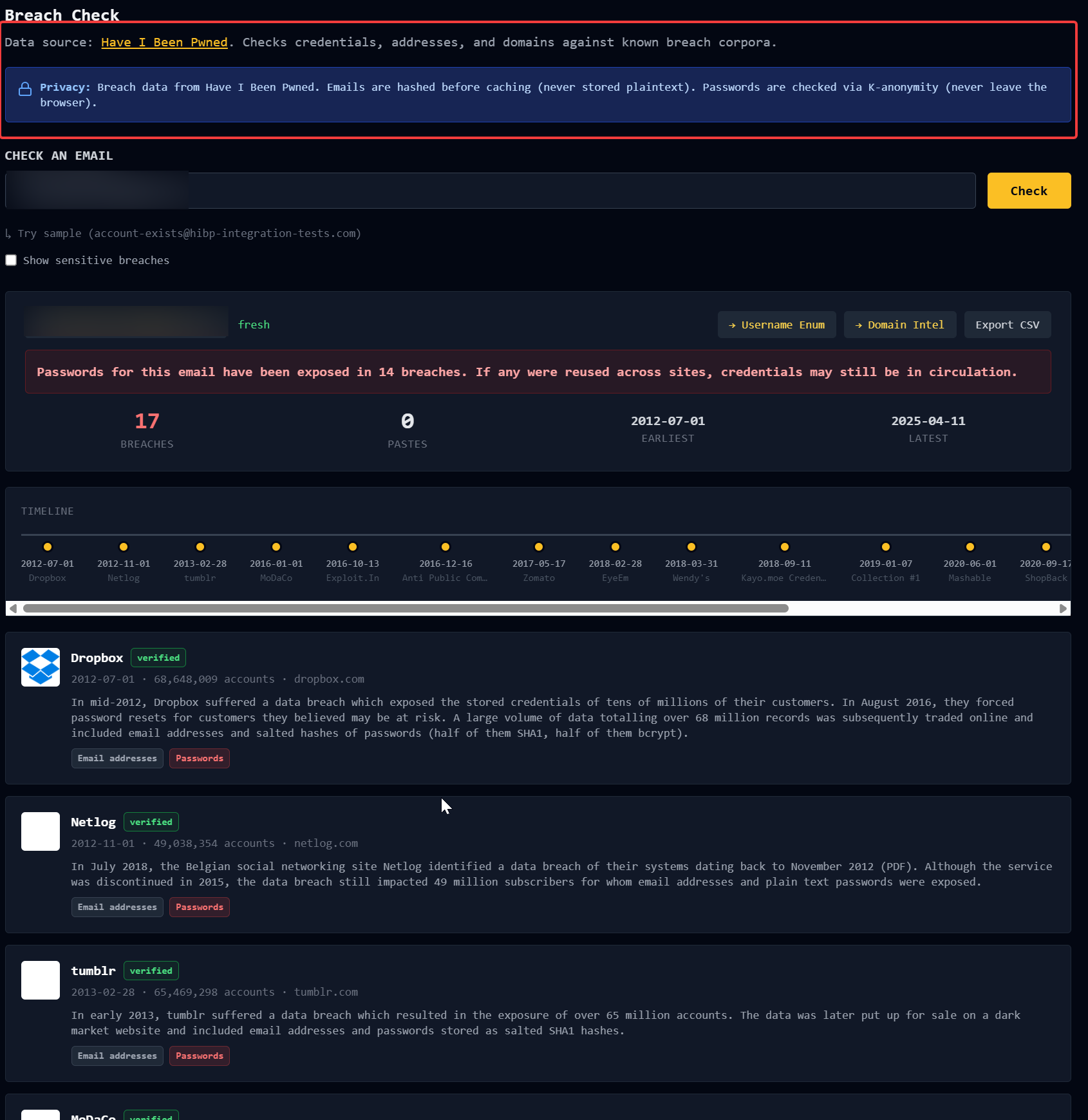
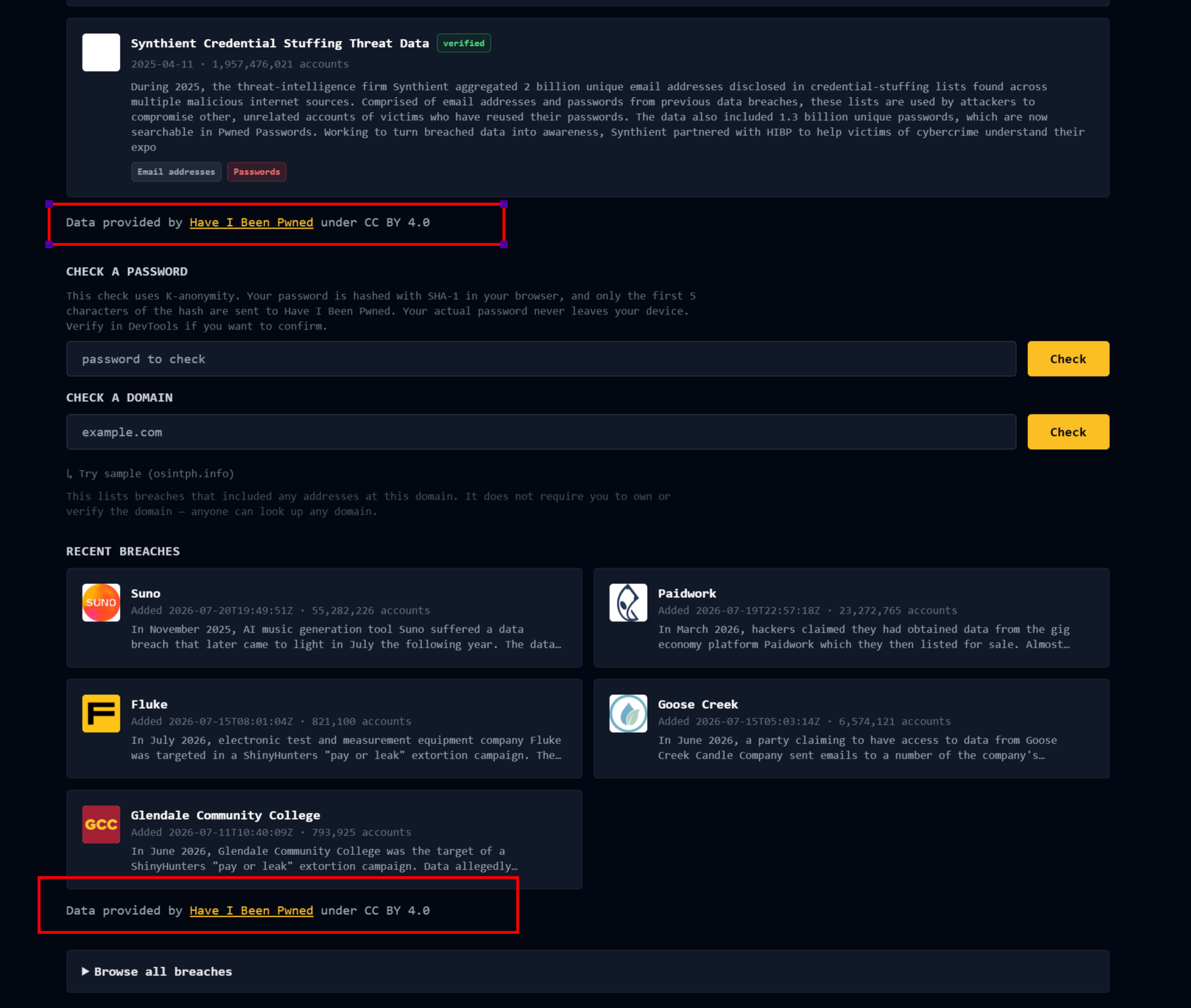
Five surfaces sounds like a lot. It is not, once you accept the premise: if the data is worth using, the credit is worth showing.
The password check, and why your password never leaves your browser
The email lookup is the paid part. The password check is free, and it is the more interesting piece of engineering.
The obvious way to build "has this password been breached" is to send the password to a server and have the server check. That is also the worst way, because now a password you were worried about has been transmitted to a third party who has no business seeing it.
HIBP solves this with k-anonymity, and the design is elegant enough to be worth explaining properly.
Your browser hashes the password with SHA-1 locally. It sends only the first five characters of that hash to HIBP. HIBP returns every hash suffix in its corpus that begins with those five characters, typically several hundred of them, with the number of times each has appeared in a breach. Your browser then checks locally whether your full hash is in that list.
HIBP learns that someone, somewhere, has a password whose hash starts with 5BAA6. It never learns which of the several hundred matching passwords is yours, or whether yours is in the list at all. The server cannot know the answer to the question it just helped you answer.
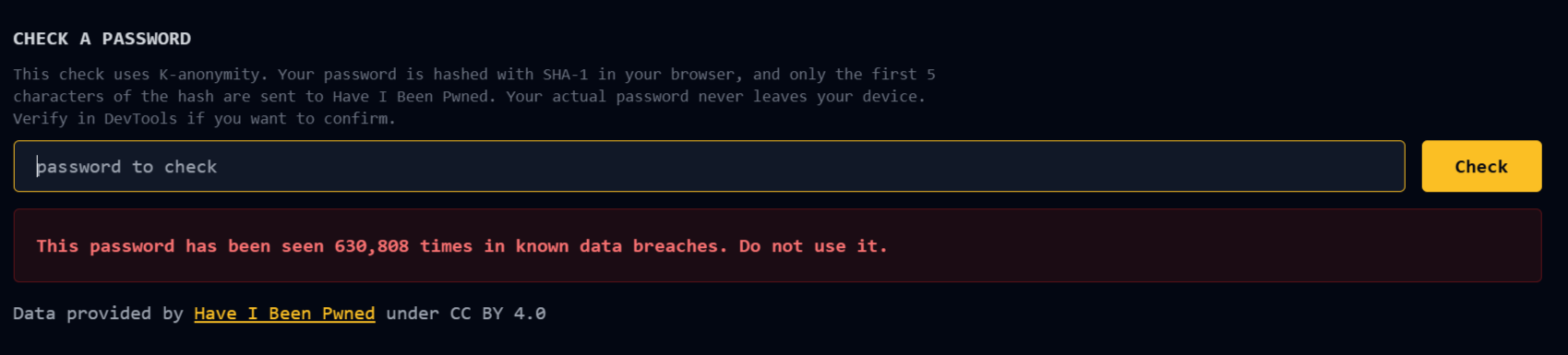
FalconEye never sees the password either. The check runs entirely in the browser, direct to HIBP, with no round trip through my server. That is not a promise you have to take on faith: open DevTools, watch the network tab, run a check. The only request that fires is a GET to api.pwnedpasswords.com/range/ followed by five characters. Nothing else leaves the page.
I encourage you to actually do that rather than believe me. A privacy claim you can verify in ten seconds is worth more than one you cannot.
What the tab does
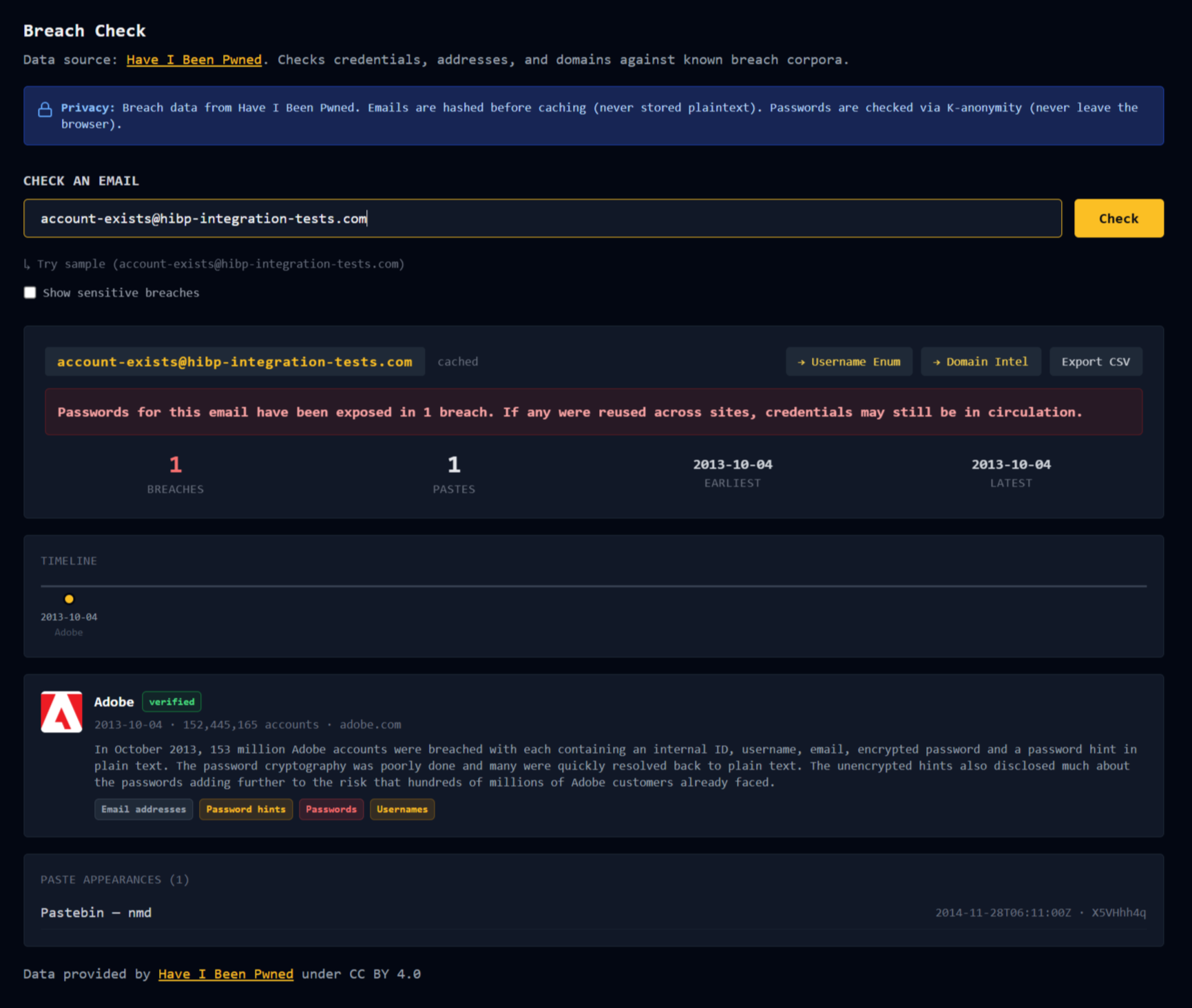
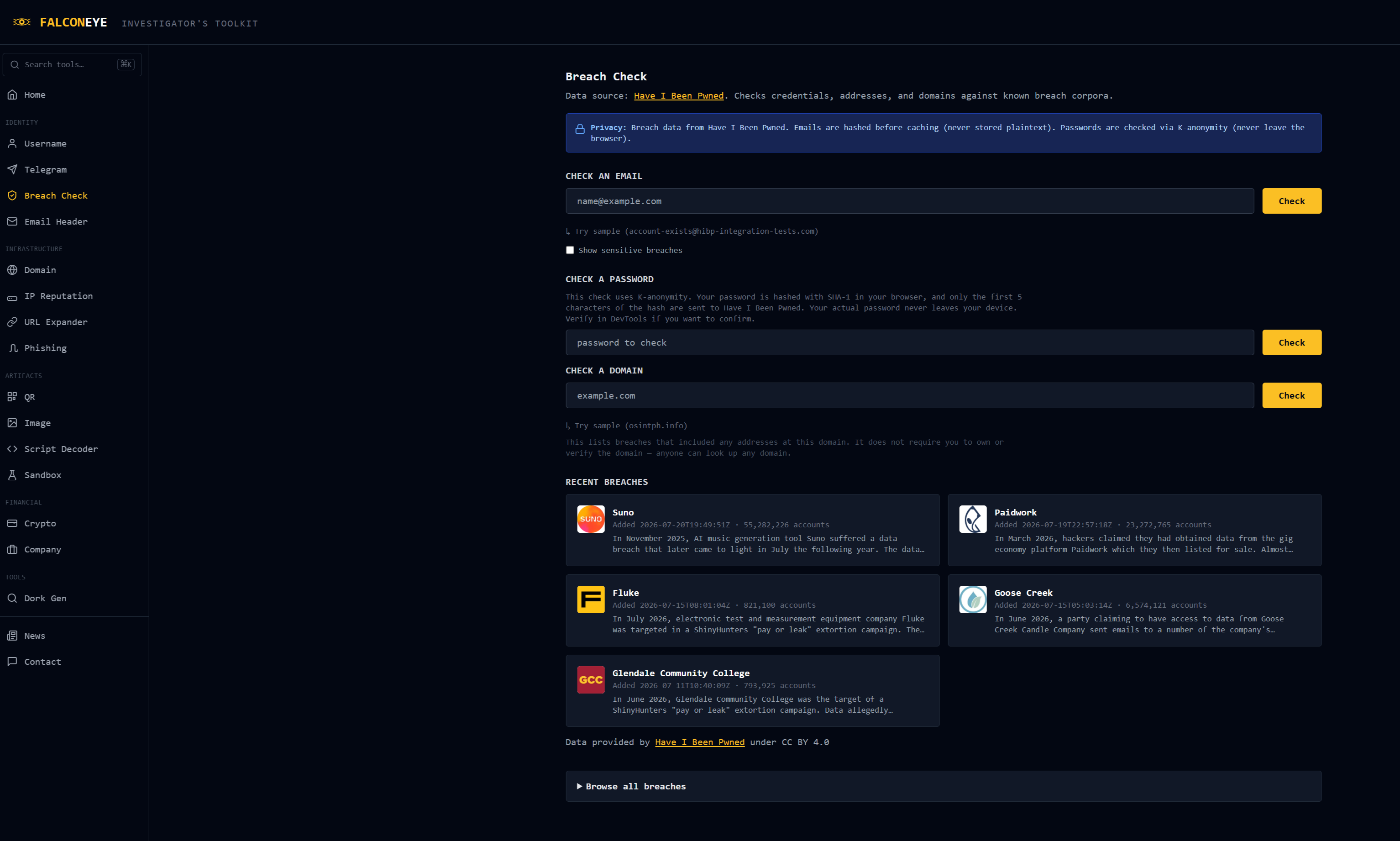
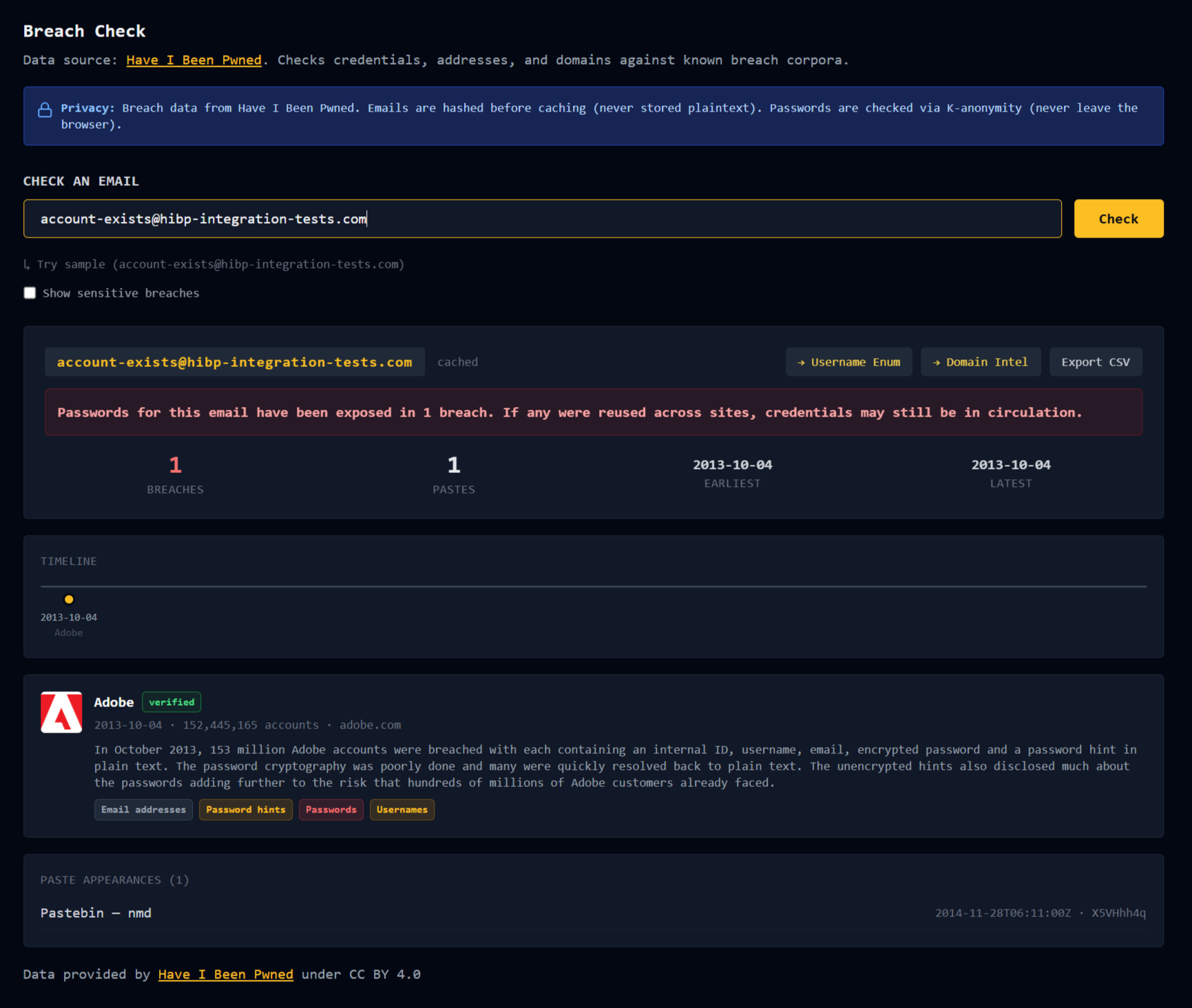
Email lookup returns every breach the address appears in, enriched with full metadata: what the breach was, when it happened, how many accounts, and precisely which data classes were exposed. Passwords, physical addresses, dates of birth, and so on, rendered as chips so you can see at a glance whether this was an email-only leak or something that put real personal data in circulation. It also queries paste sites, since credentials often surface in a paste before they land in a formal breach corpus.
A timeline lays the breaches out chronologically, which turns a list into a story. Here is when this identity started leaking, here is the gap, here is the cluster in 2019 when three services went down in six months.
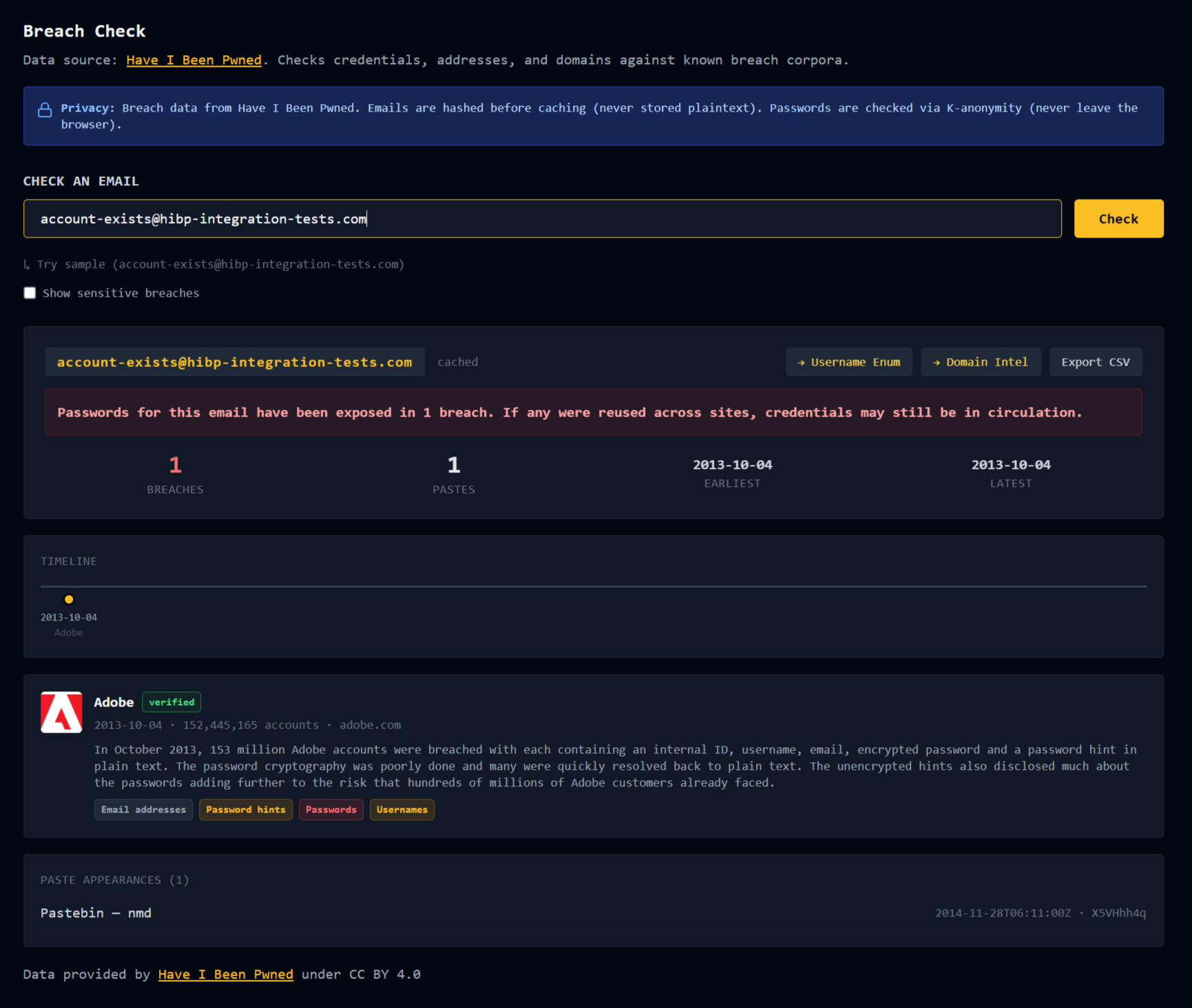
Sensitive breaches are hidden by default behind a toggle, following HIBP's own IsSensitive flag. If an address appears in an adult-site leak, that is not something to surface casually next to a retail breach, and the tool should not make that decision for you.
Domain lookup returns every breach that included addresses at a given domain. Useful for corporate work: before a BEC engagement, knowing that a target organization has had addresses in four breaches tells you something about the credential-reuse risk you are walking into.
Password check as described above.
And the results pivot into the rest of FalconEye. An email's local part drops into the Username tab to check where that handle appears across 965 platforms. The email's domain drops into Domain Intel. That composition is the whole point of a workbench: no single lookup is an answer, but a chain of them starts to be.
The constraints, honestly
The email API is rate-limited to 10 requests per minute on the Core plan, so FalconEye caches aggressively and applies its own per-visitor limits well below that ceiling. Emails are hashed before caching; the plaintext address is never stored.
In the future, I may consider accepting contributions to be able to pay for a higher tier with larger rate limits, for now, this will do.
Breach data is only as complete as HIBP's corpus, which is large but not omniscient. "No breaches found" means "not in this corpus," not "safe."
The same applies to passwords, more emphatically. A password not appearing in Pwned Passwords tells you it has not shown up in a known breach. It tells you nothing about whether the password is strong, unique, or a good idea. Use a password manager.
Go support the thing
HIBP is fifteen billion accounts of carefully maintained public-interest infrastructure, run for over a decade, with the most useful parts given away free. The paid tiers exist because servers cost money, not because anyone is getting rich.
If you use breach data professionally, a subscription starts at $4.39 a month and it is the least you can do.
And if you are building something on top of someone else's data: read their terms, then write to them anyway. Ten minutes, and you get to stop guessing.
FalconEye is a free, self-hosted OSINT toolkit for practitioners. Eighteen tabs. No login. AGPL-3.0. Live at falconeye.osintph.info, source at github.com/osintph/falconeye.
Breach data provided by Have I Been Pwned under CC BY 4.0.
Reach out if you have questions or comments or what to collaborate
Session ID: 059db238ab37c3d92615c5cc24b694da29c598cc13e27886053722404118e14271