Build Your Own Wayback: Self-Hosting ArchiveBox for OSINT Evidence - Why and how

Three months ago I was tracing a crypto fraud network through a thread of breadcrumbs the operators had left across half a dozen sites. A Telegram channel, a few Twitter posts, a podcast interview, a defunct exchange's terms of service, and a forum thread on a Russian-language board. By the time I came back to write up the case, two of those pages had been quietly altered, one had been deleted entirely, and the Telegram channel had been wiped. The Wayback Machine had partial coverage. The most important page, the one with the operator's real name briefly visible in a botched comment edit, had never been crawled.
Link rot loses cases. If you are doing OSINT seriously, you cannot depend on the open web staying still long enough to write a report, and you absolutely cannot depend on the Internet Archive to have captured the exact page state you need. You need your own evidence locker.
This is the third post in my self-hosted OSINT stack series, following the SearXNG and Changedetection.io writeups. Same pattern, same Cloudflare Access hardening, same OVH box. Different problem space.
 Sigmund
 Sigmund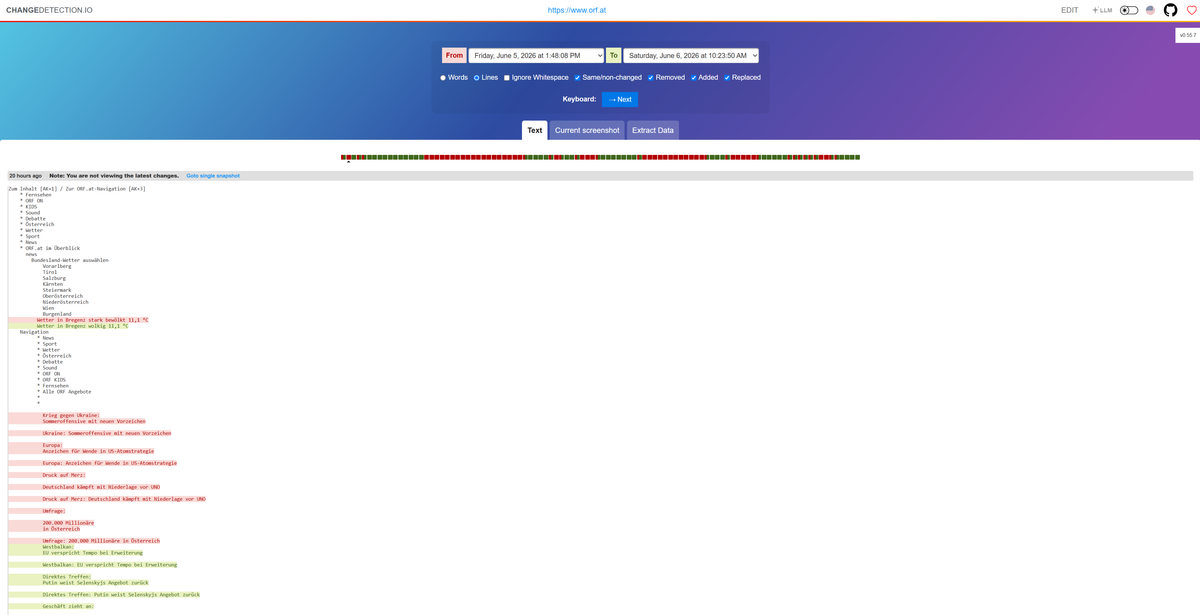
This post is structured in two halves. The first half is why: why the Wayback Machine isn't enough for OSINT work, why ArchiveBox is the right tool for an individual practitioner, and the honest tradeoffs you should know going in. The second half is how: the architecture, the full setup, and the integration that makes it auto-archive every detected change. If you already know you want this and just need the deployment recipe, jump to "The Architecture" and start there.
Part One: Why
Why You Can't Just Use the Wayback Machine
The Internet Archive does important work and you should still use it as a secondary source. But for OSINT, it has structural problems:
The situation has gotten meaningfully worse in the last twelve months, which is worth flagging on its own. News captures into the Wayback Machine dropped roughly 87 percent between May and October 2025 as major publishers started actively blocking the Internet Archive's crawlers. The New York Times confirmed in January 2026 that it now hard-blocks the archive.org_bot user agent via robots.txt. The Guardian has done the same. Reddit cut off bulk Wayback access in August 2025. The proximate reason in every case is AI training scrapers using the Wayback Machine as a laundered ingestion path for paywalled content, but the second-order effect lands on you: a meaningful chunk of the news and social content you might want to preserve for an investigation is now either missing from Wayback entirely or being removed retroactively. The trend is one direction.
Coverage gaps. The IA crawls on its own schedule. There is no guarantee that the page state you need at the time you need it has been captured. For a long-tail forum post or a freshly-published article that gets edited within hours, the gap between version A and version B might be the only version IA has.
Removal on request. The IA honors removal requests from copyright holders and from sites that add a robots.txt exclusion retroactively. Pages that existed in their archive yesterday can vanish today. There is no "rewind to a captured state I previously saw."
Subpoena exposure. Your queries to archive.org are logs that exist on someone else's server. For sensitive subjects (corporate misconduct, state actors, organized crime), you do not want a third party able to enumerate what you were researching and when.
Browser session and cookie limitations. IA cannot capture pages that require login. Anything behind a paywall, an account, or a "click to accept cookies" wall renders as a broken capture or no capture at all.
No chain of custody. A WARC pulled from IA does not have your signature on it. You did not control the capture moment. For evidence work, that matters.
Self-hosted ArchiveBox solves all five.
Why ArchiveBox Specifically
For server-side archiving that an individual practitioner can actually run, there are two real options.
Browsertrix and the Webrecorder stack is what serious institutional archivists run. The Internet Archive itself, national libraries, IIPC member organizations. The right tool if you have a Kubernetes cluster, a dedicated archivist on staff, and a sustained crawl program. For one person doing OSINT investigations, it is six layers of complexity you do not need.
ArchiveBox. One Docker container, a web UI, a working CLI. Each snapshot is a timestamped folder containing the WARC for your forensically defensible record, a PDF of the rendered page, a PNG screenshot, a self-contained single-file HTML for offline viewing, plus readability and mercury extractions for the article text, the headers, and the DOM. Every output is a standard format. Even if ArchiveBox itself disappears tomorrow, your captures don't.
Browser extensions like SingleFile and ArchiveWeb.page are a separate category, not a competitor. They run client-side in your authenticated browser session and capture exactly what you can see in the moment. Reach for them when you need to grab something only your logged-in browser can render, like a Google Doc, a paywalled article you have a subscription to, or a Cloudflare-Access-protected admin page. Reach for ArchiveBox for everything that needs to happen unattended, on a schedule, or with evidentiary weight.
The "any future tool can read" part is the whole point. ArchiveBox could disappear tomorrow and your archived data would still be valuable, because WARC is an ISO standard and a snapshot folder is just files. There is no proprietary database, no SaaS lockin, no migration nightmare.
Be Honest About the State of the Project
ArchiveBox has a real problem: the maintainer has not cut a stable release containing the REST API and webhooks features that the documentation prominently advertises. The current stable tag (:latest and :stable) resolves to 0.7.4, which is from the 0.7.x line. The 0.8 and 0.9 series exist only as release candidates and :dev builds.
If you want push-based integration with other tools (Changedetection firing a webhook on every change, programmatic adds from custom scripts, a real CLI replacement), you have two options today:
Pin to a :dev SHA build. Works, but you are running release-candidate code in production and you have to monitor the project for breaking changes between builds. Schema migrations land without ceremony. I tried this. It also introduces a forced subdomain split (separate admin., web., api., public. hostnames) that's a maintenance pain for a small deployment.
Stay on 0.7.4 and build a tiny webhook bridge that uses the CLI under the hood. This is what I run. The bridge is 30 lines of YAML and a 10-line shell script. It exposes a webhook endpoint, takes a URL, runs archivebox add inside the container. The trick for getting versioned snapshots out of a CLI that nominally deduplicates by URL is in the next section. Full setup in the Changedetection section below.
The CLI is the boring stable interface that has worked the same way for years. The bridge gives you push-based integration on top of it. You get the workflow win without the version-chasing tax.
This is not a fatal problem for OSINT use. The web UI is fast, the CLI is scriptable, and the captures themselves are the same regardless of how the URL was submitted. But I want you going in with eyes open: this tool has rough edges and you need to work around them.
Part Two: How
That's the case for self-hosting an archive, and ArchiveBox specifically. From here on it's deployment, configuration, and the integration with Changedetection that turns this into a push-based OSINT preservation pipeline. If you've followed my earlier posts in this series the shape will be familiar.
The Architecture
Same pattern as the rest of my self-hosted stack. If you have followed my earlier posts on OVH for OSINT infrastructure, SearXNG, and Changedetection.io, this will look familiar:
- OVH VPS, Ubuntu 24.04, the same 4 vCore / 8 GB box that hosts SearXNG and Changedetection
- ArchiveBox in Docker, bound to 127.0.0.1:8000 (never publicly exposed)
- Caddy as reverse proxy, terminating TLS with a Cloudflare Origin Certificate
- Cloudflare proxying the public hostname, with Cloudflare Access in front, requiring Google Workspace SSO with MFA before the request even reaches my origin
- Persistent storage at
/opt/archivebox/data, separate from the SearXNG/Changedetection stack so updates and restarts of one do not affect the other
The defense-in-depth is important. ArchiveBox itself has authentication, but you do not want the Django login form to be your only barrier. With Cloudflare Access in front, Cloudflare authenticates the request before my origin ever sees it. The certificate transparency logs do not reveal a login page to scrape. Bot traffic gets filtered upstream. If a vulnerability is announced for ArchiveBox tomorrow, the exposure surface for me is limited to people I have explicitly granted Access policy permissions.
Setup, Phase 1: Pre-flight
ArchiveBox is the heaviest of my self-hosted tools because every capture spins headless Chromium. Budget around 500 MB to 1 GB of RAM per concurrent capture job, and storage growing fast: 5 to 10 MB for a static page, 50 to 200 MB for a media-heavy page, GB territory if you let it pull embedded video.
On the OVH box, headroom check:
free -h
df -h /
nproc
docker ps --format "table {{.Names}}\t{{.Status}}\t{{.Ports}}"
Want at least 1.5 GB of free RAM and 20 GB earmarked for the archive volume.
Setup, Phase 2: Docker Compose Deploy
ArchiveBox lives in its own compose project so it has an independent lifecycle from the search/watch stack:
sudo mkdir -p /opt/archivebox/data
sudo chown -R $USER:$USER /opt/archivebox
cd /opt/archivebox
Compose file, written with vi or heredoc (never nano):
services:
  archivebox:
    image: archivebox/archivebox:0.7.4
    container_name: archivebox
    restart: unless-stopped
    ports:
      - "127.0.0.1:8000:8000"
    volumes:
      - ./data:/data
    environment:
      - PUBLIC_INDEX=False
      - PUBLIC_SNAPSHOTS=False
      - PUBLIC_ADD_VIEW=False
      - ALLOWED_HOSTS=archive.osintph.info,127.0.0.1,localhost
      - CSRF_TRUSTED_ORIGINS=https://archive.osintph.info
      - SAVE_ARCHIVE_DOT_ORG=False
      - SAVE_MEDIA=False
      - MEDIA_MAX_SIZE=750m
      - TIMEOUT=120
      - CHROME_TIMEOUT=90
      - RESOLUTION=1440,2000
      - PUID=1000
      - PGID=1000
    healthcheck:
      test: ["CMD", "curl", "-fsS", "http://localhost:8000/health/"]
      interval: 30s
      timeout: 20s
      retries: 5
A few choices worth explaining:
Pinned to :0.7.4, not :latest. If the maintainer ever cuts a 0.9 stable with the subdomain split (which the dev builds use) my deployment will not silently upgrade into a broken state.
SAVE_ARCHIVE_DOT_ORG=False. I do not want my captures echoed to the Wayback Machine. The whole point of self-hosting is that the capture is mine and stays with me.
SAVE_MEDIA=False. Disk growth gets out of control fast if every YouTube link gets the full mp4 pulled. I leave it off globally and override per-snapshot from the UI when I actually want video.
PUBLIC_*=False. Even with Cloudflare Access in front, the ArchiveBox layer also requires login. Belt and braces.
Then initialize:
cd /opt/archivebox
docker compose run --rm archivebox init --setup
The --setup flag fetches runtime dependencies on first run. Expect a couple of minutes.
Setup, Phase 3: Admin Account
Generate a long random password rather than typing one. You will store it in 1Password and never type it again:
ADMIN_PW=$(openssl rand -base64 24)
docker compose run --rm \
  -e DJANGO_SUPERUSER_USERNAME=sigmund \
  -e [email protected] \
  -e DJANGO_SUPERUSER_PASSWORD="$ADMIN_PW" \
  archivebox manage createsuperuser --noinput
echo "Admin password: $ADMIN_PW"
Stash the password immediately. ArchiveBox will not show it again.
Bring it up:
docker compose up -d
sleep 10
docker compose ps
curl -fsS http://127.0.0.1:8000/health/
Healthcheck should pass within 30 seconds.
Setup, Phase 4: Reverse Proxy and DNS
Same Caddy pattern as the other tools. New vhost block, new Cloudflare Origin Certificate, new DNS record.
In Cloudflare, add an A record for archive pointing at your VPS IP, with the orange-cloud proxy enabled. Then mint an Origin Certificate (SSL/TLS → Origin Server → Create Certificate) scoped to that one hostname. ECDSA, 15 years. Drop the certificate and private key into /etc/ssl/cloudflare/archive.osintph.info.pem and .key on the VPS with appropriate permissions (644 for the cert, 600 for the key, owned by root).
Caddy vhost block:
archive.osintph.info {
    tls /etc/ssl/cloudflare/archive.osintph.info.pem /etc/ssl/cloudflare/archive.osintph.info.key
    reverse_proxy 127.0.0.1:8000
}
Validate, reload:
sudo caddy validate --config /etc/caddy/Caddyfile
sudo systemctl reload caddy
Setup, Phase 5: Cloudflare Access (Optional)
Without Access, anyone on the internet can hit your archive's login page. Bot traffic will start showing up within hours. Add Cloudflare Access to require SSO before anyone touches the Django layer.
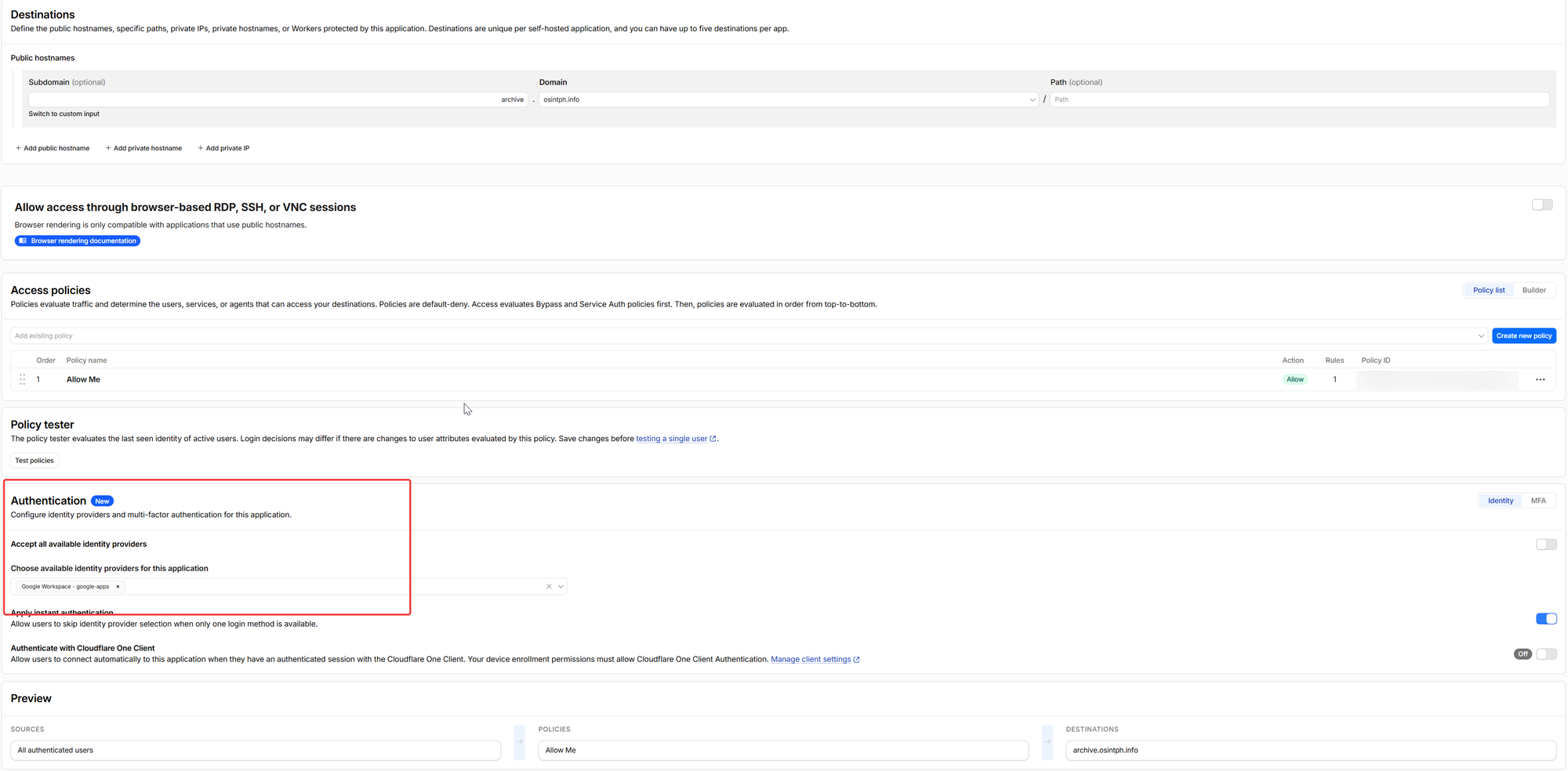
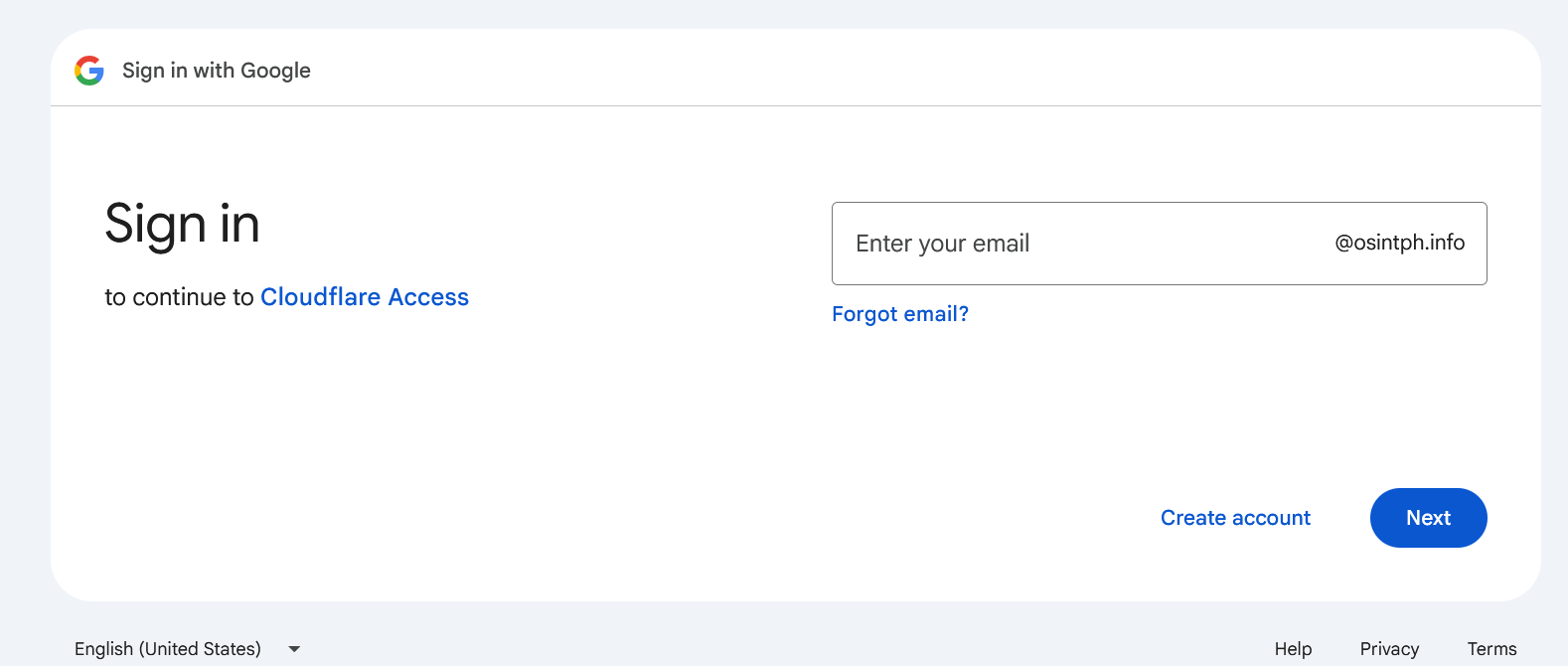
Zero Trust dashboard → Access → Applications → Add an application → Self-hosted. Application domain archive.osintph.info. Session duration matching your other tools (24 hours is fine). Identity provider: whatever you use, in my case Google Workspace.
Policy: Allow, include emails matching your address, require MFA via the identity provider. Same shape as the policies on search.osintph.info and watch.osintph.info.
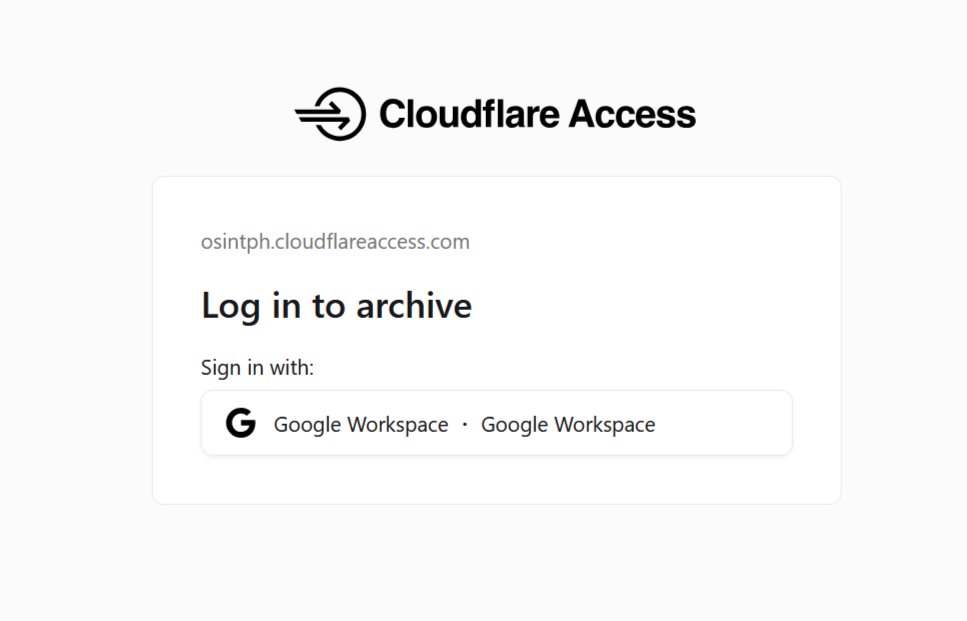
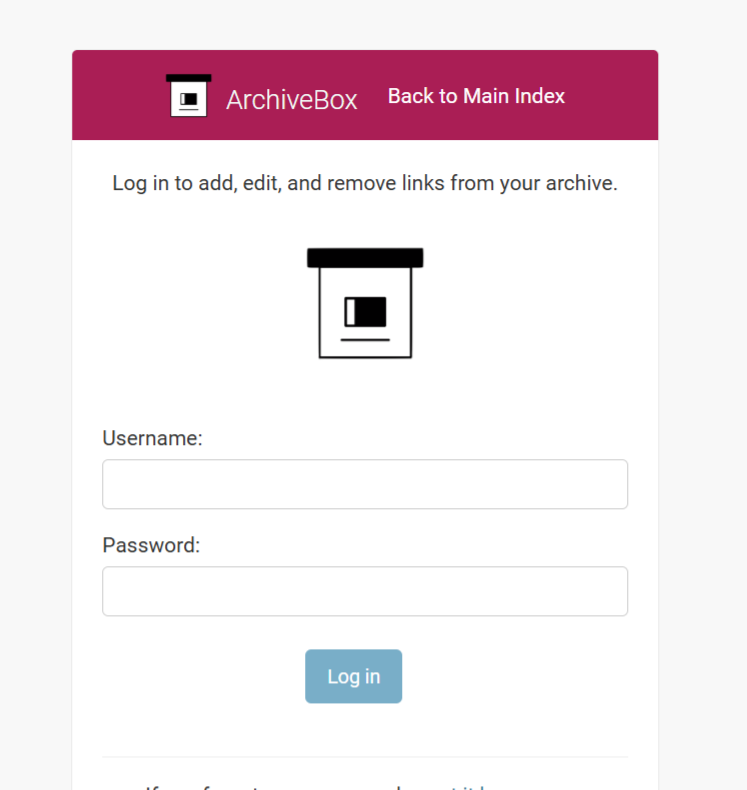
Save. Hit https://archive.osintph.info from a clean browser session and you should bounce through Google login, then land on the ArchiveBox login page, then onto the admin UI.
First Capture
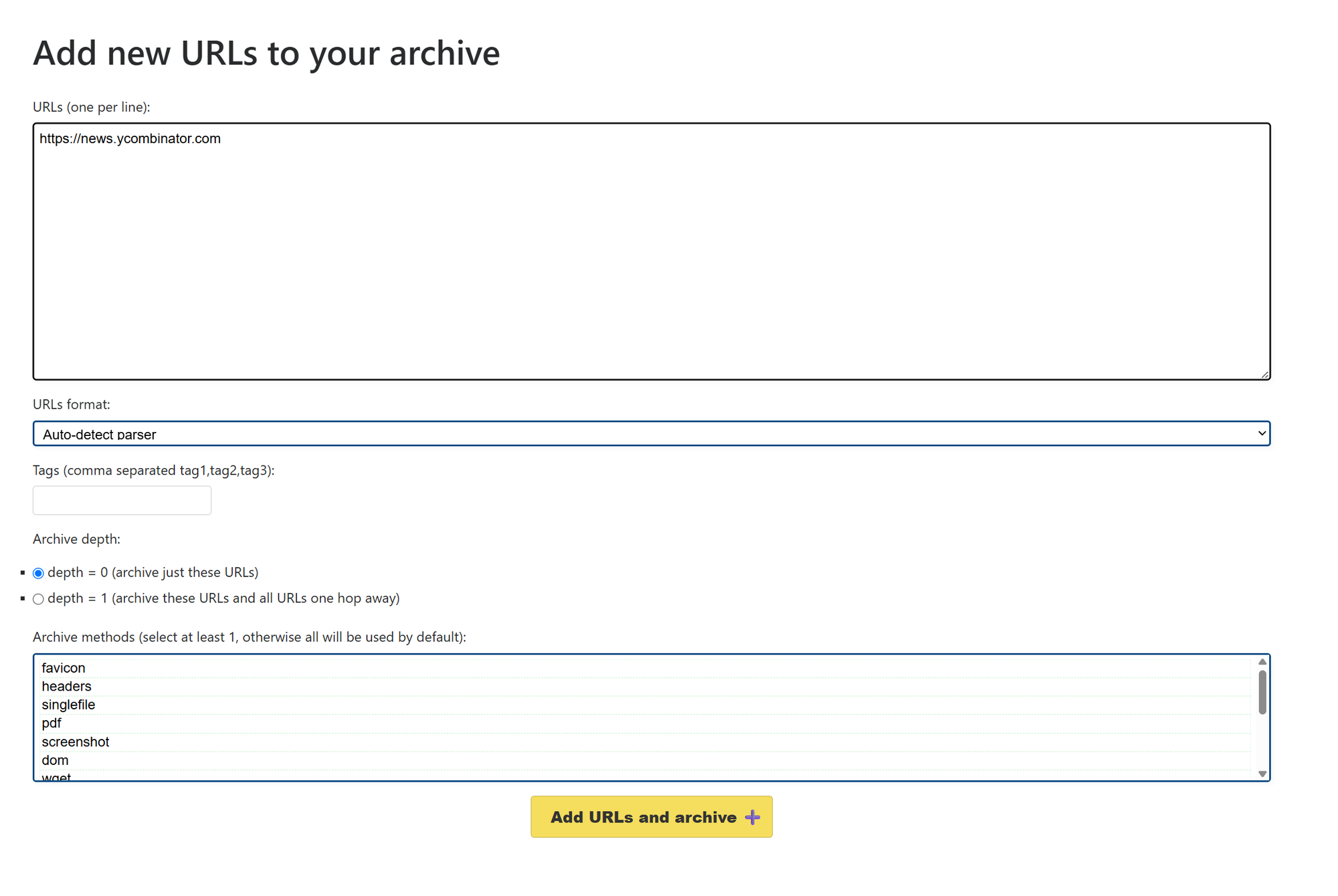
Click "Add" in the top right. Paste a URL. The minimum useful test:
https://news.ycombinator.com
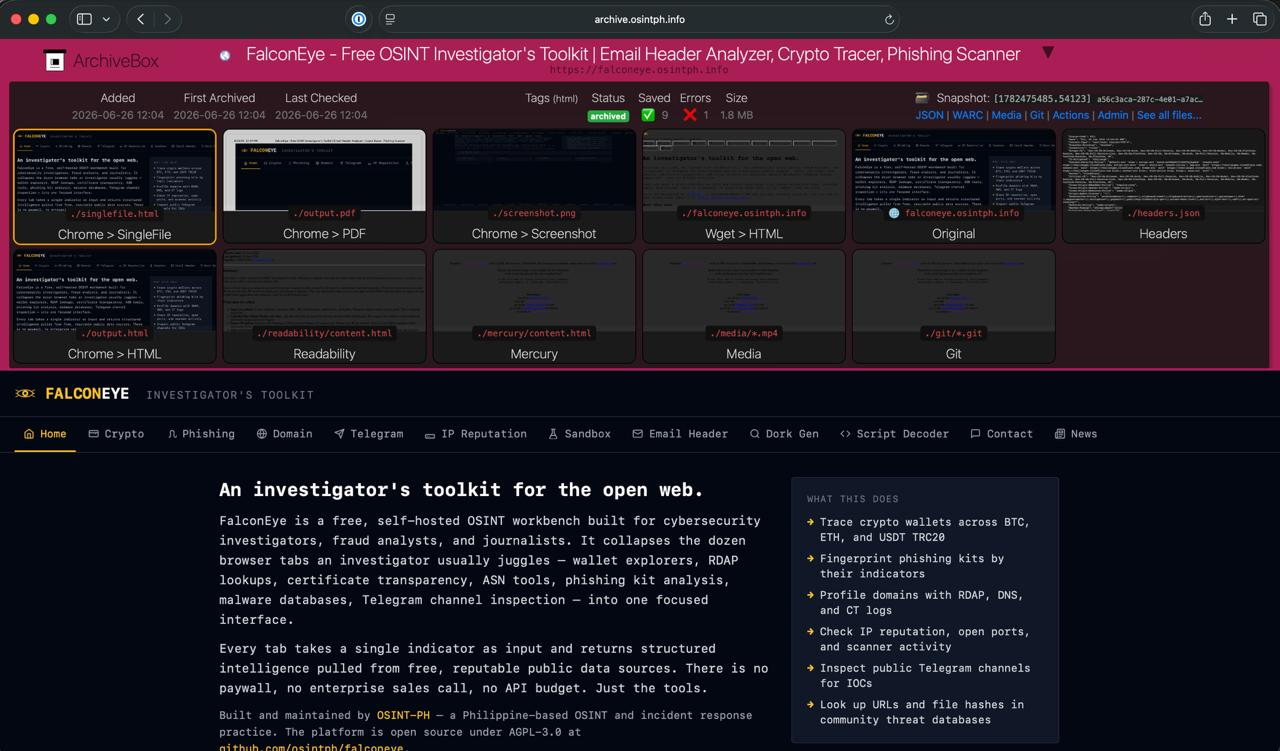
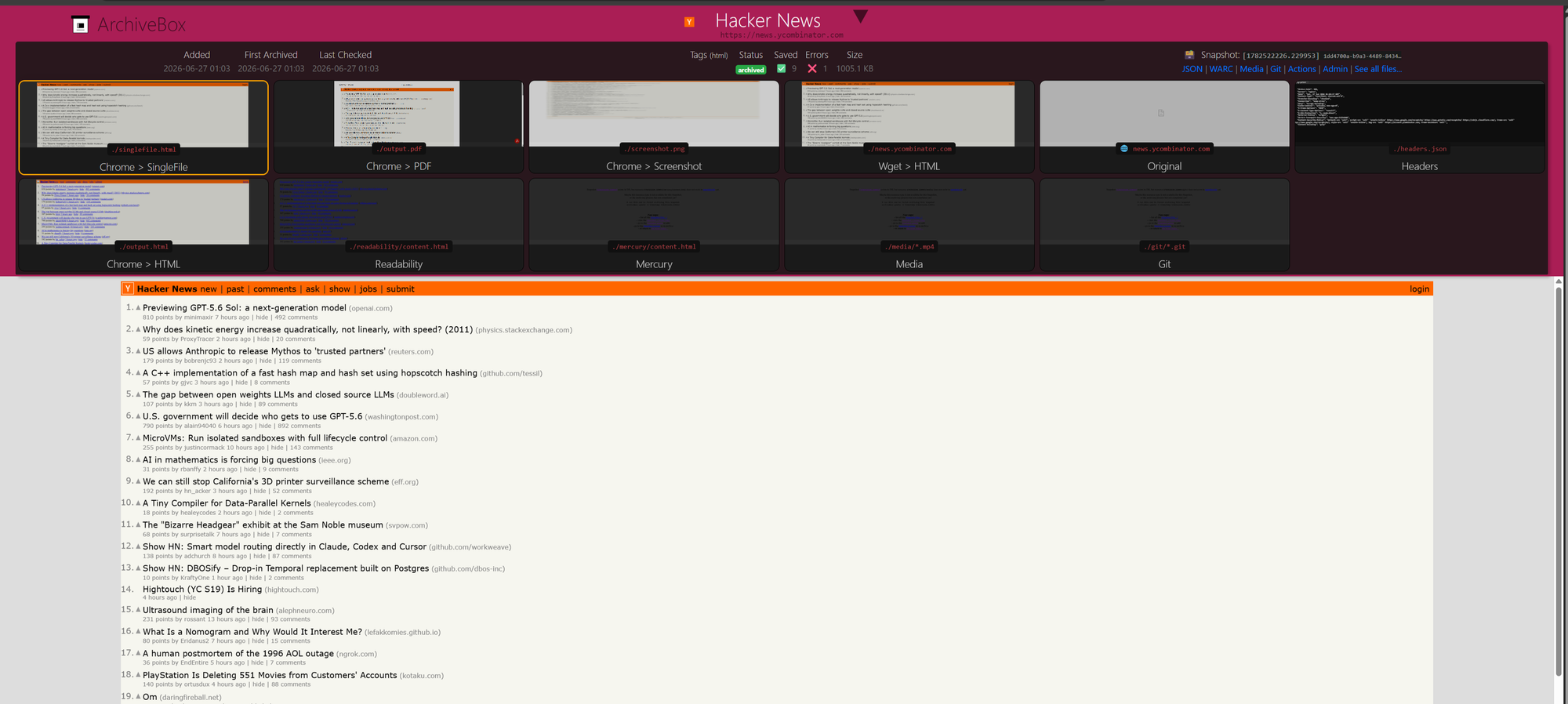
Static-feeling but actually JavaScript-rendered, with real content. Submit with depth 0. Two minutes later, the snapshot detail page should show a tile grid: SingleFile, PDF, Screenshot, Wget HTML, Chrome HTML, Readability, Mercury, Headers, Original. The screenshot tile should render the actual front page with stories, not a blank shell. If it does, your Chromium pipeline is working.
Open the WARC link from the snapshot header. That file is the forensically defensible record. Same format the Internet Archive uses, same format any future replay tool will read.
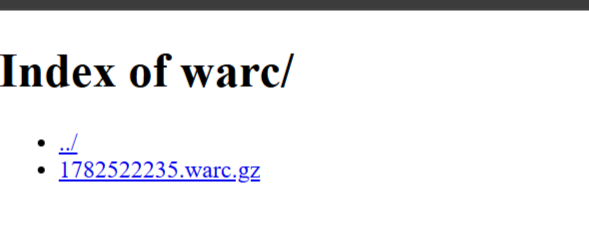
ls /opt/archivebox/data/archive/<timestamp>/warc/
zcat /opt/archivebox/data/archive/<timestamp>/warc/*.warc.gz | head -20
You should see WARC/1.0 headers. That is your evidence.

How to Actually Use This for OSINT
A few workflows I run regularly:
Subject of interest capture. Anyone I am actively investigating, any time I find a page about them, goes into ArchiveBox tagged with the case name. Their bio, their company website, their social profiles, news articles mentioning them, press releases, archived versions of pages they have since edited. By the time I write a report, I have a chronological record of how their digital footprint looked at each touchpoint of the investigation.
Citation preservation. Any time I cite a URL in a report, that URL gets archived first. If a defendant's lawyer reads my report six months later and the original URL has changed, I can produce the WARC showing exactly what the page said when I cited it. Citations without preservation are not citations, they are wishes.
Adversary infrastructure snapshots. Phishing pages, scam sites, dark web mirrors, fake company portals. Capture them immediately and capture them often. They go down fast. Sometimes the operator panics and deletes the site within hours of being identified. The capture is the only durable record.
Forum and social media threads. Threads that mention subjects of interest, archived with depth 1 so I get the replies as well as the original post. The screenshot extractor preserves the visual context (usernames, post times, reaction counts) that pure text extraction misses.
Tag everything. ArchiveBox's full text search across snapshots is good, but tagging by case name and source type makes retrieval trivial six months later when you have thousands of snapshots.

Auto-Archive on Detected Change
This is where the whole stack pays off.
If you are running Changedetection.io alongside ArchiveBox, the natural workflow is: Changedetection notices a watched page has changed, ArchiveBox automatically captures the new state. You build a tamper-evident timeline of every version of every page you care about, without lifting a finger.
The catch, as I mentioned earlier, is that ArchiveBox 0.7.4 has no REST API. So we cannot have Changedetection POST a payload directly. The fix is a tiny webhook bridge that sits between them: receives the notification from Changedetection, validates a bearer token, executes archivebox add inside the container.
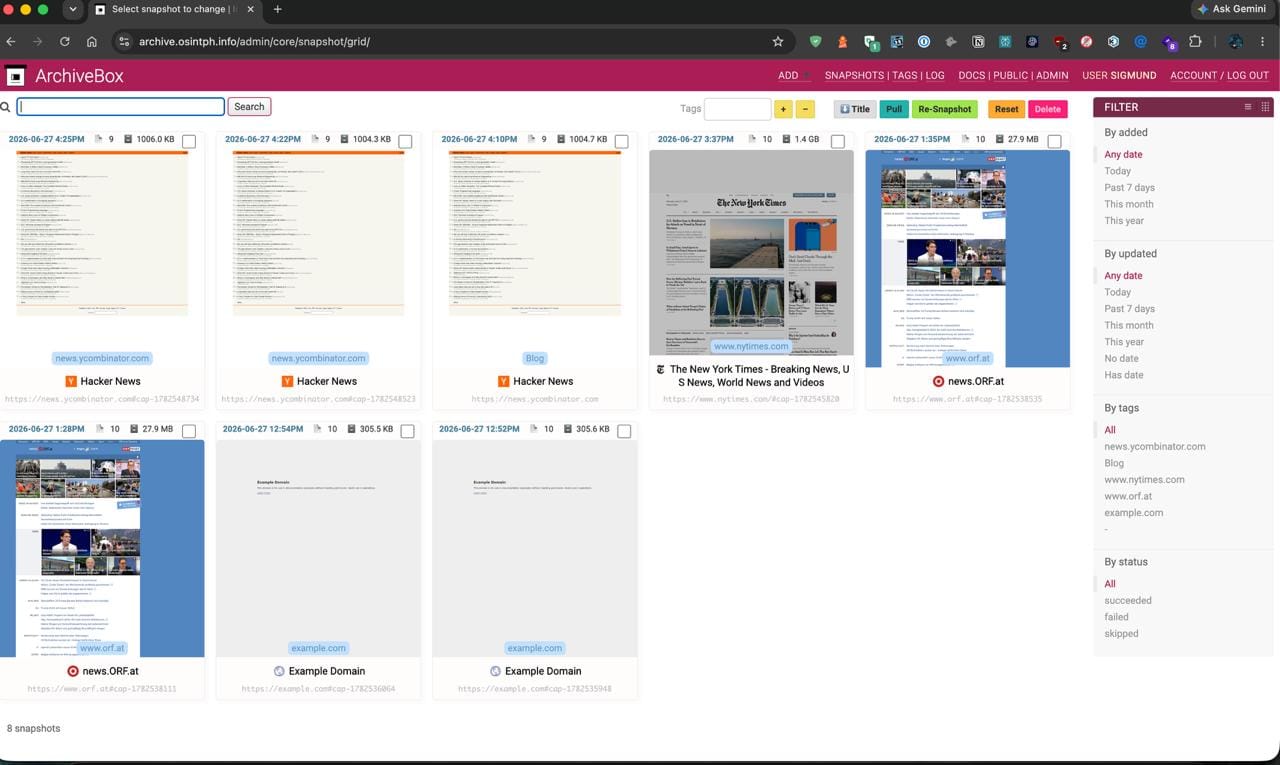
There is a second catch I want to flag up front so you do not waste an evening on it like I did. ArchiveBox 0.7.4 deduplicates by URL. If you naively pipe the same URL through the bridge ten times because Changedetection has flagged ten changes, you get exactly one snapshot, ever. There is an --update flag that nominally forces a re-archive, but it has a known bug (issue #1477) where it creates orphaned snapshot folders that never appear in the UI. Your disk fills up and your archive looks empty. The clean workaround is documented by the maintainer himself in issue #179: append a unique hash fragment to the URL. The browser never sends fragments to the server, so the captured page content is byte-identical to a clean capture, but ArchiveBox treats each #cap-<timestamp> as a different URL and creates a fresh snapshot folder for it. Each fire produces a new row in the admin UI. We then use the --tag flag to group them by base domain so you can filter to see all captures of a given site sorted chronologically. This is the entire versioning mechanism. It is two extra lines of shell.
The bridge
I use adnanh/webhook, a small Go binary purpose-built for this. Config is YAML, security is bearer-token based, the binary has been stable for years and currently sits at 2.8.2. The bridge runs as its own container on a shared internal docker network that both Changedetection and the bridge can see. ArchiveBox does not need to be on that network at all, because the bridge talks to ArchiveBox via the docker socket, not over HTTP.
A note on the security tradeoff: the bridge container mounts /var/run/docker.sock so it can docker exec into the ArchiveBox container. This effectively gives the bridge root-on-host privileges. I accept that risk because the bridge is internal-only (no public exposure), executes exactly one shell script, and the script only accepts http:// and https:// URLs and only ever invokes archivebox add. If you are not comfortable with that, the polling alternative further down the post is your fallback.
Setup
Create a new compose project at /opt/archive-bridge/ so it has an independent lifecycle from both ArchiveBox and the search/watch stack.
The Dockerfile pulls the webhook binary into an image that also has the docker CLI:
FROM docker:27-cli
RUN apk add --no-cache ca-certificates wget && \
    wget -O /tmp/webhook.tar.gz \
      https://github.com/adnanh/webhook/releases/download/2.8.2/webhook-linux-amd64.tar.gz && \
    tar -xzf /tmp/webhook.tar.gz -C /tmp && \
    mv /tmp/webhook-linux-amd64/webhook /usr/local/bin/webhook && \
    chmod +x /usr/local/bin/webhook && \
    rm -rf /tmp/webhook* /tmp/webhook-linux-amd64
ENTRYPOINT ["/usr/local/bin/webhook"]
The shell script the webhook executes, with the hash-fragment versioning baked in:
archive.sh
#!/bin/sh
# Capture a URL with ArchiveBox 0.7.4. Appends a unique hash fragment per
# fire so each Changedetection trigger produces a new snapshot. The hash
# is never sent to the server (browser-side anchor), so the captured page
# content is identical to a clean capture. Documented workaround from
# https://github.com/ArchiveBox/ArchiveBox/issues/179
set -eu

URL="${1:-}"
case "$URL" in
  http://*|https://*) ;;
  *)
    echo "[$(date -u +%FT%TZ)] rejected invalid url: $URL" >&2
    exit 1
    ;;
esac

# Serialize captures so two concurrent fires don't fight for Chromium
LOCK=/tmp/archive.lock
exec 9>"$LOCK"
if ! flock -n 9; then
  echo "[$(date -u +%FT%TZ)] another capture in progress, refusing concurrent" >&2
  exit 0
fi

TS=$(date +%s)

# Strip any existing hash fragment, then extract host for the tag
URL_CLEAN="${URL%%#*}"
HOST=$(echo "$URL_CLEAN" | sed -E 's|^https?://||; s|/.*$||; s|:.*$||')

# Unique URL per fire: the fragment is a browser-side anchor, not sent to
# the origin, so the captured content is identical to a clean capture, but
# ArchiveBox treats it as a new URL and creates a new snapshot folder.
UNIQUE_URL="${URL_CLEAN}#cap-${TS}"

echo "[$(date -u +%FT%TZ)] archiving: $UNIQUE_URL (tag: $HOST)"

docker exec --user=archivebox archivebox \
  archivebox add --tag="$HOST" "$UNIQUE_URL"

echo "[$(date -u +%FT%TZ)] done: $UNIQUE_URL"
What this does, line by line. It validates that the URL starts with http:// or https:// and rejects anything else, so a malformed payload cannot inject shell commands. It takes a flock so two simultaneous Changedetection fires do not both try to spin up Chromium and thrash the box. It strips any hash fragment the caller may have already supplied (defensive), extracts the bare hostname as the tag, and appends a fresh #cap-<unix-timestamp> fragment to the URL. Then it calls archivebox add with the unique URL and the host tag.
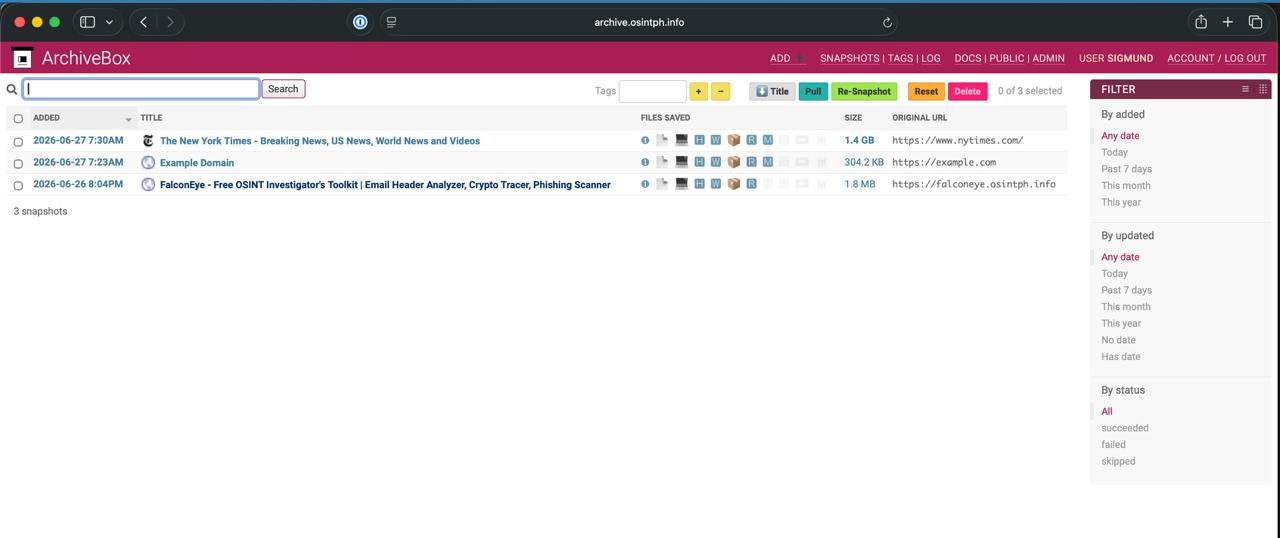
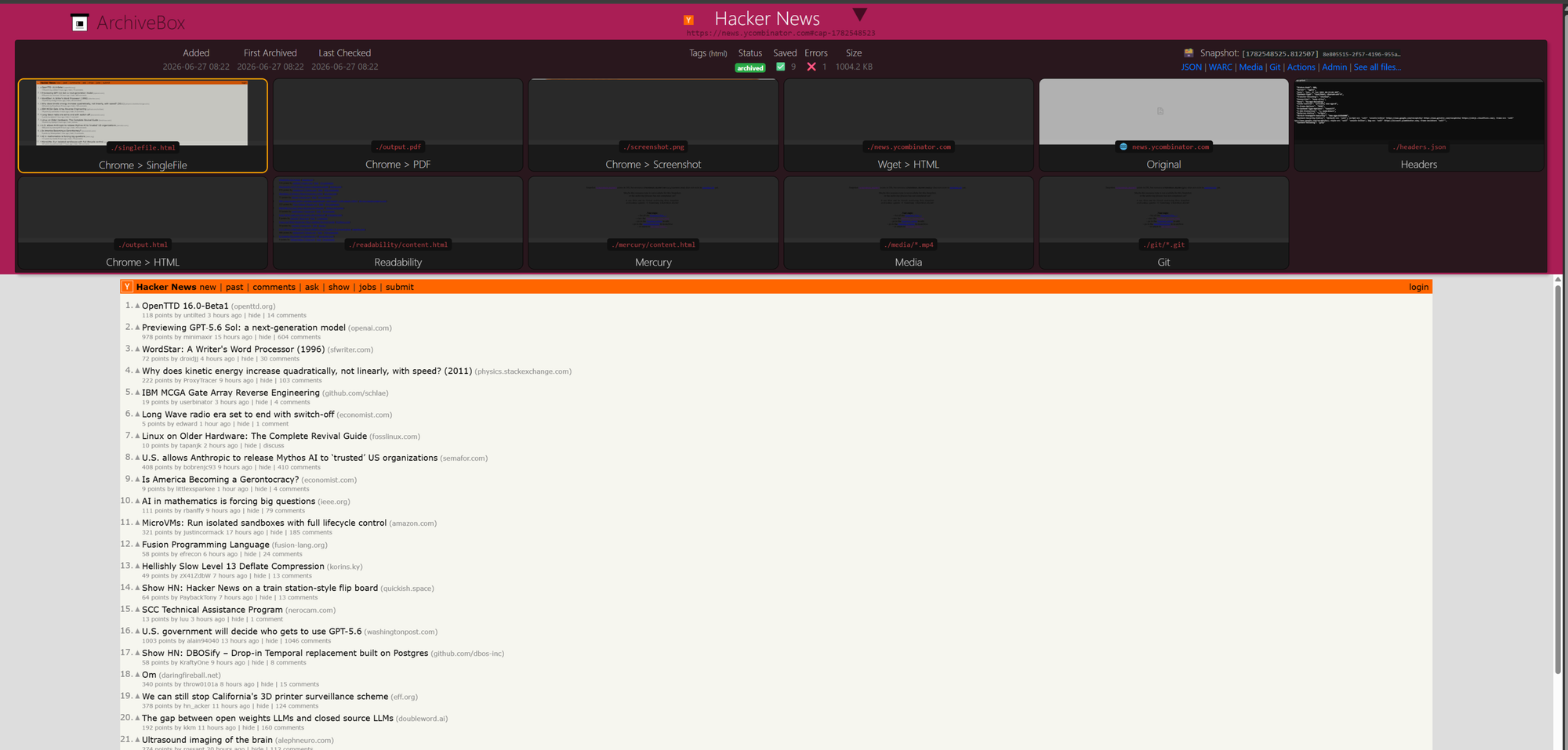
The result: every fire produces a fresh snapshot folder. The admin UI shows them as separate rows, each with its own timestamp, screenshot, PDF, WARC, and singlefile output. The URL column displays the hash-tagged version (https://nytimes.com#cap-1782525372) so each is uniquely identifiable. The tag column shows the bare hostname, and clicking the tag in the filter sidebar gives you a chronological list of every capture of that site.
The hooks config (token redacted; generate yours with openssl rand -hex 32):
- id: archive
  execute-command: /scripts/archive.sh
  command-working-directory: /scripts
  response-message: "archive queued"
  include-command-output-in-response: false
  pass-arguments-to-command:
    - source: payload
      name: url
  trigger-rule:
    match:
      type: value
      value: "Bearer YOUR_TOKEN_HERE"
      parameter:
        source: header
        name: Authorization
Lock that file down to mode 600 since it contains the shared secret.
The compose file attaches the bridge to a shared external network called archive-bridge. You create the network with docker network create archive-bridge, then edit your existing Changedetection compose to also attach to it. Both containers can then resolve each other by name on the internal network. The bridge listens on port 9000 inside the network and is not exposed publicly.
Configuring Changedetection
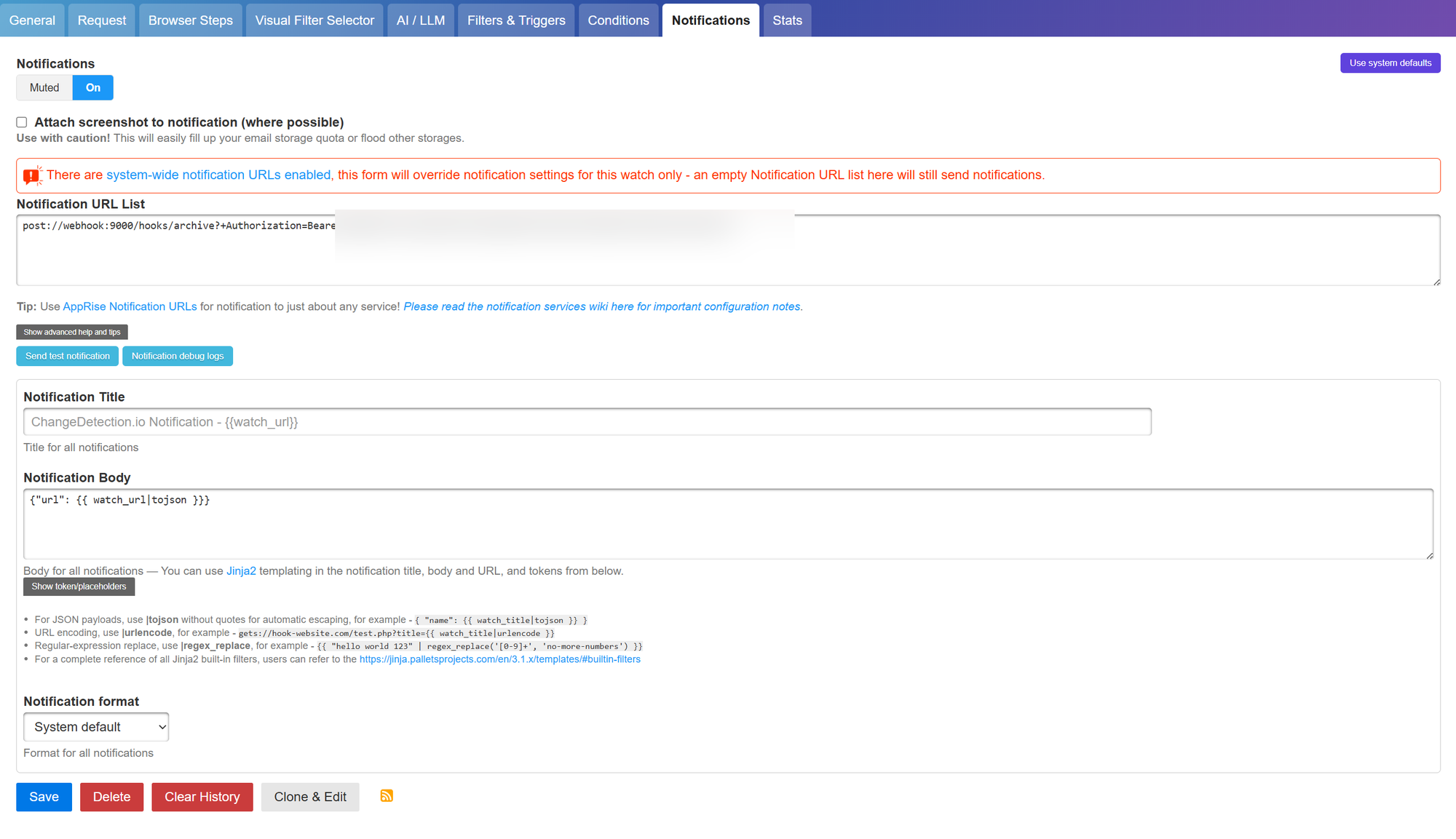
In the Changedetection UI, open the watch you want auto-archived, switch to the Notifications tab, and flip the toggle from Muted to On. (Per-watch configuration is the right choice here. You do not want every change of every watch firing into the archive. Some watches are noisy by design and would just create churn.)
Notification URL:
post://webhook:9000/hooks/archive?+Authorization=Bearer%20YOUR_TOKEN_HERE
That post:// scheme is Apprise's generic HTTP POST notifier. The + prefix on Authorization tells Apprise to send it as a real HTTP header rather than a query parameter. The %20 is the URL-encoded space between "Bearer" and the token.
Notification Body:
{"url": {{ watch_url|tojson }}}
The |tojson filter is critical. It safely escapes the URL even if it contains quotes or special characters. Changedetection auto-detects valid JSON and sets Content-Type: application/json for you.
Notification format: Text
Save and hit Send test notification.
Change Detection:

ArchiveBox Started the snapshot:

Snapshot Completed:
The gotcha that will catch you
The first test will probably fail with this error in the notification debug logs:
Notification target 'http://webhook:9000/hooks/archive' is a private/reserved
address or contains a parser-differential payload. Set
ALLOW_IANA_RESTRICTED_ADDRESSES=true to allow.
Apprise blocks notifications to private and reserved IP ranges by default as an SSRF protection. Reasonable default for a tool that ships to thousands of users, annoying when your entire deployment is intentionally internal.
Fix is one environment variable on the Changedetection container. Add to its compose file under environment::
- ALLOW_IANA_RESTRICTED_ADDRESSES=true
Recreate the container, retry the test. Green.
Note: this disables Apprise's SSRF protection globally for the Changedetection instance, not just for this one webhook target. Acceptable if you control all the notification URLs configured in your Changedetection (which on a self-hosted personal instance you do). Be aware of what you traded.
What it looks like working
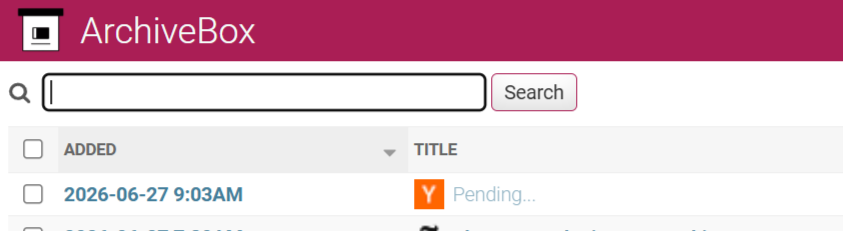
Once the test fires green, your next real detected change will auto-archive. Watch the ArchiveBox UI: a new snapshot row appears within seconds of the Changedetection notification, with "Pending..." in the title. A minute or two later, the title resolves to the page's actual <title>, the file icons populate with screenshots and PDF and SingleFile and WARC, and you have a real evidence-grade capture of the page state that triggered the change.

The workflow this unlocks: any time you want a page automatically preserved at every change, you add it to Changedetection with notifications on. Any time you want a page archived once for citation, you add it manually through the ArchiveBox UI. Selective, push-based, no polling lag, no rate limiting, no API token rotation. The bridge has run for me without intervention since I built it.
The fallback: polling
If you genuinely cannot accept the docker-socket security tradeoff in the bridge, there is a polling fallback. Changedetection can export an RSS feed of changes. ArchiveBox has a built-in scheduler. Point one at the other:
docker compose exec archivebox archivebox schedule \
  --every=15min --depth=0 \
  https://watch.osintph.info/rss?tag=archive-me
Tag any watch you want auto-archived with archive-me in Changedetection. The scheduler pulls the RSS every 15 minutes. Lossier (up to 15-minute lag between change detection and capture, and the RSS will contain stale entries between polls) but no docker socket exposure. You also lose the hash-fragment versioning trick because the scheduler does not let you rewrite the URL before submission, so you are back to one-snapshot-per-URL.
I run the bridge. Polling is the backup plan.
Saksi: the next evolution
The bridge gets you to push-based archiving. What it does not give you is chain of custody. Each WARC ArchiveBox produces is internally well-formed, but there is no cryptographic signature linking the WARC to the time it was captured, no manifest tying multiple captures of the same URL into a single forensic timeline, no signed timestamp from a third-party authority.
I am building Saksi (working name, Filipino for "witness") to add that layer on top. Each archived URL gets a SHA-256 of the resulting WARC, a JSON manifest with capture metadata, and an optional RFC 3161 signed timestamp from a free timestamp authority. The output is a single tarball per snapshot that can be handed to opposing counsel and verified independently of the ArchiveBox instance that produced it. Release will follow on the OSINT-PH GitHub portfolio.
What You Should Do Today
If you do nothing else after reading this post, do these three things:
Pick one open investigation and start archiving the URLs you have already touched. Even retroactively. Now is always better than later. Pages disappear without warning.
Set up a citation rule for yourself. Before you cite a URL in any document, run it through your ArchiveBox first. Make it muscle memory.
Stop trusting the Wayback Machine as a primary source. Use it as a secondary, treat it as best-effort. Your own archive is the source of record.
The Internet Archive is a public good. It is also a third party operating in a legal and political environment you do not control. For your evidence work, you need both: their broad coverage as a fallback, and your own narrow, deep, controlled archive as the primary.
ArchiveBox is the simplest tool that gets you there. It has flaws, the release cadence in particular, but the underlying capture engine is solid, the output formats are durable, and the data is yours. Self-host it, put it behind Cloudflare Access, wire up the hash-fragment bridge, and start treating link rot as the threat it actually is.
Credits where due: this entire stack pattern follows the philosophy articulated by Michael Bazzell of IntelTechniques, who has been pushing self-hosted OSINT infrastructure long before it was trendy. His principle that "if you do not own the tool, you do not own the workflow" is the backbone of everything in this series. If you have not read his work, start there.
Companion code (Saksi) and a longer post on chain-of-custody for OSINT evidence preservation are in progress. Subscribe to the newsletter if you want them in your inbox.
Reach out if you have questions or comments or what to collaborate
Session ID: 059db238ab37c3d92615c5cc24b694da29c598cc13e27886053722404118e14271