FalconEye: An investigator's toolkit for the open web

There is a moment every OSINT investigator recognizes. You are deep into a case. You have eleven browser tabs open. One is crt.sh hanging on a 502. Another is a wallet explorer. Three are Cloudflare worker dashboards. One is a half-loaded URLhaus page. The pivot you need to make involves copying a value from tab seven into tab nine, then back to tab three to verify, then tab eleven to log the finding.
This is normal. This is how the work gets done.
It is also wasteful in a way that compounds over months. The pivots are predictable. The data sources are public. The same queries get re-run on the same indicators by the same investigator three weeks apart because nothing remembers what happened last time.
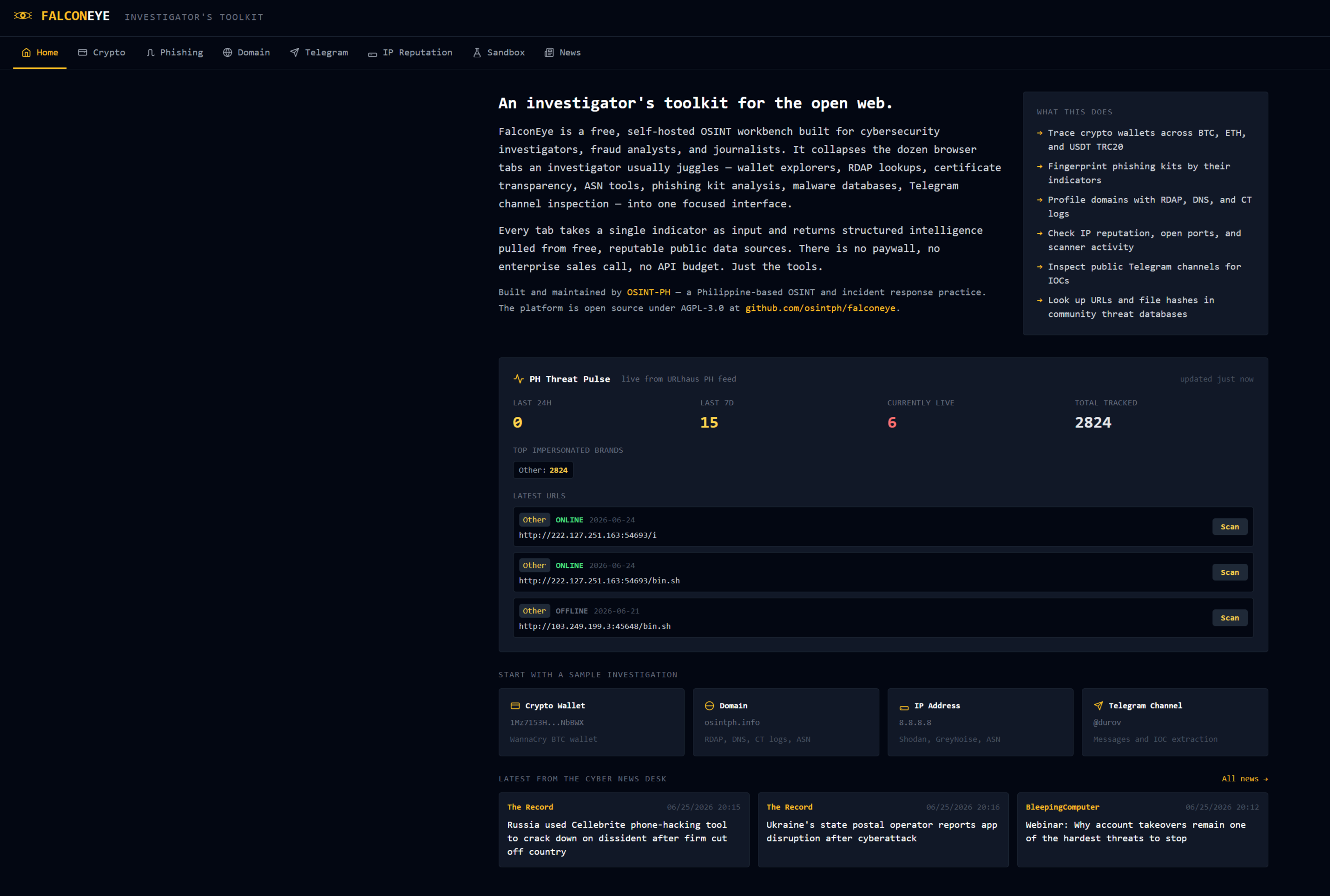
FalconEye is what I built to stop doing this. It is a self-hosted OSINT workbench that collapses the eight or nine tools an investigator opens during a typical pivot into one focused interface, with shared caching across modules and a UI that lets you chain investigations in single clicks. It is live at falconeye.osintph.info, open source under AGPL-3.0 at github.com/osintph/falconeye, and free to deploy on any Ubuntu Box.
There will be more tools, also keep in mind, this is all working without API or with fully free API's.
Sharing the fully functional tool for everybody here.

 osintph
This post is a walkthrough of what it does, why each design decision was made, and the failures along the way. If you want to use it, the live instance works without setup. If you want to run your own copy, the repo has a provisioning script.
What it does in one paragraph
You paste an indicator. FalconEye fans out queries to the relevant public data sources in parallel, normalizes the responses, caches the result, and renders a structured intelligence card. Crypto wallets get a transaction graph and counterparty analysis. Domains get RDAP, DNS, certificate transparency, and ASN attribution. IPs get GreyNoise classification, Shodan ports and vulnerabilities, and abuse history. Telegram channels get message extraction with automatic IOC parsing. URLs and file hashes get checked against URLhaus and MalwareBazaar. Every indicator that surfaces in one tab has a one-click pivot to whichever tab can investigate it further.
That is the whole pitch. The rest of this post is the details.
The eight tabs and why each exists
Home
The landing tab. About the platform, what it can do, a live "PH Threat Pulse" widget pulling from URLhaus's country feed, an examples grid that demonstrates each tab with a single click, and the three most recent global cyber news headlines.
I built this last, after using the platform myself for a few weeks. The first iteration had Crypto as the default landing tab. Visitors saw a single input box floating in a void. Nobody knew what FalconEye was unless they read the small subtitle text. The Home tab fixes that.
Crypto Investigation Workbench
Paste a Bitcoin, Ethereum, or USDT TRC20 address. Get a transaction summary, counterparty list, and a force-directed transaction graph rendered with D3.js. Data sources:
- BTC: blockstream.info (no API key, no rate limit signaled)
- ETH: BlockCypher (200 requests per hour free)
- USDT TRC20: TronGrid (no key, generous limits)
I originally tried Blockchair for a unified API across all three. It failed within a week -- endpoints changed, rate limits tightened, an error response that was previously documented as JSON started returning HTML. I rewrote the module to use three native explorers in parallel. The code is more verbose. It has not broken in months.
The transaction graph is restricted to the most recent 100 transactions per address by default. Anything more and the D3 force simulation chokes on the client. If you need historical depth, the underlying explorer links are exposed in the summary card.
Phishing Kit Scanner
Paste a URL. FalconEye fetches it through a validated proxy, fingerprints the HTML, and flags indicators of known phishing kit families. The detection rules cover:
- Telegram bot exfiltration patterns (bot tokens in the JavaScript, send-message endpoints)
- Cloned bank asset paths (Wells Fargo, Chase, HSBC, regional banks, and Philippine banks like BDO, BPI, GCash, Maya)
- OTP capture endpoints (specific form field naming conventions used by AnyDesk-style phishing kits)
- Known phishing kit framework markers (left in by lazy operators who never strip the kit's source comments)
Detections include a confidence score and the matched pattern. False positives happen, especially on legitimate banking sites that share asset paths. The output is "indicators matched," not "this is phishing," and the investigator decides.
Domain Intelligence
Paste a domain. Get RDAP, DNS records, certificate transparency timeline, subdomain enumeration from CT logs, and ASN attribution. The data flow:
- RDAP via rdap.org (the universal proxy that knows which TLD-specific RDAP server to query)
- DNS via
dnspythonresolving A, AAAA, MX, NS, TXT, CNAME, SOA records server-side - Certificate Transparency primary from crt.sh, fallback to SSLMate's Cert Spotter when crt.sh returns 502 (which it does several times a week -- their Postgres backend gets crushed during CT log spikes)
- ASN attribution via RIPEstat (no key, well-documented, never breaks)
The Cert Spotter fallback was added after the third time a user reported empty CT results during a crt.sh outage. The honest UX shows which source the certificates came from. If both fail, the card says "CT sources unavailable" rather than the misleading "no certificates found in CT logs."
CT log parsing also yields a subdomain list. The card shows everything that ever issued a certificate matching *.domain.com, sorted by first-seen date. This is one of the most useful capabilities for tracking actor infrastructure over time, and it works without paying for a passive DNS subscription.
Telegram Channel Inspector
Paste a public Telegram channel name or t.me/ link. FalconEye scrapes the public web preview at t.me/s/{channel}, extracts the last 20–50 visible messages, and parses IOCs from each message body. Aggregated output:
- URLs (with brand detection: GCash, Maya, BDO, BPI, Binance, USDT, Shopee, etc.)
- Crypto addresses (BTC, ETH, USDT TRC20)
- Email addresses
- Phone numbers (PH-formatted and international)
- Possible bank account numbers (numeric sequences 10–16 digits that are not phone numbers)
- Brand mentions across all messages
No Telegram API. No phone number. No bot token. The scrape uses a realistic browser User-Agent and is cached for six hours per channel to avoid rate-limiting.
Every extracted crypto address has a one-click pivot to the Crypto Workbench. Every extracted URL pivots to the Phishing Scanner. This is the most-used pivot path in active investigations: a phishing kit's bot token leads to a channel, the channel inspector extracts the operator's wallets and victim URLs, and within four clicks the investigator has the wallet's transaction history.
IP Reputation
Paste an IPv4 or IPv6 address. Get geolocation, ASN, reverse DNS, open ports, CVEs, scanner activity classification, and URLhaus history. Data sources:
- Shodan InternetDB (free, no key, weekly refresh) for ports, CPEs, hostnames, tags, and known CVEs
- Shodan CVEDB (free, no key) for CVSS, EPSS, and CISA KEV enrichment on each CVE
- GreyNoise Community API (free with Community key) for scanner activity classification (malicious / benign / unknown) and RIOT data
- RIPEstat for ASN and prefix data
- URLhaus for historical malicious URL associations on the host
- System DNS for reverse PTR lookups
The CVE enrichment is the value-add here. Shodan InternetDB tells you an IP has CVE-2023-46604 open. Shodan CVEDB then tells you that CVE has a CVSS of 10.0, an EPSS score of 97 percent, and is on the CISA KEV catalog. That changes the urgency of the finding immediately. Without enrichment a CVE list is just trivia.
File & URL Sandbox History
Paste a SHA256, SHA1, MD5 hash, or a URL. Get matches against URLhaus and MalwareBazaar. For URLs you get distribution history, associated payloads, threat classification, and blocklist status. For hashes you get filename, file type, signature, YARA rule hits, and download counts from the MalwareBazaar community.
Both sources are operated by abuse.ch and share a single free API key. The detection layer (Phishing Scanner) handles passive content fingerprinting. The Sandbox tab handles community threat intelligence. Use both for a complete picture.
Cyber News
RSS-aggregated headlines from the major global cybersecurity sources (Bleeping Computer, The Hacker News, Krebs on Security, Dark Reading, The Record by Recorded Future, Security Week), Philippine cyber and tech outlets (Rappler, Inquirer, Philstar, GMA, Manila Times -- server-side keyword-filtered to surface only cyber-relevant stories), and a few regional sources. Refreshed every 30 minutes. Stored in SQLite with the article fingerprint as the dedupe key so the same story across multiple feeds is consolidated.
This is the simplest tab. It is also the one I use most often during morning triage. Having seven feeds rendered as a clean list takes less screen real estate than seven browser bookmarks and surfaces stories I would otherwise miss.
The pivot mesh
The platform's distinguishing feature is not any individual tab. It is the chain of pivots between them.
Open the Phishing Scanner. Scan a URL. The result shows a Telegram bot token in the exfiltration code. Click the token. You land on the Telegram Inspector with the channel pre-populated and the message history extracted. The channel's recent posts include three BTC addresses and four phishing URLs. Click any BTC address. You land on the Crypto Workbench with the wallet investigation already running. The wallet's transaction graph shows a 6 BTC transfer to a known exchange deposit address from your previous investigation.
This is six tabs and four clicks. The equivalent in a generic browser workflow is somewhere between 20 and 40 minutes of copy-paste between disparate websites.
Every IOC type that appears in any tab has a destination tab. URLs go to the Phishing Scanner. IPs go to IP Reputation. Hashes and URLs go to Sandbox. Crypto addresses go to the Crypto Workbench. Domains go to Domain Intelligence. Telegram channels go to the Telegram Inspector. The platform's job is to keep the investigator's attention on the case, not on the tooling.
The stack
The choices were boring on purpose. Every component is something I can debug at 2am without reaching for documentation.
- FastAPI + Uvicorn + Gunicorn with three async workers behind nginx
- SQLite with WAL mode as the cache database (no Postgres, no Redis, no Docker -- one process, one file)
- Tailwind CSS via CDN for styling (no build step, no PostCSS pipeline)
- Vanilla JavaScript for the frontend (no React, no Vue, no bundler)
- D3.js for the transaction graph (the only frontend library that pulls its weight)
- nginx with Cloudflare Origin Certificates for TLS termination
- Cloudflare in front for caching, WAF, and DDoS protection
- Ubuntu 24.04 on a 4 vCPU / 8 GB OVH VPS
The whole platform fits in a single Git repository. No microservices. No message queues. The cache is a single SQLite file. The deployment is one git pull and a systemctl restart. Total cold-start latency from clean Ubuntu install to live FalconEye instance is under four minutes if you run the provisioning script.
Could it be faster, more scalable, more elegant? Yes. Does it need to be? Not at this volume. The platform handles every investigator pivot I throw at it in under three seconds end-to-end. When that stops being true, I will refactor. Until then, the boring stack pays compounding dividends in time-not-spent-on-yak-shaving.
What I built and threw away
Two earlier versions of FalconEye exist in the Git history. Both are dead. Both taught me something.
Version 1 was a phishing-lure tracker scoped to the Philippines. It scraped a handful of malware feeds, joined them against a brand-detection rule set, and emitted alerts. It worked. It also accumulated 40,000 detections in three weeks with no UI for triaging them, so the data was useless. The lesson: a feed without a workbench is just noise.
Version 2 was an automated ingest pipeline that pulled the URLhaus and OpenPhish feeds on a cron and stored everything in PostgreSQL. The investigation UI was bolted on as an afterthought. It returned empty results constantly because the ingest worker silently failed on malformed CSV rows and nobody noticed. The lesson: build the investigator interface first, add ingest later, never let the database eat errors silently.
Version 3 (the current platform) inverts everything. There is no background ingest. There are no cron jobs aggregating intelligence in the dark. Every query is fired in response to an investigator paste, cached for 6 to 60 minutes depending on the source, and aged out when stale. The platform is fast because it does almost nothing in the background. The data is fresh because it is fetched at query time.
This architecture is heretical to the threat intelligence industry's "ingest everything, query the warehouse" gospel. It is also the right design for an investigator's tool, where the value is in the chase, not in the warehouse.
Where it breaks
Three failure modes I have hit running this in production:
crt.sh outages. The single most fragile dependency. Their Postgres backend gets overwhelmed roughly weekly. The Cert Spotter fallback covers most cases but is less complete. When both are down, the Domain Intel tab honestly tells you so. There is no workaround. CT log infrastructure is a public good with no SLA.
Telegram rate-limiting. If you scrape t.me/s/{channel} too aggressively from a single IP, Telegram serves you a Cloudflare challenge. The cache is set to 6 hours per channel to stay well under the threshold. In months of operation I have not been blocked once.
URLhaus 403s on rapid lookups. The IP Reputation and Sandbox tabs both hit URLhaus. Hitting it 20 times in a minute will earn you a 403. The cache absorbs almost all of this in normal operation. If you do trigger a 403, the card honestly tells you which source failed.
All three failures are graceful degradations rather than crashes. The platform never hard-fails on a partial result. The card shows what it has, says what it could not get, and the investigator decides what to do next.
Honest limitations
FalconEye is not:
- A SIEM. It does not ingest your logs. It does not correlate events. It is read-only intelligence on indicators you provide.
- A passive DNS service. CT log subdomain enumeration is useful but is not a substitute for SecurityTrails or DomainTools at the upper end.
- A real-time threat feed. The Cyber News tab is a 30-minute-refresh RSS aggregator, not a streaming intelligence platform.
- An attribution platform. It surfaces indicators. It does not draw conclusions about who is behind them.
- Production-grade for high-volume use. SQLite on a 4-vCPU VPS handles single-investigator workloads cleanly. If you put a team of 20 on it, the architecture will start to creak.
If any of those gaps matter to your work, FalconEye is a complement to your existing tools, not a replacement.
Try it
The live instance at falconeye.osintph.info is free, no signup, no API key, no tracking beyond standard nginx access logs. The Home tab has four sample IOCs you can click to see the platform work end-to-end without typing anything.
If you want your own copy, the repo is at github.com/osintph/falconeye. It is AGPL-3.0 licensed – fork it, modify it, deploy it, run it for your team. The only thing AGPL asks is that if you make it a hosted service for others, you publish your modifications back. Internal use has no obligations.
osintph
The provisioning script in scripts/provision.sh handles a clean Ubuntu 24.04 deploy. Two free API keys are needed (GreyNoise Community and abuse.ch's unified Auth-Key -- both take 60 seconds to register, both have unlimited free fair-use quotas). Beyond that, no costs.
Pull requests welcome. If you build a new tab -- a username OSINT module, an ASN profile, a passive DNS integration -- I will review and merge useful ones. The architecture is intentionally modular: each tab is a single router file in app/routers/ plus a section in index.html and app.js. Adding a new module is a couple of hours of work, not a rewrite.
This is the tool I wanted to exist. It exists now. Use it.
FalconEye is built and maintained as part of OSINT-PH, an OSINT and incident response practice. Follow the blog for case studies, technical writeups, and new tool releases.


Reach out if you have questions or comments or what to collaborate
Session ID: 059db238ab37c3d92615c5cc24b694da29c598cc13e27886053722404118e14271