CSI Linux 2026 and the New Case Management System: A Practitioner Walkthrough

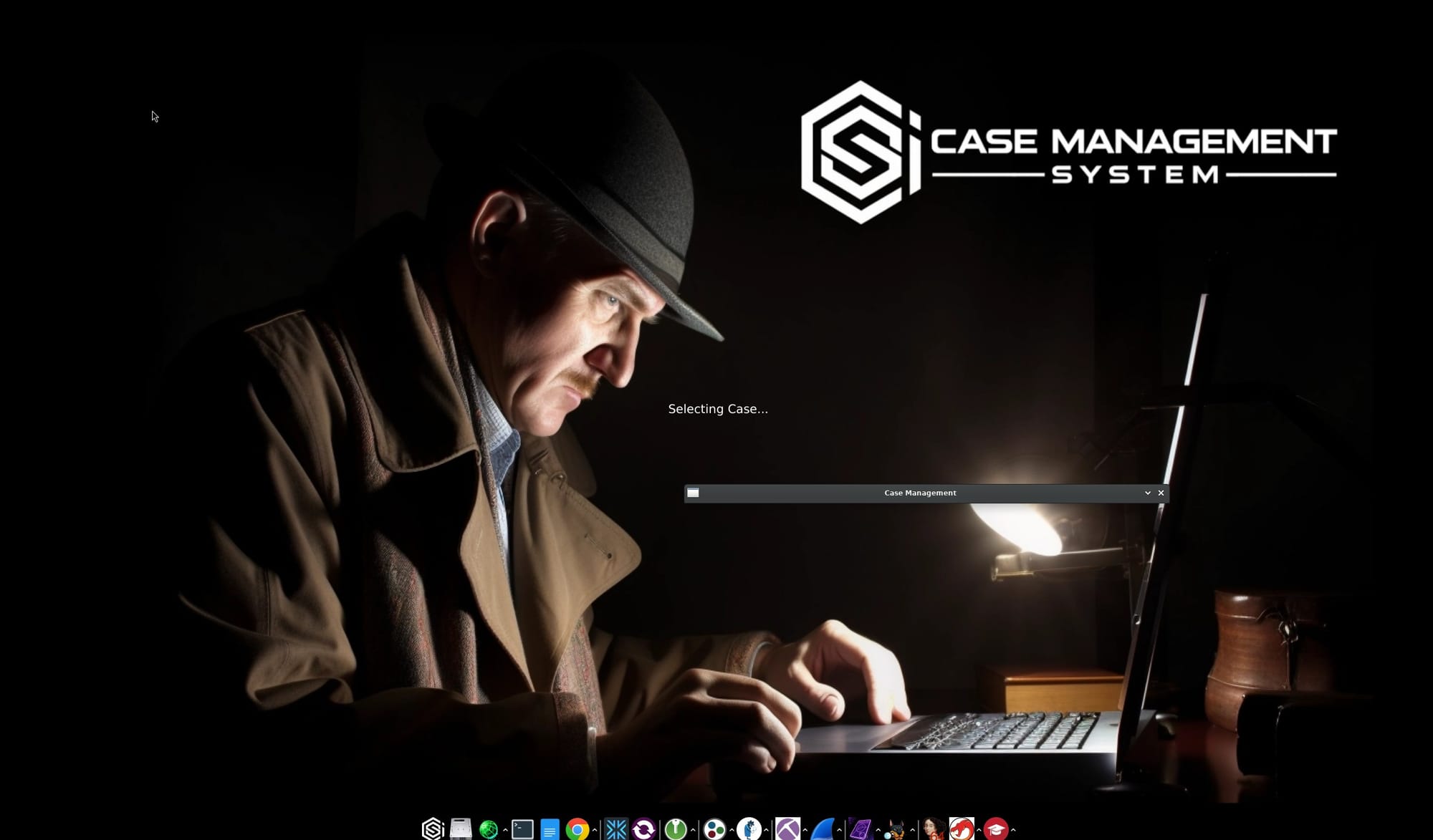
CSI Linux has been around long enough that most working investigators have either tried it, dismissed it, or quietly kept it on a spare VM for the few tools that are easier to run there than to install yourself. The 2026 release changes the calculus. The headline is not new tooling. It is the rebuilt Case Management System, now branded CSI-CMS, which has been promoted from "a folder with some templates" to the actual operational layer of the platform. I mean it. It is AWESOME!
This walkthrough is for OSINT and DFIR practitioners who already know what the platform is and want a straight read on whether the 2026 CMS is worth adopting. I am running CSI Linux 2026.4 as a VirtualBox appliance, and the screenshots below are from a demo case I spun up to test the workflow end to end.
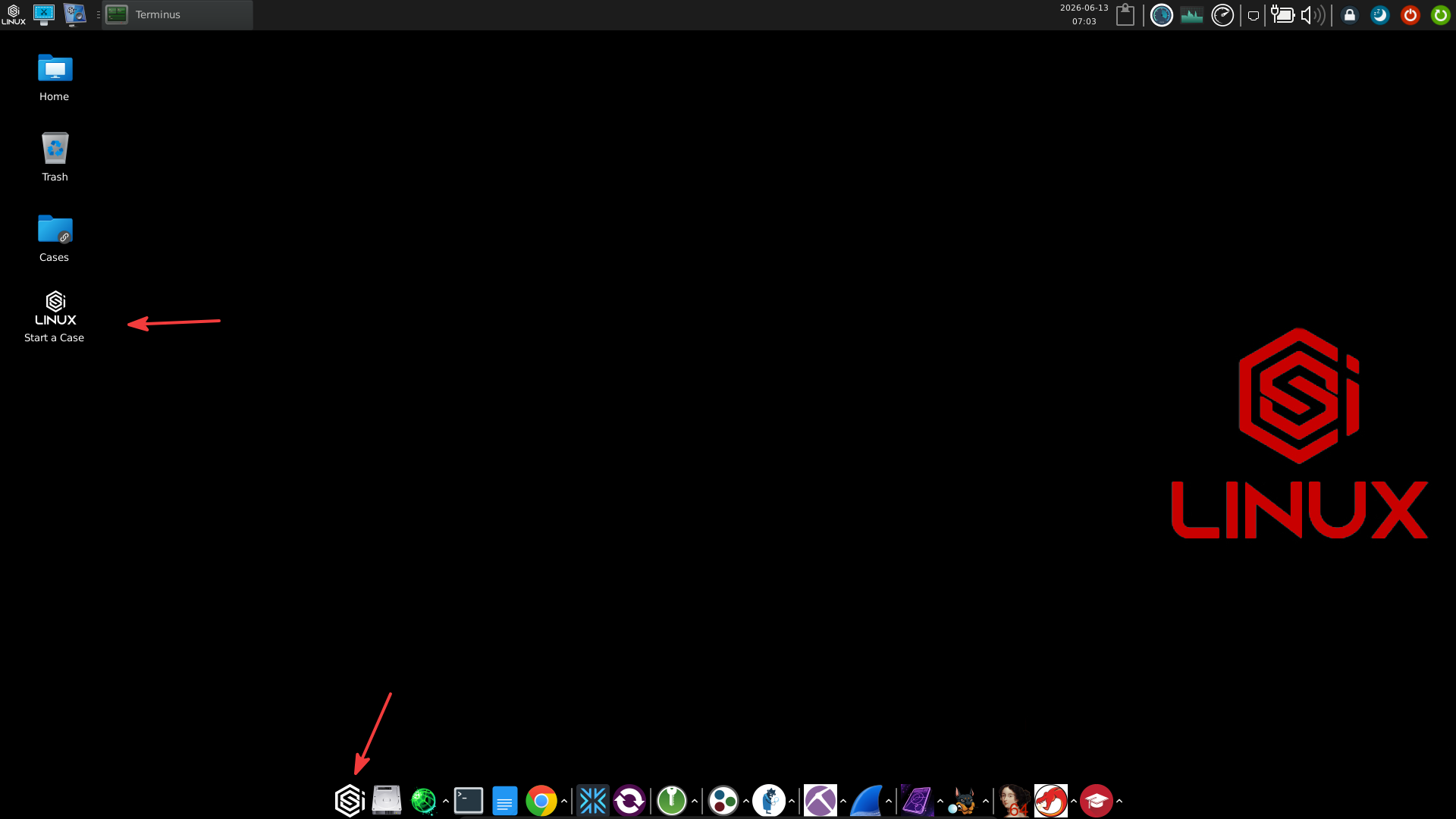
What actually changed in 2026
The platform itself is still Ubuntu LTS underneath, still XFCE on top, still updated through the powerup script. The visible difference is that case management is no longer a thin wrapper that creates a ~/Cases/<name> directory and a caseinfo.txt. The 2026 CMS is a structured case object with typed workflows, artifact registration, an internal evidence model, and report rendering in both JSON and HTML.
The bootable image is now flagged as legacy on the downloads page, with the virtual appliance treated as the supported delivery format. VirtualBox is the default selection and the one I would recommend. A VMware build is also offered, along with the legacy bootable Triage Drive (a DD-format forensic copy, not an ISO) and a separate set of Windows-based Triage Apps for on-host forensic work. The CSI SIEM appliance is listed there too, but that is a separate product and out of scope for this post. Minimum requirements for the main appliance are unchanged: 6+ GB RAM, 140+ GB disk, two cores, internet access.
If you already run an older CSI Linux instance, the platform's own recommendation is to download the 2026 appliance fresh rather than try to upgrade in place. Older cases under ~/Cases will not migrate cleanly into the new CMS data model, and you do not want a half-converted case in front of you the first time you need to produce a report.
In Jeremy Martin's own May 2026 operational briefing on the release, he frames the rebuild around five operational changes:
- Case-centered workflow. The investigation revolves around the case, not the tool.
- CSI-CMS as the hub. Notes, evidence, and reports live in one place.
- Standardised evidence organisation. Predictable, segmented paths replace ad-hoc folders.
- Reporting throughout. Findings are captured as the work happens, not reconstructed from memory at the end.
- Training aligned to practice. The Echothis Labs course updates focus on defensible methodology rather than isolated tool usage.
That last point tells you the priority. The platform is being positioned as the substrate for a working investigative methodology, not just as a Linux distribution that happens to ship a lot of tools.
Why this matters for OSINT practitioners
The old workflow was honest about what it was. You hit "Start a Case", chose a case type from a list, and the application created a directory tree with a few helper scripts and Word templates. Everything after that was on you. Browser captures, screenshots, Maltego graphs, Sherlock dumps, wallet lookups, all of it landed wherever you remembered to save it. The "case" was a discipline you imposed, not a thing the system enforced.
The 2026 CMS flips that. The case becomes a first-class object that owns the evidence, the artifacts, the timeline, and the report. Tools launched from inside an active case write their outputs back to the case automatically. You can still drop files in by hand, but the default path is automated capture with registered metadata.
For a working OSINT practitioner this is the difference between writing a report from a folder of screenshots and writing one from a structured set of artifacts that already has hashes, timestamps, and source attribution recorded.
Creating a case in the 2026 CMS
Launching the Case Management app the first time prompts you to accept the CSI-CMS Terms of Use. The notice is short and worth reading. The headline points are that the platform is intended for lawful and authorised use, that it does not pretend to implement age, identity, or regulatory verification on your behalf, and that you carry the responsibility for legal compliance in your jurisdiction. None of that is surprising for an investigative platform, but it is good to see it stated cleanly.
After accepting the notice, an Agency Wizard runs the first time (if data/agency_data.json is not already present) to set up the agency metadata that populates report headers and the case workspace sidebar. The fields cover unit name, address, contact details, and website. If you skip the wizard or leave the fields blank, every generated report will carry literal Your Unit / Your Address / Your City placeholders in the header, and the sidebar will show the same. You can revisit and change them at any time under Settings → Agency Data. Get this right before you generate your first report.
Past the legal screen, the launcher gives you four options: Unassigned/Intel, Start a New Case, Open an Existing Case, and Cancel.
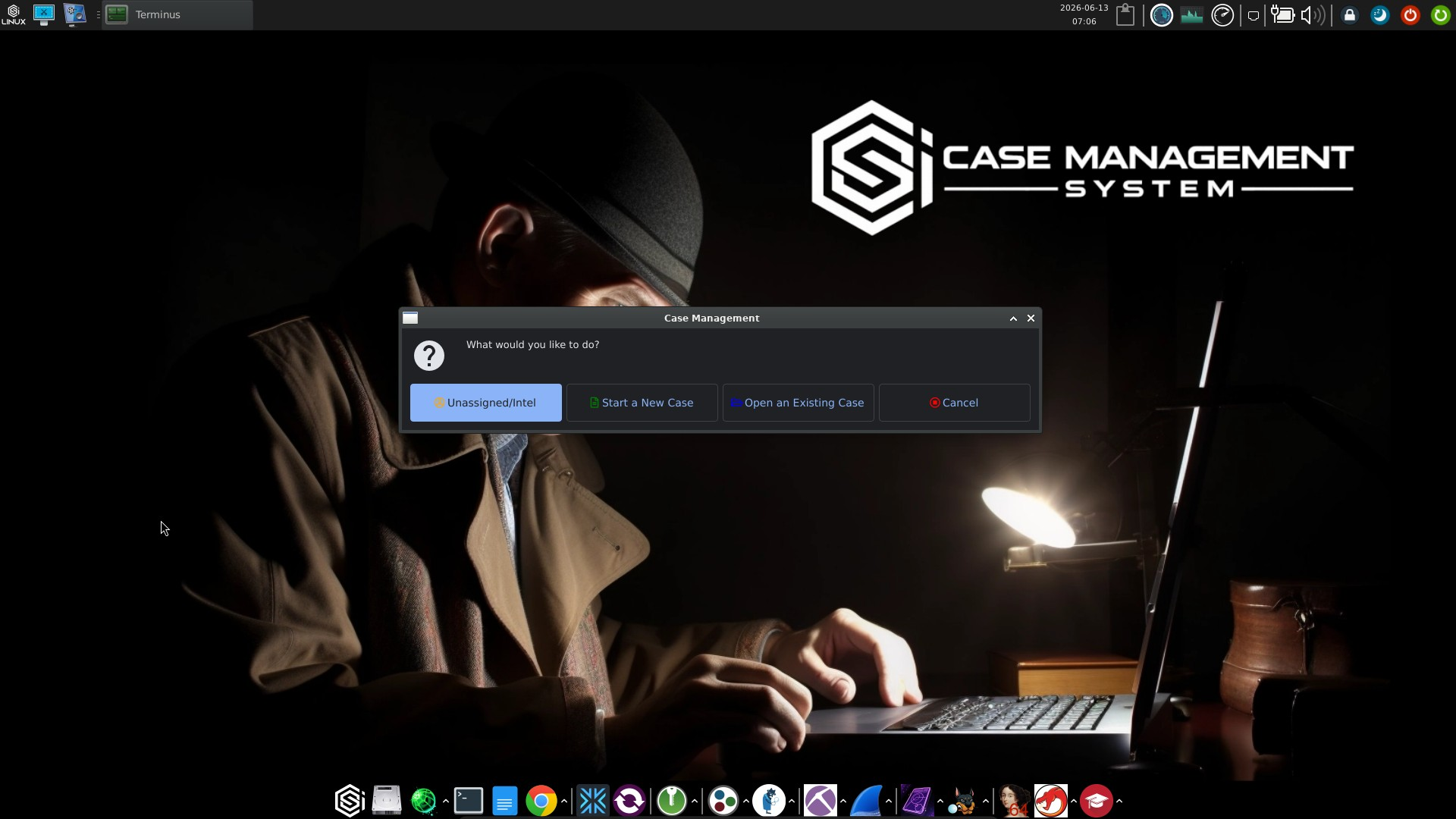
Unassigned/Intel is worth flagging early because the older versions did not have a clean equivalent. It is a working mode for general intelligence collection that is not yet tied to a specific case file. Anything you pull while in that mode lives in an unassigned bucket that you can promote into a case later. For OSINT practitioners who routinely chase leads before deciding whether they amount to a case, this is the right design.
Start a New Case opens a small dialog asking for four things: case name, investigator name, allegation (a free-text description of what the case is about), and the destination folder, which defaults to /home/csi/Cases. That is it. No investigation type picker, no template selection, no wizard steps.
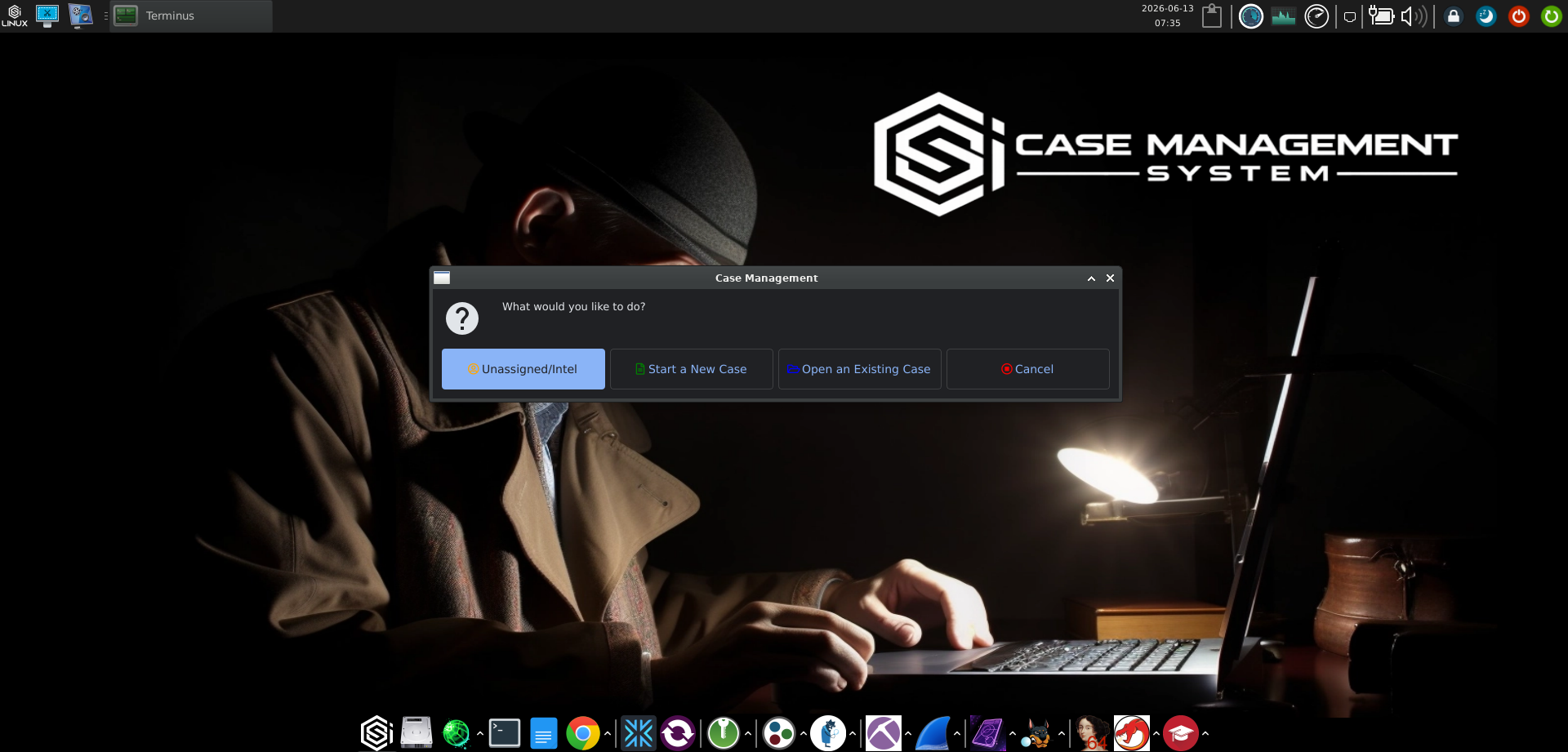
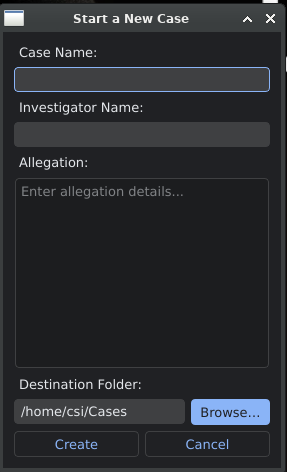
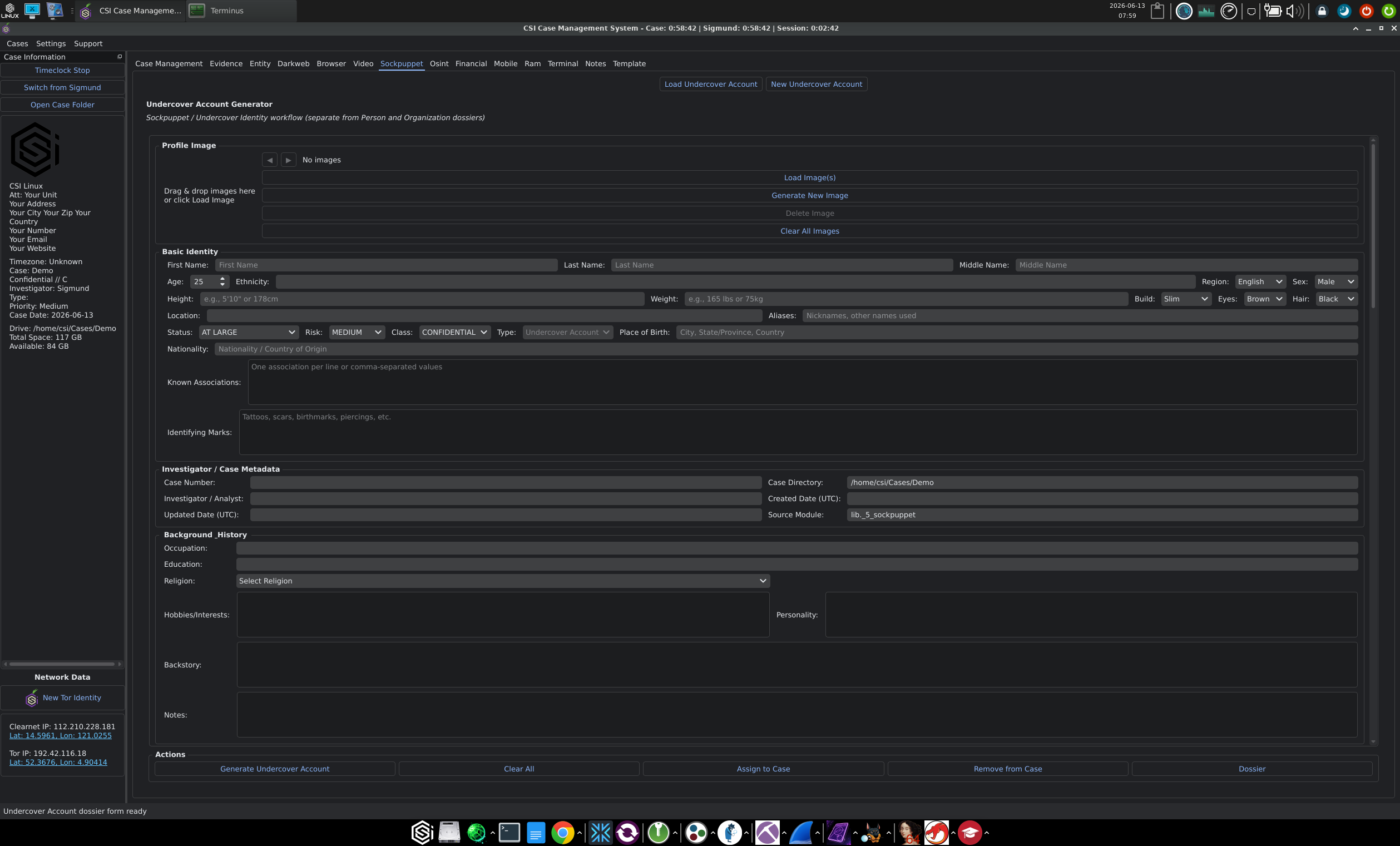
This is the architectural shift worth understanding. In the older CSI Linux releases, the case type chose your path at creation. In 2026, the case is a generic container and every investigative workflow lives as a tab inside the open case. A new case workspace exposes tabs for Case Management, Evidence, Entity, Darkweb, Browser, Video, Sockpuppet, OSINT, Financial, Mobile, RAM, Terminal, Notes, and Template, all bound to the same case object. You reach for the workflow the case needs, when the case needs it, without locking into a single path at the start.
The folder layout the CMS builds is consistent across cases. A new case lives at /home/csi/Cases/<CaseName>/ with an Evidence/ tree underneath that the integrated tools write into automatically. The IP intelligence flow I walk through later, for example, writes its outputs to /home/csi/Cases/<CaseName>/Evidence/Online/IP-Address/<address>/. Predictable paths are the small change that makes the report generator work.
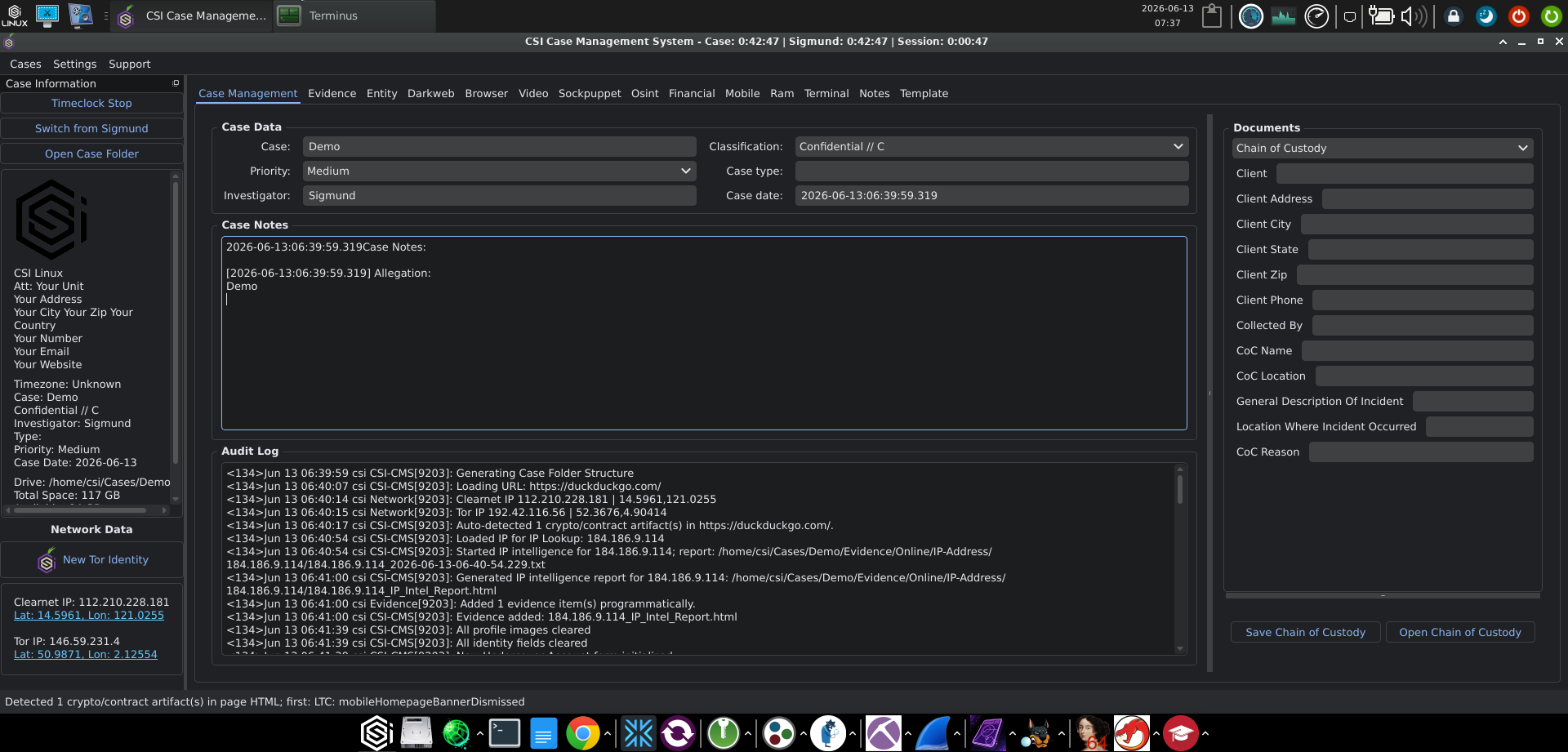
The case workspace
The case workspace is where most of the practical change shows up. The old version was a thin status pane wrapped around a directory tree. The 2026 workspace is a proper three-pane application.
The left rail is the Case Information panel. It carries the case metadata, the disk location and free space for the case folder, a Timeclock running three separate timers (the case clock, the active investigator's clock, and the current session), an investigator switcher for cases with more than one person on them, and a Network Data block showing your current Clearnet IP and Tor IP with coordinates next to each, plus a "New Tor Identity" button to rotate. Having the OPSEC indicators in your face on every tab is the right design choice for a platform that expects you to operate through Tor when the case calls for it.
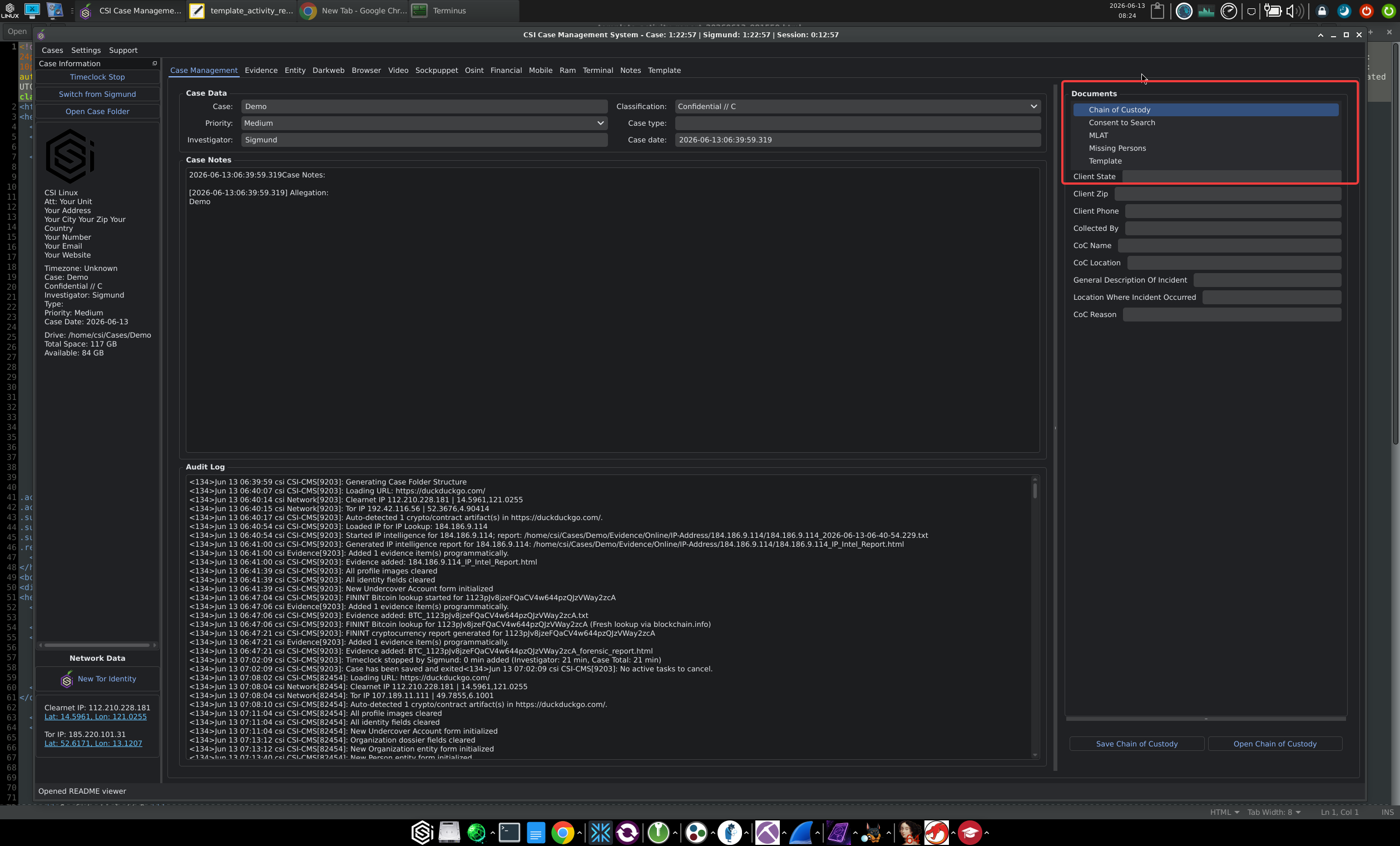
The centre pane is the active tab. The Case Management tab itself shows the case data (name, classification, priority, case type as an editable metadata tag, investigator, case date), the case notes section (each entry timestamped, with an Allegation field that pins the structured description of what the case is about), and an audit log section. The audit log is the part I want to call out specifically. It is not buried in a debug pane. It streams real syslog-format entries from the CSI-CMS process, with priority codes and PIDs intact, every time something happens in the case. Folder structure created, URL loaded, IP looked up, evidence added programmatically, identity fields cleared, Bitcoin lookup started against blockchain.info. You can watch the system record your actions in real time.
The right rail is the Documents panel. This is the case-level report generator (the per-artifact HTML Evidentiary Reports are produced by the individual workflow tabs, covered later). The template dropdown reads from data/doc-templates.json and offers templates such as Forensic Investigation Reports (the default), Chain of Custody, Missing Persons, and others, with Save and Open controls underneath. Selecting a template loads a dynamic form whose fields are auto-populated from the case data and the agency profile.
The distinction between evidence and artifacts is worth pausing on, because it is the same distinction every serious case management system makes and the old CSI Linux blurred. Evidence is the source material you have a right to possess and that you can defend in writing: an imaged drive, a captured page, a downloaded video, a transaction log. Artifacts are the things you produce from evidence during analysis: extracted indicators, link graphs, decoded payloads, timeline entries. The CMS now tracks both separately and stores hashes for each at the time of registration.
For OSINT work the evidence column fills up with WARC files, full-page captures, downloaded media, WHOIS and RDAP responses, archived JSON from API pulls, and similar. The artifact column fills up with the entities and indicators you derive from them.
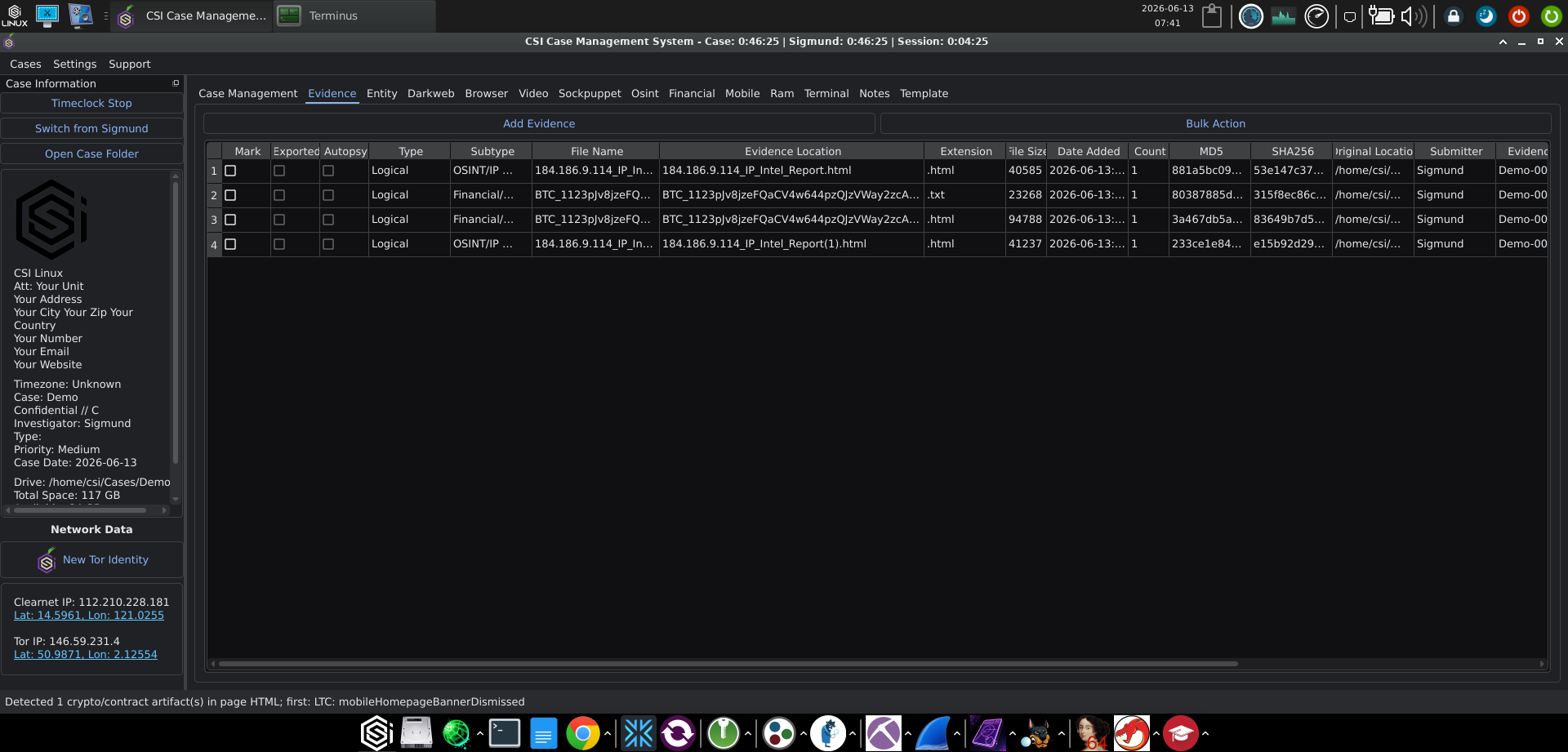
The Evidence tab is structured as a table with full columns for Mark, Exported, Autopsy, Type, Subtype, File Name, Evidence Location, Extension, File Size, Date Added, MD5, SHA256, Original Location, Submitter, Evidence # (auto-numbered per case, e.g. Demo-0000...), Chain of Custody flag, and Notes. Add Evidence handles manual additions for files the integrated tools did not capture themselves, and Bulk Action exposes the multi-item operations.
A quick tour of the tabs
For OSINT practitioners specifically, the tabs that earn their keep day to day are:
- Case Management for case metadata, notes, allegation, and the audit log.
- Evidence as described above.
- Entity for dossiers on real subjects of the investigation. Two dossier types are supported: Organisation (with fields for organisation name, aliases, abbreviation, type, status, classification, risk level, and a background/history block) and Person of Interest (with full identity, physical description, status set to a value like
AT LARGE, risk level, classification, type set toSuspect, place of birth, nationality, known associations, and identifying marks). A Missing Persons action exists on the person form. - Sockpuppet for the undercover identities you operate, explicitly flagged in the UI as separate from Person and Organization dossiers. The form covers the same identity fields as a Person dossier, with
Type: Undercover Accountinstead ofSuspect, plus a profile-image section with a Generate New Image control for synthetic faces. Generate Undercover Account builds the full identity from your inputs and assigns it to the case. - OSINT for structured open-source searches by category. Categories exposed in the workflow are Username, Domain, IP Address, Email, Phone, Address, Vehicle, Business, and Wi-Fi. Username searches also expose Site Collection toggles for Financial, Gaming, NSFW, Onion, and Social communities, mirroring how Sherlock and Maigret group their checks.
- Browser is a multi-profile Chromium with separate Clear, Tor, I2P, and Lokinet profiles per case (stored under
Tools/CSI-Browser/), with BeautifulSoup-assisted capture, automatic detection and routing of crypto wallet addresses into the Financial tab, and torrent handoff to qBittorrent. - Darkweb runs multi-engine onion searches in parallel (Ahmia, Tor66, Torch, NotEvil, Deep Search, DuckDuckGo onion, TorDEX, plus the local CSI-CMS Scanner Darkly dataset), with verification crawls via
csi_scanner_darkly.pyover Tor (SOCKS5 to127.0.0.1:9050), hidden-service listing parsed from your localtorrc, OnionShare integration for evidence distribution, and a separate torrent forensics workflow that accepts magnets,.torrentfiles, or info hashes and scrapes trackers and peers. - Video runs a forensic-triage stack of yt-dlp, Streamlink, FFmpeg, and OpenCV for downloads, live streams, conversions, frame extraction, and evidence hashing.
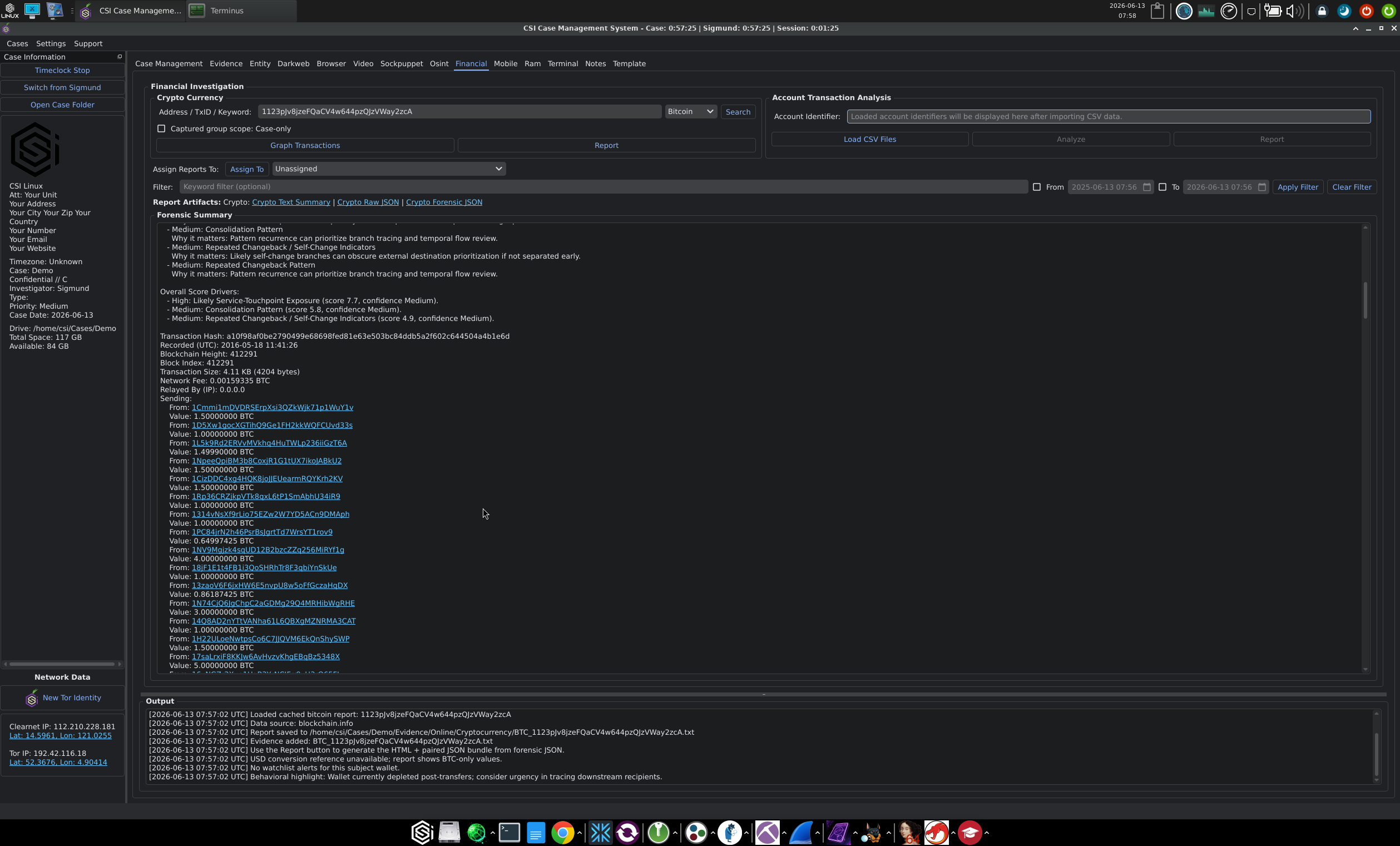
- Financial as a split workflow: Crypto Currency on one side (Bitcoin and Ethereum toggle, address/TxID/keyword lookup, Graph Transactions output, Forensic Summary), Account Transaction Analysis on the other (CSV import for bank or exchange statements, with filter, date range, and report output). The crypto side runs the FININT workflow that shows up in the audit log entries when you query a Bitcoin address against blockchain.info.
- Notes for case-level notes that complement the Case Management tab's notes section.
- Template for the document templates used by the Documents panel.
The DFIR tabs (Mobile, RAM, Terminal) are there for the host-side work, but if your engagements are mostly OSINT and online investigations you will spend most of your time across Case Management, Evidence, Entity, OSINT, Sockpuppet, Darkweb, Browser, and Financial.
How the tool integrations actually work
This is where the new CMS justifies the rebuild. The integrated workflows do not just write files into a case folder. They register each result as a structured evidence item with hashes, source, submitter, and an audit log entry, then preview the rendered artifact in the same window. The IP intelligence flow I walk through in the next section is the cleanest example, but the same pattern shows up across the other tabs.
A few concrete behaviours worth noting:
The Sockpuppet tab's Generate Undercover Account action builds the full identity from your inputs (including an optional generated profile image) and writes it into the case with a clear Type: Undercover Account label, separate from the Entity tab's Person and Organisation dossiers. That separation between subjects of the investigation and identities you operate is the right way to model it.
The Financial tab's Crypto Currency lookup ties results back to the case under the FININT workflow visible in the audit log, with blockchain.info as a data source for Bitcoin queries. Results land in /home/csi/Cases/<Case>/Evidence/Financial/ and the audit log records the lookup, the artifact creation, and the evidence registration in sequence.
The Darkweb and Browser tabs handle capture and preservation against hidden services and the clear web, writing back through the case with the source address recorded. The Video tab does the same for video evidence.
The integration is not deep in every case, and I would not call any of these tools best-in-class compared to what you would buy commercially. What they do offer is consistency: every tab's output enters the case the same way, with the same metadata fields, the same audit trail, and the same evidentiary report style. That is the part that saves real time.
IP intelligence inside the OSINT tab
The IP intelligence flow is worth showing in detail because it is one of the most common day-one tasks in any open source investigation and it is the place where the case integration earns its keep.
In an open case, you go to the OSINT tab, select the IP Address category from the row of category buttons (next to Username, Domain, Email, Phone, Address, Vehicle, Business, and Wi-Fi), and paste the address into the search field. The UI describes what it is about to do in plain text: "Runs geolocation, ASN, and proxy checks across multiple providers. Results are logged automatically when you press Search."
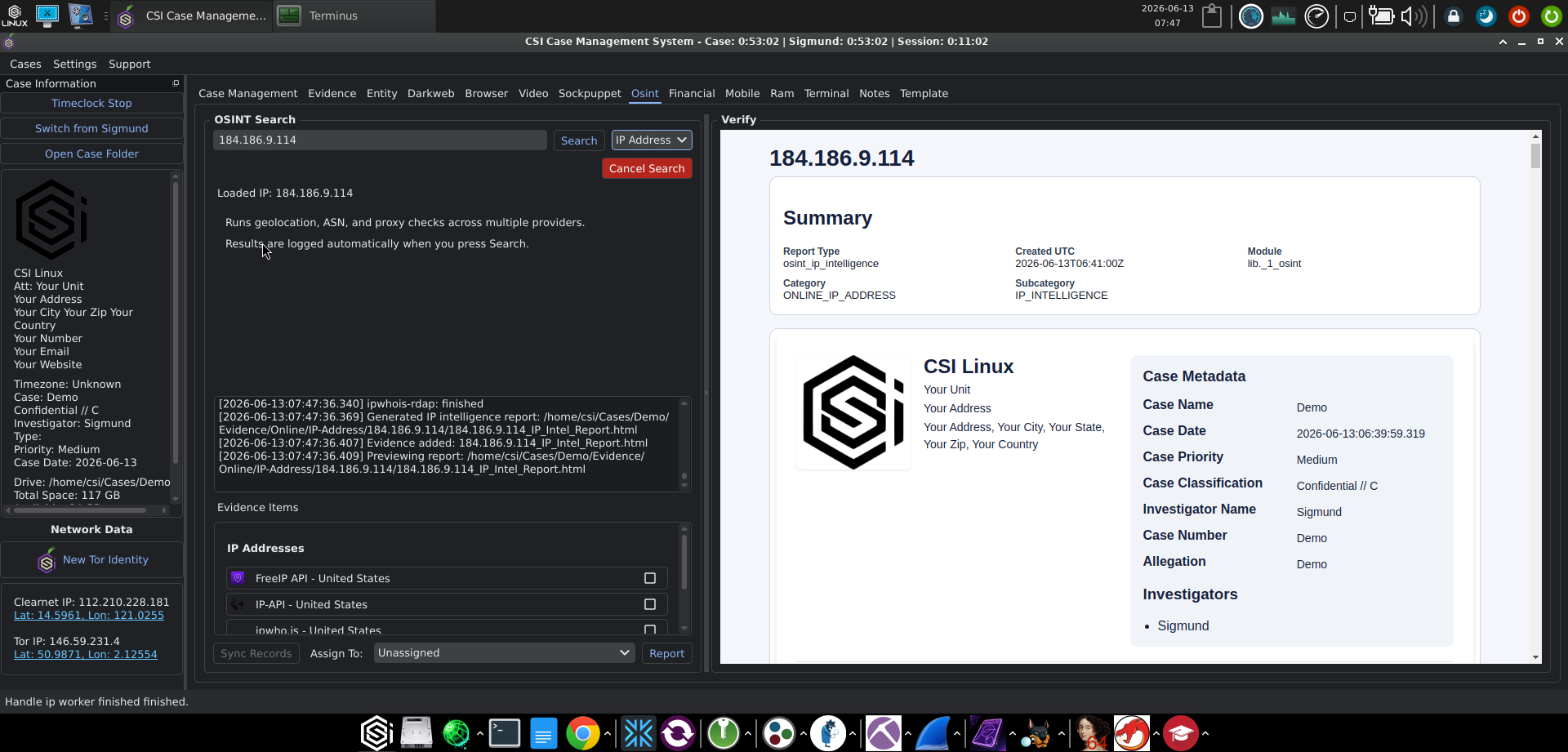
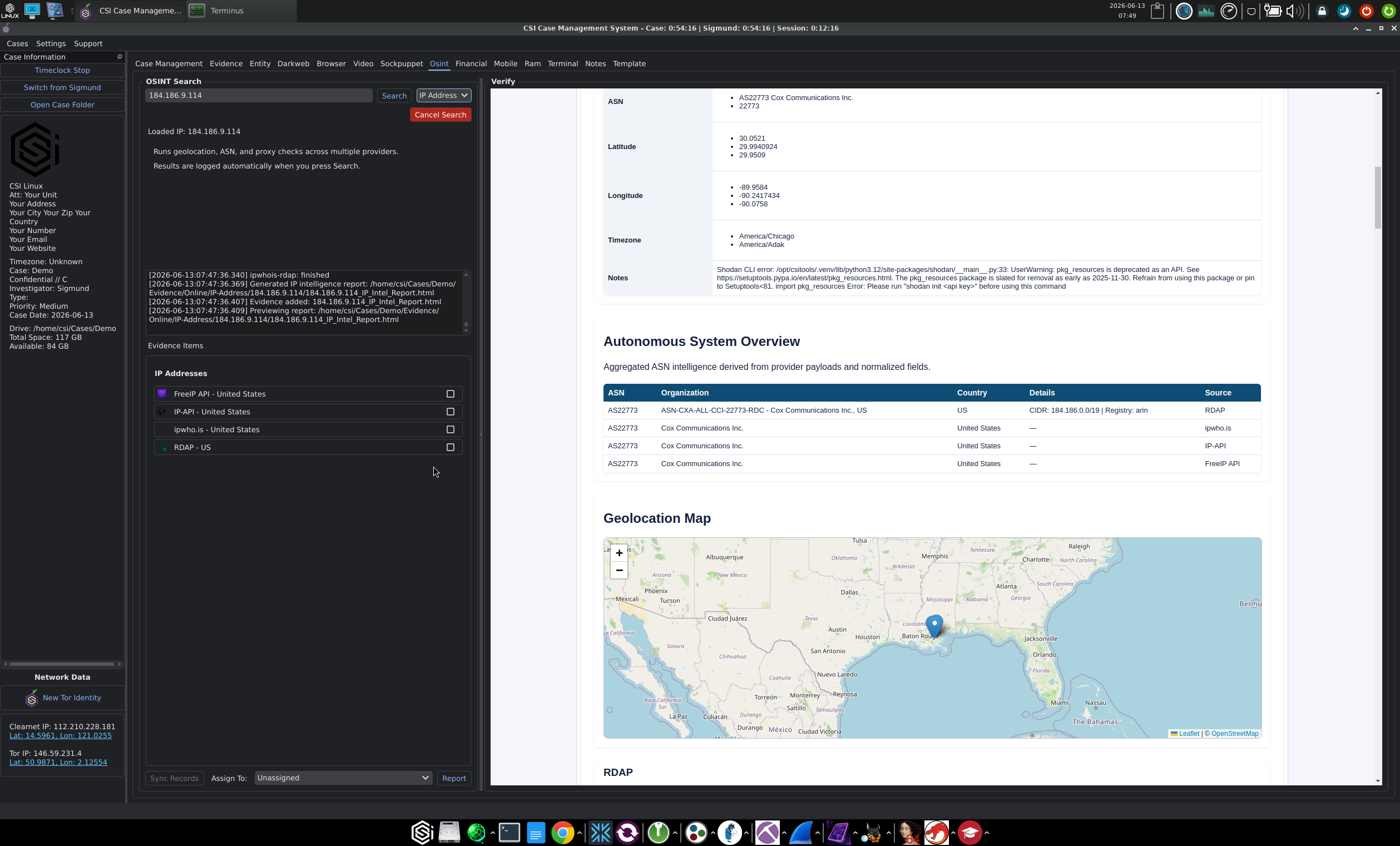
Press Search and the workflow runs four providers in parallel and registers each result as a separate item in the Evidence Items panel:
- FreeIP API for fast geolocation
- IP-API as a second geolocation source for cross-checking
- ipwho.is for a third geolocation and ASN reference
- RDAP for the authoritative registration record from the regional registry
Running four providers in one pass is the right design. Geolocation databases disagree more often than people who do not work with them assume, and a registration record from RDAP is what you actually want to point at in any communication that follows. The fact that each provider registers as its own evidence item, with its own checkbox, means you can mark which one you intend to rely on in the report and leave the rest on the case file for cross-reference.
Never heard of RDAP? Read this:
 Sigmund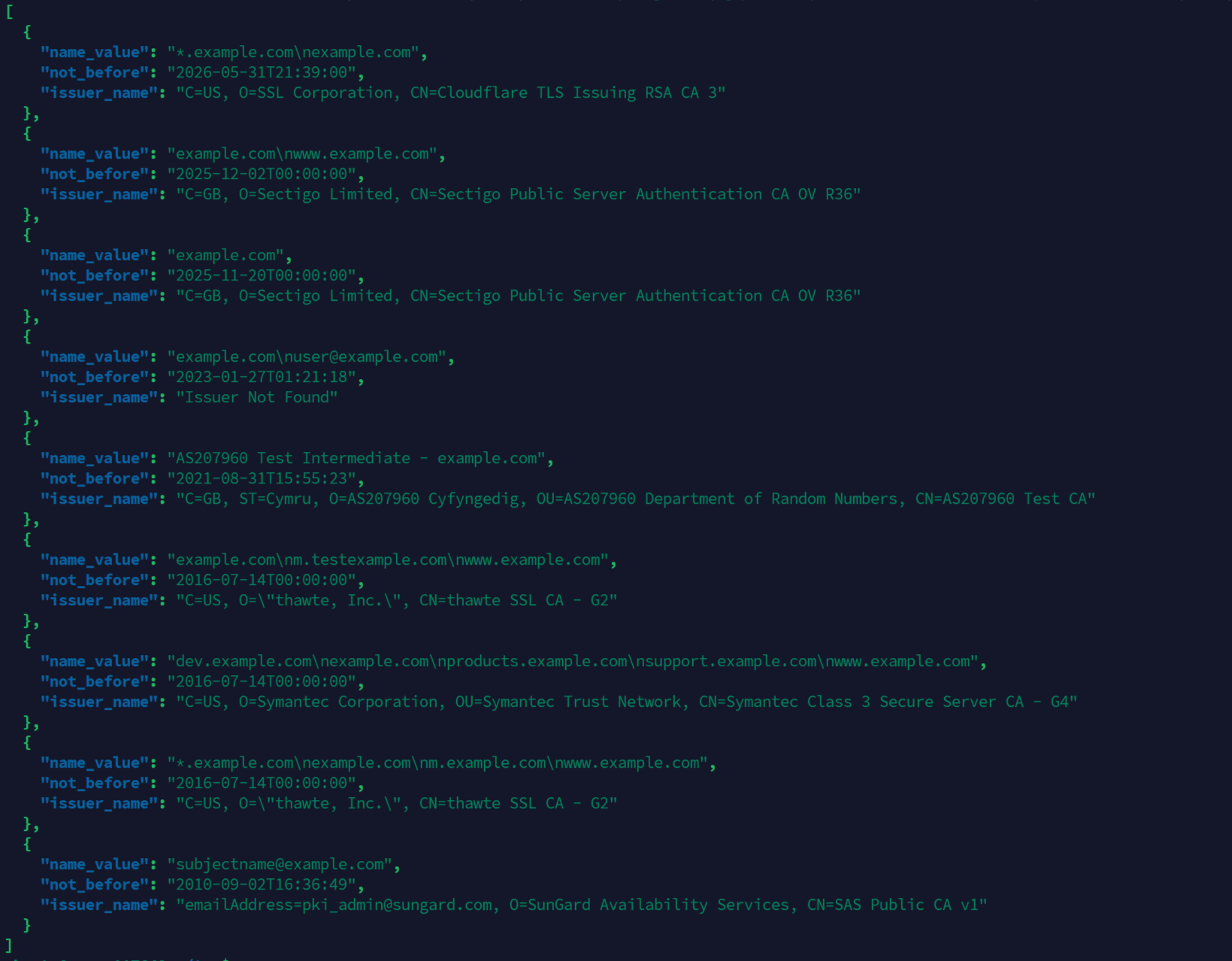
The audit log on the Case Management tab records the same flow line by line: ipwhois-rdap: finished, Generated IP intelligence report: /home/csi/Cases/<Case>/Evidence/Online/IP-Address/<IP>/<IP>_IP_Intel_Report.html, and Evidence added: <IP>_IP_Intel_Report.html. The report itself is rendered into the Verify panel on the right side of the OSINT tab so you can read it without leaving the workflow.
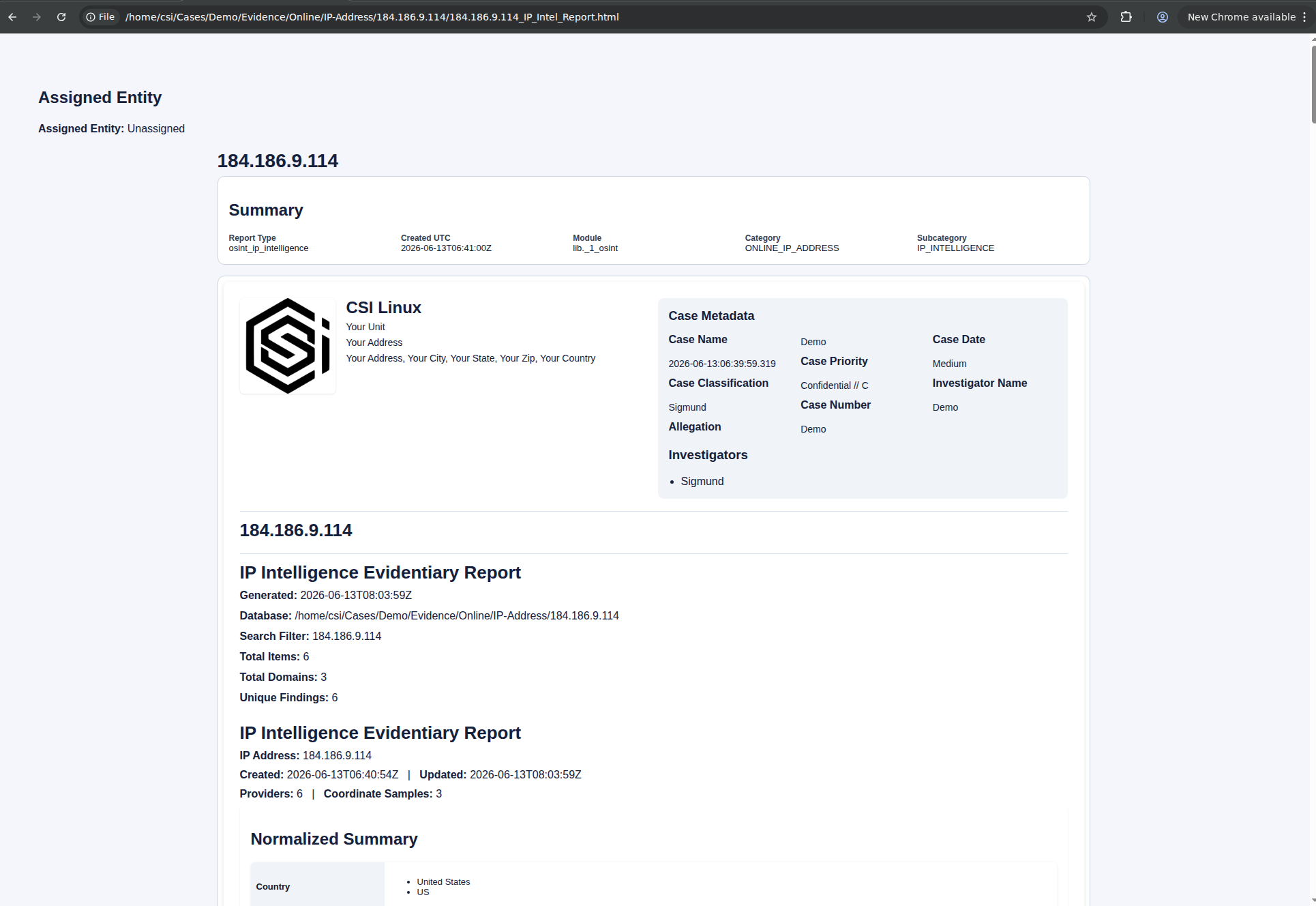
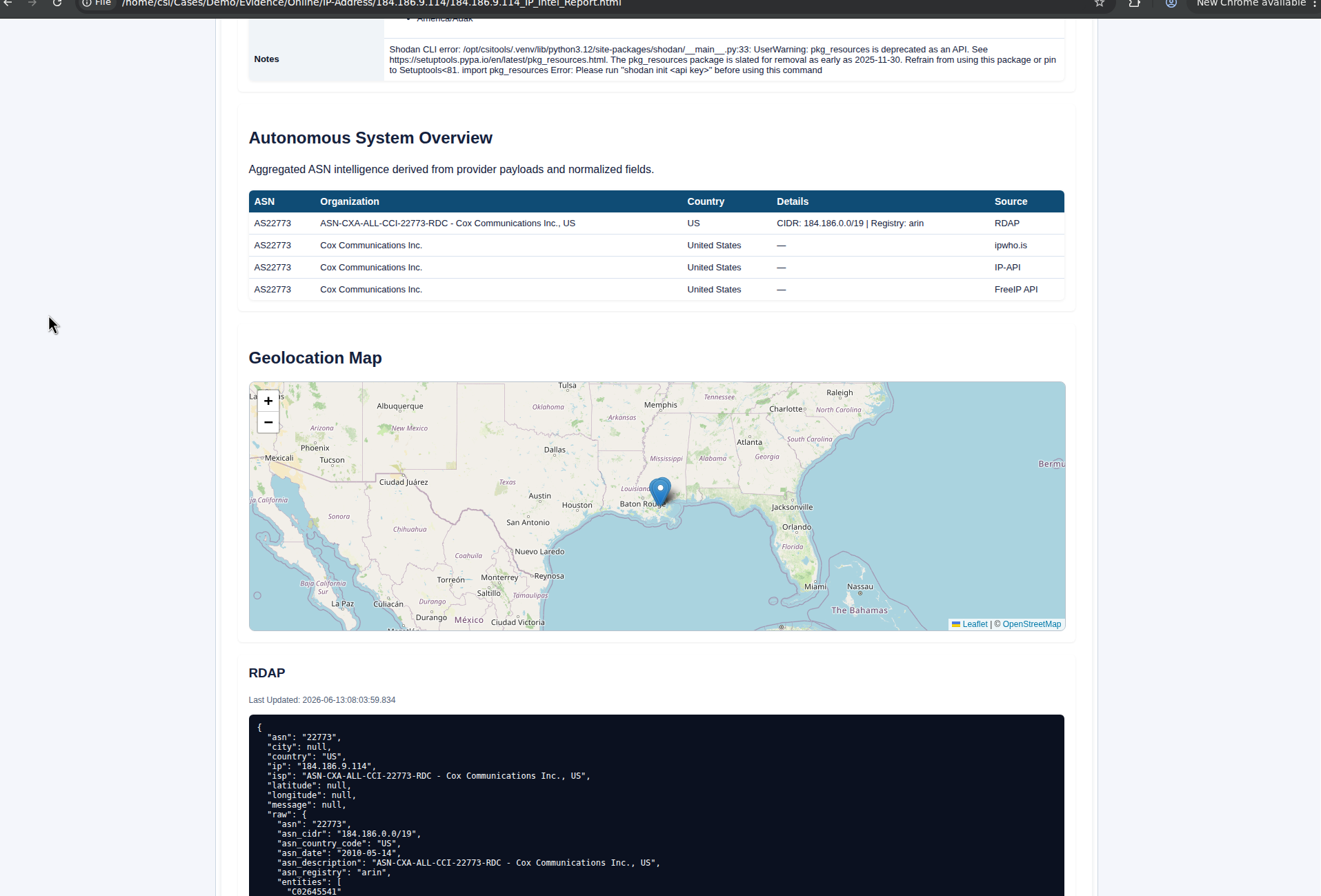
The generated artifact is titled "IP Intelligence Evidentiary Report" in the rendered HTML, with the case metadata embedded in the header. That matters when the artifact has to stand on its own outside the CMS, in a client deliverable or a referral package. The report header carries the case name, date, priority, classification, investigator, case number, and allegation, plus a Report Type, Module, Category, and Subcategory block that ties the artifact back to the CMS internals.
The practical value here is not the lookups themselves. Any competent OSINT practitioner can pull the same data from a handful of standard sources. The value is that the result is preserved, attributed, and tied to the case at the moment of collection, with multiple providers on file, an evidentiary report rendered automatically, and case metadata baked in. When you need to draft a preservation letter to the IP range owner, or send an abuse complaint about activity from a specific address, the RDAP record, jurisdiction, and abuse contact data are already on file and timestamped to when you collected them.
For investigators handling cyber extortion, business email compromise, or other cases that involve following an IP back to its responsible party, that preserved attribution chain is the part that saves rework two weeks later when the trail goes cold and someone asks where the data came from.
Artifact preservation and chain of custody
The CMS now records, for every evidence item:
- Original source (URL, device, file path, hidden service address)
- Capture method and the responsible CSI-CMS module
- Capture timestamp in UTC
- MD5 and SHA256 hashes, both computed at the moment of capture
- Submitter (the investigator who registered it)
- An auto-numbered Evidence # tied to the case (e.g.
Demo-0000...) - A Chain of Custody flag for items being formally tracked
- An audit log entry tying the action to the case
For OSINT work the chain of custody question is less rigid than in a court-bound forensic case, but the metadata still matters. When you go back to a case three weeks later, the recorded source, timestamp, and audit trail save you the work of reconstructing where each artifact came from and who touched it. The Autopsy column on the Evidence tab is a separate practical detail: items flagged there can be handed off to Autopsy for deeper forensic analysis without leaving the case file, which keeps the heavier DFIR work attached to the same evidence record.
For practitioners who do feed work into formal proceedings, the hashes and timestamps put you in a defensible position. Defensible is not the same as airtight, and CSI Linux does not pretend it is. The CMS gives you the records. You still have to handle the original evidence correctly outside the system, store backups, and not contaminate the working copy.
Reports and document generation
Reporting in the 2026 CMS happens at two layers, and it is worth keeping them straight.
The first is per-artifact. Each workflow tab generates its own HTML report when you take an action that warrants one. The IP intelligence flow walked through above is the cleanest example: a single OSINT lookup produces an "IP Intelligence Evidentiary Report" written to Evidence/Online/IP-Address/<IP>/<IP>_IP_Intel_Report.html, with case metadata baked into the header. The Financial tab does the same for crypto and account analysis, with HTML and ODT outputs. The Dark Web tab produces both search reports and forensic torrent reports. The Video tab can export HTML and PDF. Each artifact is registered as an evidence item with MD5 and SHA256 hashes, written into the case Evidence tree, and visible immediately in the Evidence tab.
The second is case-level. The right-side Documents panel of the case workspace is where this lives. The template dropdown reads from data/doc-templates.json and offers a set of templates including Forensic Investigation Reports (the default), Chain of Custody, and Missing Persons. Each template is a dynamic form with rows of widgets (line edits, multi-line text, combo boxes, calendar pickers, and image slots where the template supports them, like the Missing Persons package) that auto-populate from the case data and the agency profile. Synonymous field labels are reconciled automatically (Case Ref vs Case ID, and similar), every detected date is normalised, and every value is coerced to ASCII before generation. The output is a Word document or OpenDocument file, resolved from documents/Templates and written to $case_directory/Report/<Document>_<Case>.ext. If a report for the same template already exists for the case, the UI offers to reopen it directly rather than overwrite it blindly.
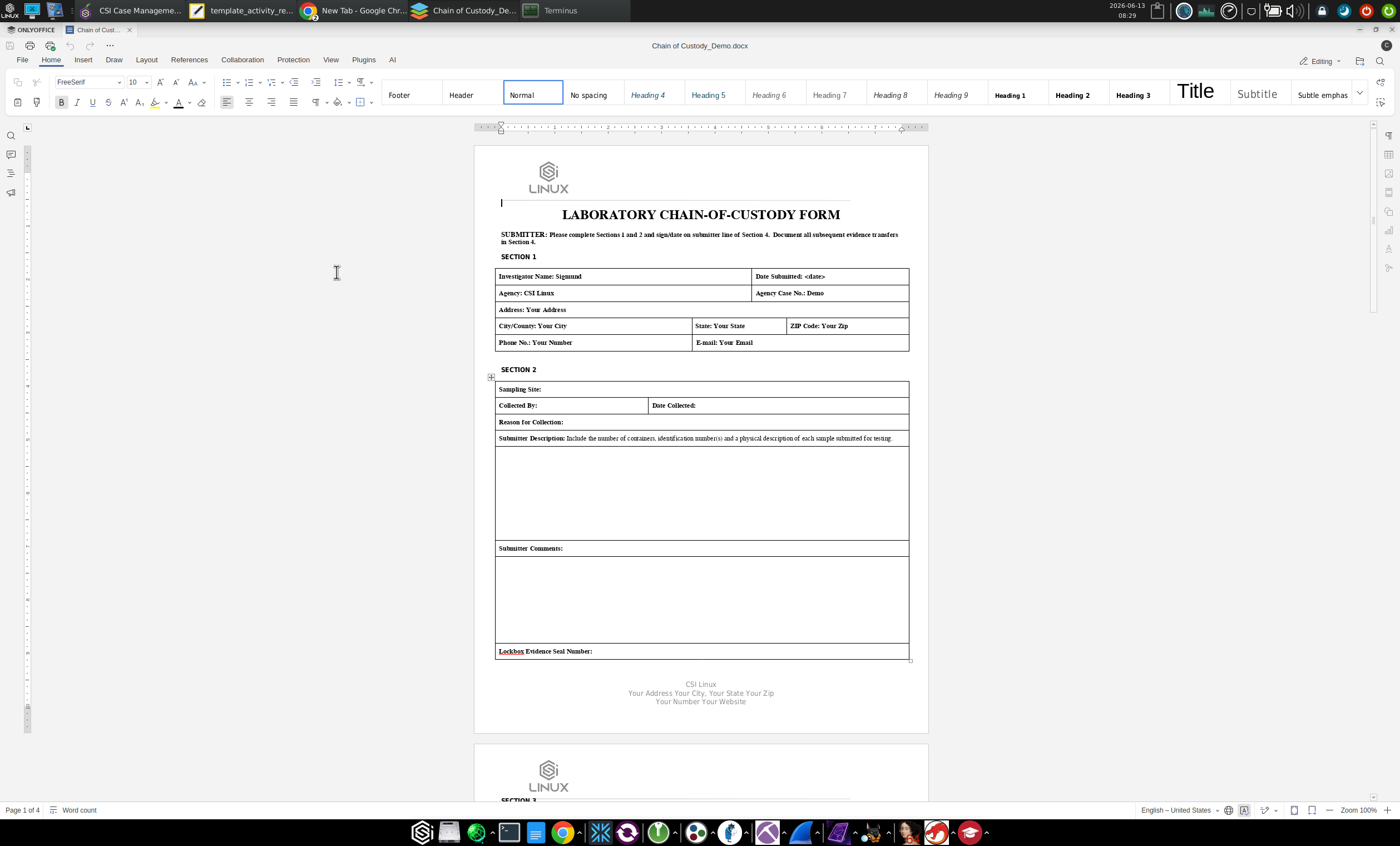
he 2026 CMS also treats reporting as something you build incrementally rather than reconstruct from memory at handoff. Each artifact and finding registers against the case at the moment of capture. The per-artifact Evidentiary Reports are produced as the work happens, and the case-level documents pull from the same case data when you generate them. For long-running cases this is the difference between writing a coherent final report on day fifteen and trying to remember what you did on day three.
In practice the two layers are complementary. The per-artifact Evidentiary Reports are where most of the day-to-day evidentiary value sits. The case-level documents are what you produce when the case is ready for review, handoff, or court, and they reference the per-artifact reports rather than replacing them.
Navi-AI inside the CMS
CSI Linux ships with an optional AI integration that the powerup script lists as Navi-AI among its installable components. It is positioned as an investigative assistant, not an autonomous agent, and it is best used as a second pair of eyes on collected material rather than as a primary source. It can summarise a body of captured pages, suggest entity links, and draft sections of a report.
I am not going to oversell this. The integration is useful when you need to compress a large pile of captured material into something you can review, and less useful when you are doing the actual analytical work that the case turns on. Treat any output as a draft, verify it against the source evidence, and never let it write into the artifact store unattended.
Where the 2026 CMS fits in an OSINT workflow
Whether you adopt it depends on what your current setup looks like.
If your existing workflow is a folder per case with screenshots, exported JSON, and a personal Markdown notes file, the 2026 CMS is a clear upgrade. You get evidence and artifact metadata for free, a structured report, and integrations that capture your work as you go. The cost is committing to working inside the platform.
If you already run a serious commercial case management system (Hunchly for capture, Maltego for graphing, a dedicated investigative case platform for the casework itself) then CSI-CMS does not replace that stack. It does become a useful free option for cases where you do not want to spin up the commercial stack, for training environments, for handoff cases where the receiving party also runs CSI Linux, and for cases you want to keep entirely offline on an air-gapped VM.
For practitioners running multiple parallel cases across mixed engagement types (some OSINT, some DFIR, some crypto tracing) the consistent case object and consistent report format are the practical wins. You stop reinventing the file layout for each new engagement.
What still needs work
This is a first numbered release of a rebuilt subsystem, so there are rough edges. A few things worth flagging:
- The per-artifact HTML Evidentiary Reports use functional rather than polished styling. For a client deliverable you will probably want to render your own template from the case data or edit the HTML before delivery. The
.docxand.odttemplates on the case-level side are more flexible to customise because they are real Office documents underdocuments/Templates. - The audit log on the Case Management tab is great as a real-time stream but does not yet offer filtering or search at the panel level. For deep review you will be reading
$case_directory/audit.logdirectly. - The Navi-AI integration ships with the default models that the powerup script installs. If you have your own model endpoints or run a local stack you trust more, plugging them in is currently a manual configuration job rather than a settings toggle.
- The Verify panel that some workflow tabs render on the right side is genuinely useful when it shows the generated report inline (the IP intelligence flow uses this well), and less useful when it shows the stylised placeholder art that some other tabs use. This will probably settle as more workflows mature.
None of these are deal-breakers. They are the kind of issues you expect in a first numbered release of a rebuilt subsystem, and the CSI Linux team has been responsive on the public channels about pending improvements.
Worth your time?
A big YES for me and likeley a yes, for most readers of this blog. The CMS in CSI Linux 2026 is the first version of the case management layer that I would actually run a real (small or medium) case through end to end without falling back to my own folder structure. The evidence and artifact handling is sane, the report output is usable, and the cost is a VM and an afternoon of setup.
I would still keep my commercial tools for the cases that need them. But CSI Linux 2026.4 has earned a place in the rotation as something more than a toolkit Linux. The case management system is finally the headline, and for once that headline holds up.
Download CSI Linux 2026.4 from the official downloads page. Default appliance credentials are csi / csi. Change them before doing anything else.
If you want a structured way into the 2026 platform, the CSI Linux team is running a Founder-Led Investigator Cohort as a four-week guided programme covering setup, evidence preservation, OSINT, and reporting, with hands-on labs and a certification path at the end. The CSI Linux Discord is the place to ask questions and watch for announcements.
If you found this useful, the next post in this series will walk through a worked dark web case inside the 2026 CMS end to end, including evidence capture, artifact extraction, and the resulting JSON report. Subscribe to get it when it lands.
Reach out if you have questions or comments or what to collaborate
Session Messenger: 059db238ab37c3d92615c5cc24b694da29c598cc13e27886053722404118e14271