How I Built a Telegram Channel Monitor for OSINT During the Iran Conflict
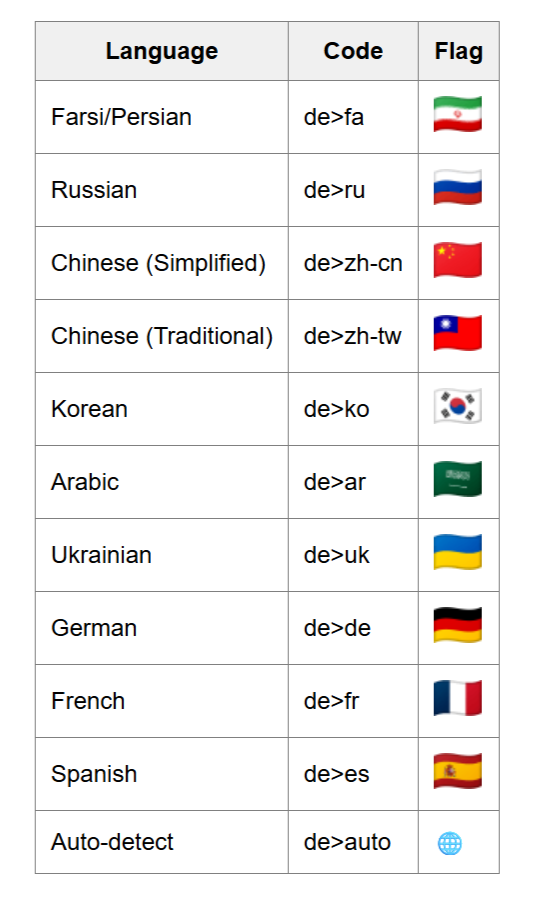
Edit: I have added multi language support for this so i renamed this and dropped the Farsi from the title, it now supports:

Edit: I have added multi language support for this so i renamed this and dropped the Farsi from the title, it now supports:
In recent times, and of course now in the current climate surrounding the Iran conflict, Telegram has become one of the most active platforms for real-time information sharing — often before any mainstream news outlet picks it up.
Not without reason are Governments often itchy about blocking / banning Telegram. You know what I mean.
Back to the current conflict, many of the most critical channels broadcast exclusively in Farsi (Persian), creating a language barrier for non-Persian OSINT analysts. Of course, needless to say, Telegram is always to take with a grain of salt, there is propaganda, nonsense, and misinformation, but, this is expected and you will have to do the analysis work of course.
To solve this, I built a Python-based Telegram channel scraper that automatically downloads messages and photos from a target channel and translates them from Farsi into English — then renders everything into a clean, readable HTML report. Here’s exactly how I did it. Python has once more proven to be capable of tasks like this.
Having said this, since there are a lot of interesting Farsi language threat actor channels out there, this may come in handy in general, and with a few tweaks this can obviously be adapted for other languages, hence, I uploaded this version to Github for everybody to get and modify and use to their hearts content.
Why Telegram for OSINT?
Telegram channels operate with minimal censorship compared to other platforms, making them a goldmine for:
- Real-time conflict updates from ground-level sources
- Propaganda and narrative analysis from state-affiliated channels
- Troop movement reports, casualty claims, and territorial updates
- Photo and video evidence posted directly from the field
During active conflicts, monitoring these channels in near real-time gives analysts a significant intelligence advantage. The challenge is the language barrier — and that’s exactly what this tool solves. Keep in mind, this has a lot of other uses eventually.
Tools and Libraries Used
ToolPurposeTelethonTelegram client library for Python — fetches messages via the official Telegram APIdeep-translatorFree Google Translate wrapper — handles Farsi → English translationpython-dotenvLoads credentials securely from a .env filejinja2HTML templating (used for layout generation)
Step 1: Get Your Telegram API Credentials
Unlike bot tokens (which you get from @BotFather), the Telethon user API needs credentials tied to your personal Telegram account. This allows the script to act as a real user — accessing public and private channels you’re already a member of. I say this further down in detail again, but, best practice here is to use a burner number or a service like TextVerified, during experiments like this, I have more than once gotten banned by Telegram for causing too much noise or traffic or too many requests in a short period of time. You would not want that to happen to your main number, nor would you want your main number to be out there, associated with such things.
How to Get Your API ID and Hash
- Open a browser and go to https://my.telegram.org
- Enter your phone number (with country code, e.g.
+63XXXXXXXXXX) - Telegram will send a login code to your Telegram app — enter it on the page
- Once logged in, click “API Development Tools”
- Fill in the application form:
App title: e.g.FarsiMonitor
Short name: e.g.farsimon(lowercase, no spaces)
Platform: SelectOther
Description: Optional
Click “Create Application”
You will now see:
api_id— a numeric ID (e.g.29123456)api_hash— a 32-character hex string
⚠️ Security Warning: Never share these credentials or commit them to a public GitHub repository. They are permanently tied to your Telegram account. Anyone with these values can impersonate your account.
Step 2: Set Up Your Environment
If you are running Parrot OS (Debian-based) or Kali Linuxm, both use an externally managed Python environment that blocks system-wide pip installs. The fix is a Python virtual environment.
# Create project folder and virtual environment
mkdir ~/farsi-monitor && cd ~/farsi-monitor
python3 -m venv venv
# Activate the virtual environment
source venv/bin/activate
# Install required libraries
pip install telethon deep-translator python-dotenv jinja2
Your prompt will show (venv) prefix once activated. Every time you open a new terminal session, re-activate with:
source ~/farsi-monitor/venv/bin/activateStep 3: Configure Your Credentials
Create a .env file in your project folder — never hardcode credentials directly in your script:
# ~/farsi-monitor/.env
TELEGRAM_API_ID=29XXXXXX
TELEGRAM_API_HASH=a1b2c3d4e5f6abcdef1234567890abcd
TELEGRAM_PHONE=+63XXXXXXXXXX
TELEGRAM_CHANNEL=target_channel_username
For TELEGRAM_CHANNEL, use:
- The channel’s public username (e.g.
irna_1931for IRNA's Farsi channel) - Or a full invite link (e.g.
https://t.me/xyz)
Add .env to your .gitignore immediately:
echo ".env" >> .gitignore
echo "*.session" >> .gitignore
Step 4: The Script
I uploaded the script to GitHub so you can just get it from there, that is easier as I might add features to it:
- Authenticates with Telegram using your user account
- Fetches the last N messages from the target channel
- Downloads all photos to a local
media/folder - Translates all Farsi text to English using Google Translate
- Preserves message formatting (bold, italic, links, mentions, hashtags)
- Outputs a JSON data file and a styled HTML report
Step 5: Run It
# Activate your virtual environment
source ~/farsi-monitor/venv/bin/activate
# Run the script
python farsi_monitor.py
On first run, Telethon will prompt:
Please enter the code you received: 12345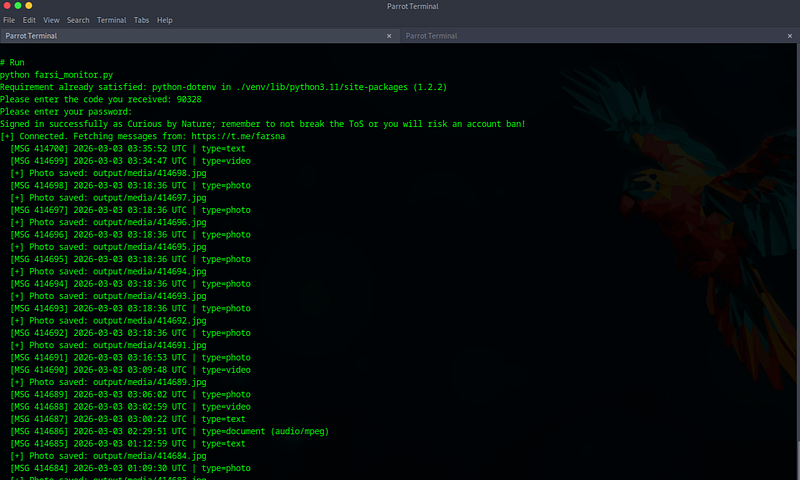
Enter the OTP code sent to your Telegram app. A .session file is created — all future runs are fully automatic with no re-authentication needed.
It will also ask for your password if you have that set up for your TG account.
Step 6: View the Output
output/
├── messages.html    ← Open in Firefox
├── messages.json    ← Structured data for further processing
└── media/
    ├── 10001.jpg
    ├── 10002.jpg
    └── ...
firefox ~/farsi-monitor/output/messages.html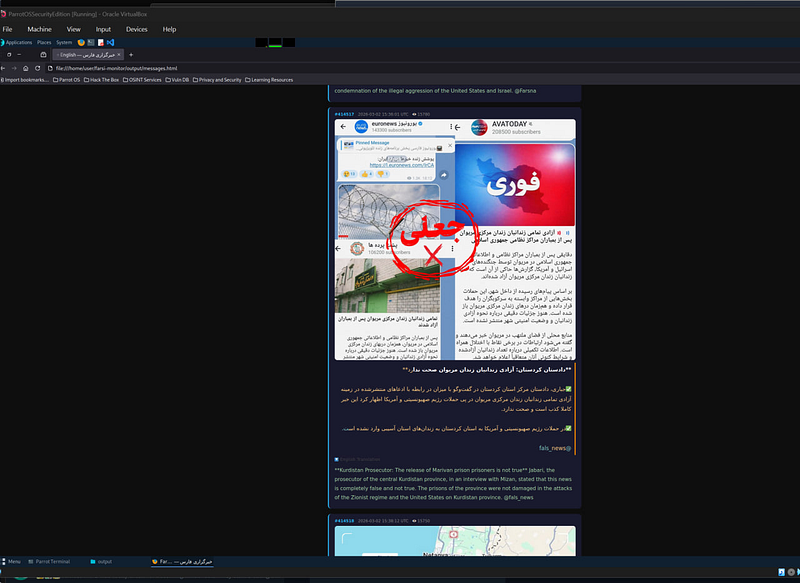
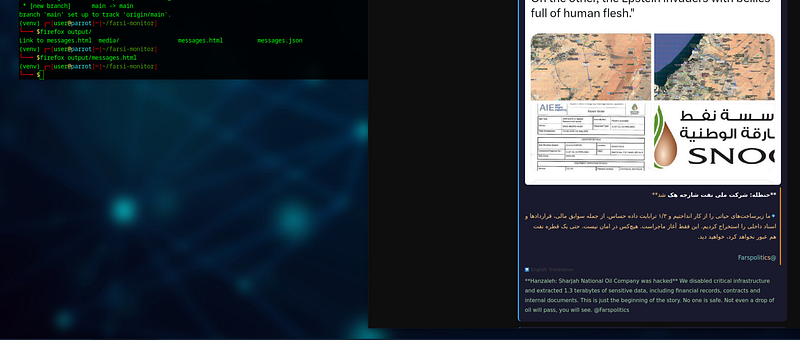

The HTML report renders:
- Original Farsi text in amber, right-to-left aligned
- English translation in green directly below
- Photos embedded inline from the
media/folder - Bold, italic, links, mentions, hashtags all preserved
- View counts, reply references, and message timestamps in the metadata bar
OPSEC Considerations
Before deploying this tool operationally, keep the following in mind:
- Session files (
.session) contain your authenticated Telegram session — treat them like passwords and never share them - API credentials are permanently linked to your phone number — rotate them via
my.telegram.orgif compromised - Telegram logs API access — using a dedicated SIM or virtual number (e.g. via a VOIP service) adds a layer of separation for sensitive OSINT work. Something like https://www.textverified.com/ works just fine :).

- Rate limiting — fetching thousands of messages too quickly may trigger Telegram’s flood-wait mechanism; add
await asyncio.sleep(0.5)inside the loop for large channels - Legal and ethical scope — only monitor channels you are authorized to access; public channels are generally fair game for OSINT research
What’s Next
This is the foundation. Future enhancements I’m planning:
- Live monitoring mode using
telethon.events.NewMessagefor real-time alerts - Telegram bot integration to push translated messages to a private monitoring channel
- IOC extraction — automatically flagging location names, military units, and coordinates from translated text
- Multi-channel support — monitoring a curated list of channels simultaneously
- Integration with the other projects I have been working on like the threat intelligence platform.
This tool was built entirely with open-source Python libraries. All monitoring was conducted on publicly accessible Telegram channels for research and OSINT purposes.
What is your take?
I would love to hear from you, do you find tools like this a useful addition to your arsenal?
Happy to hear from you, my contact details are below:
You can reach out to me via Session Messenger: 059db238ab37c3d92615c5cc24b694da29c598cc13e27886053722404118e14271
As usual: