Operation Wrapped: What Spotify Actually Knows About You, and How to Pull It Yourself


Every December, Spotify hands you a glossy little slideshow of your year in music and calls it Wrapped. It is a magic trick. The point of a magic trick is to make you look at the pretty thing so you stop asking how much the magician is holding behind his back.
I got curious about the "behind his back" part. Not the top-five-artists version, the real file: every play, every timestamp, every IP address the service logged while I was half asleep on a night bus between Manila and Bangkok listening to the same three albums on repeat.
It turns out there are two very different answers to "what does Spotify store about me," and they live in two very different places. One you can pull in about ninety seconds with a Python script. The other you have to formally request, and it is the one that should make you sit up.
This walkthrough covers both. There is a ready to run Spotipy script at the bottom that dumps everything the live API will tell you about your own account into tidy JSON files. Then I walk through the GDPR data request, which is the only way to get your full listening history, and I break down which fields in that export are the ones an investigator would actually care about.
Two data worlds
Think of your Spotify data as sitting behind two different doors.
Door one is the Web API. This is the interface every third party app talks to. When some mood-playlist generator or year-in-review clone asks to connect to your account, this is what it sees. It is a live, present-tense view: who you are, what you have saved, what you have been playing lately, your top artists over a few fixed windows. It is generous, but it has a hard ceiling. The API will not hand over your lifetime history. Recently played tops out at the last 50 tracks and that is the end of the road.
Door two is the GDPR export. This is the vault. When you formally request your data under Article 15 of GDPR (or the equivalent right in your jurisdiction), Spotify assembles files that go far beyond what any app can see through the API: years of individual plays, each stamped with a timestamp, a country, a device string, and an IP address. This is the door most people never open, which is exactly why it is worth opening.
A quick note before we go further, because it changed the rules this year. In February 2026 Spotify locked down Developer Mode. Using the Web API now requires a Spotify Premium account, developers are capped at one client ID, and each app is limited to five authorised users. A batch of profile and catalogue fields were pulled in that same update, some of which were quietly reinstated in March. None of this blocks what we are doing here, since you have Premium and you are only ever authorising yourself against your own account, but it is why the script below is written to shrug off missing fields rather than crash on them.
Door one: pulling your own account through the API
Before the script, here is the honest inventory of what the Web API will tell you about yourself, and why each piece matters from a privacy angle.
Your profile (GET /me). Returns your display name, account country, email address, subscription tier, explicit-content filter settings, follower count, profile images, and a fresh immutable account identifier that Spotify added in May 2026 specifically so third parties can track you across sessions without relying on your changeable username. The email and subscription tier only come through if you grant the user-read-private and user-read-email scopes, which the script requests so you can see the full picture.
Your top artists and tracks (GET /me/top/{type}). Spotify computes affinity over three windows: roughly the last four weeks, the last six months, and "all time" (which in practice means the last several years). This is a compact behavioural fingerprint. Two people almost never share a top-50-artists list, and it shifts slowly enough to be a stable identifier.
Recently played (GET /me/player/recently-played). The last 50 tracks, each with the exact timestamp you played it. Fifty is not many, but fifty timestamped plays is enough to sketch a daily rhythm: when you wake up, when you commute, when you wind down.
Your library and playlists. Saved tracks, saved albums, your playlists and the tracks inside them, and the artists you follow. Your playlists in particular tend to leak intent. A playlist named for a person, a breakup, a workout regime, a religion, or a language you are learning says something you might not say out loud.
The script requests read-only scopes for all of the above, pulls each one, saves the raw JSON so you have the untouched source, and prints a short privacy summary so you can eyeball the sensitive bits without digging through files.
Setup
You need three things: a Spotify Premium account, Python 3.9 or newer, and an app registered in the Spotify developer dashboard.
Register the app at developer.spotify.com/dashboard. Create an app, pick "Web API," and add a redirect URI of http://127.0.0.1:8888/callback. Spotify no longer accepts http://localhost here, it wants the loopback IP written out, so use 127.0.0.1 exactly. Copy your Client ID and Client Secret.
Then install the library and set your credentials as environment variables. Never hardcode the secret into the script:
pip install spotipy

export SPOTIPY_CLIENT_ID='your-client-id'
export SPOTIPY_CLIENT_SECRET='your-client-secret'
export SPOTIPY_REDIRECT_URI='http://127.0.0.1:8888/callback'
On Windows swap export for set. Run the script once, a browser window opens asking you to authorise your own app against your own account, you approve it, and it caches a refresh token locally so you are not re-prompted every hour.
The script
#!/usr/bin/env python3
"""
spotify_self_dump.py

Pull everything the Spotify Web API will tell you about YOUR OWN account,
from a privacy-audit perspective, and save it to JSON.

Requires a Spotify Premium account (Web API policy since Feb 2026) and an app
registered at https://developer.spotify.com/dashboard with the redirect URI
http://127.0.0.1:8888/callback

Credentials come from the environment, never hardcode the secret:
    export SPOTIPY_CLIENT_ID='...'
    export SPOTIPY_CLIENT_SECRET='...'
    export SPOTIPY_REDIRECT_URI='http://127.0.0.1:8888/callback'
"""

import json
import os
import sys
from datetime import datetime, timezone
from pathlib import Path

import spotipy
from spotipy.oauth2 import SpotifyOAuth

# Read-only scopes. Each maps to one thing the API will disclose about you.
SCOPES = " ".join([
    "user-read-private",        # profile, country, subscription tier
    "user-read-email",          # account email
    "user-top-read",            # top artists and tracks
    "user-read-recently-played",# last 50 plays with timestamps
    "user-library-read",        # saved tracks and albums
    "playlist-read-private",    # your playlists, including private ones
    "user-follow-read",         # artists you follow
])

OUT_DIR = Path("spotify_export") / datetime.now(timezone.utc).strftime("%Y%m%dT%H%M%SZ")


def save(name, data):
    """Write a section to its own JSON file and report the path."""
    OUT_DIR.mkdir(parents=True, exist_ok=True)
    path = OUT_DIR / f"{name}.json"
    path.write_text(json.dumps(data, indent=2, ensure_ascii=False))
    print(f"  saved {name:20s} -> {path}")
    return data


def collect_paginated(fetch_page, limit=50):
    """Walk a paginated Spotify endpoint and return every item."""
    items, offset = [], 0
    while True:
        page = fetch_page(limit=limit, offset=offset)
        batch = page.get("items", [])
        items.extend(batch)
        if len(batch) < limit or page.get("next") is None:
            break
        offset += limit
    return items


def main():
    auth = SpotifyOAuth(scope=SCOPES, open_browser=True,
                        cache_path=".spotify_cache")
    sp = spotipy.Spotify(auth_manager=auth, requests_timeout=30, retries=3)

    print(f"Writing export to {OUT_DIR}\n")

    # ---- Profile -----------------------------------------------------------
    print("[*] Profile")
    me = {}
    try:
        me = save("profile", sp.current_user())
    except Exception as e:
        print(f"    profile fetch failed: {e}")

    # ---- Top artists and tracks over the three affinity windows ------------
    print("[*] Top items")
    for kind in ("artists", "tracks"):
        for term in ("short_term", "medium_term", "long_term"):
            try:
                res = sp.current_user_top_tracks(limit=50, time_range=term) \
                    if kind == "tracks" \
                    else sp.current_user_top_artists(limit=50, time_range=term)
                save(f"top_{kind}_{term}", res.get("items", []))
            except Exception as e:
                print(f"    top {kind}/{term} failed: {e}")

    # ---- Recently played (hard cap of 50 on Spotify's side) ----------------
    print("[*] Recently played")
    try:
        rp = sp.current_user_recently_played(limit=50)
        save("recently_played", rp.get("items", []))
    except Exception as e:
        print(f"    recently played failed: {e}")

    # ---- Saved tracks and albums -------------------------------------------
    print("[*] Library")
    try:
        saved_tracks = collect_paginated(sp.current_user_saved_tracks)
        save("saved_tracks", saved_tracks)
    except Exception as e:
        saved_tracks = []
        print(f"    saved tracks failed: {e}")
    try:
        saved_albums = collect_paginated(sp.current_user_saved_albums)
        save("saved_albums", saved_albums)
    except Exception as e:
        saved_albums = []
        print(f"    saved albums failed: {e}")

    # ---- Playlists ---------------------------------------------------------
    print("[*] Playlists")
    try:
        playlists = collect_paginated(sp.current_user_playlists)
        save("playlists", playlists)
    except Exception as e:
        playlists = []
        print(f"    playlists failed: {e}")

    # ---- Followed artists (cursor paginated, handled separately) -----------
    print("[*] Followed artists")
    followed = []
    try:
        after = None
        while True:
            page = sp.current_user_followed_artists(limit=50, after=after)
            block = page.get("artists", {})
            batch = block.get("items", [])
            followed.extend(batch)
            after = block.get("cursors", {}).get("after")
            if not after or not batch:
                break
        save("followed_artists", followed)
    except Exception as e:
        print(f"    followed artists failed: {e}")

    # ---- Privacy summary ---------------------------------------------------
    print("\n" + "=" * 60)
    print("PRIVACY SUMMARY")
    print("=" * 60)
    if me:
        print(f"Account id (immutable) : {me.get('account_id', 'n/a')}")
        print(f"Display name           : {me.get('display_name', 'n/a')}")
        print(f"Email on file          : {me.get('email', 'not disclosed')}")
        print(f"Country on file        : {me.get('country', 'not disclosed')}")
        print(f"Subscription tier      : {me.get('product', 'not disclosed')}")
        ec = me.get("explicit_content", {})
        print(f"Explicit filter locked : {ec.get('filter_locked', 'n/a')}")
        print(f"Public follower count  : {me.get('followers', {}).get('total', 'n/a')}")
    print(f"Saved tracks           : {len(saved_tracks)}")
    print(f"Saved albums           : {len(saved_albums)}")
    print(f"Playlists              : {len(playlists)}")
    print(f"Followed artists       : {len(followed)}")
    print("\nNote: the API cannot give you your lifetime play history.")
    print("For that you need the GDPR Extended Streaming History export.")
    print(f"\nRaw JSON written to: {OUT_DIR.resolve()}")


if __name__ == "__main__":
    try:
        main()
    except KeyboardInterrupt:
        sys.exit(1)
Run it:
python3 spotify_self_dump.py
You end up with a timestamped folder of JSON files and a printed summary. Read the summary first. The line that tends to surprise people is the immutable account identifier, because it exists for one reason: to let any app you authorise recognise you again later, permanently, even if you change your username.
Optional, you can also write yourself some visualization around that:
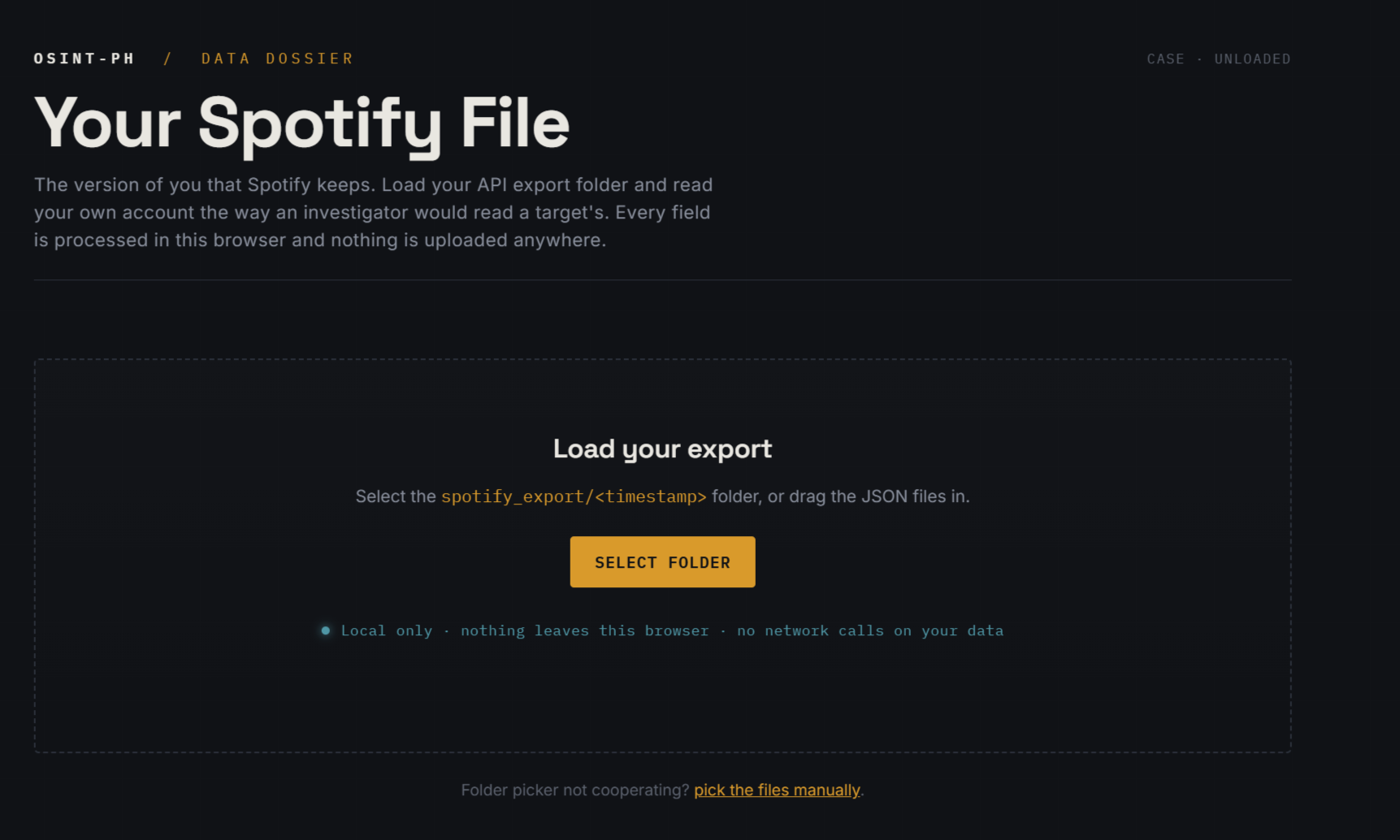
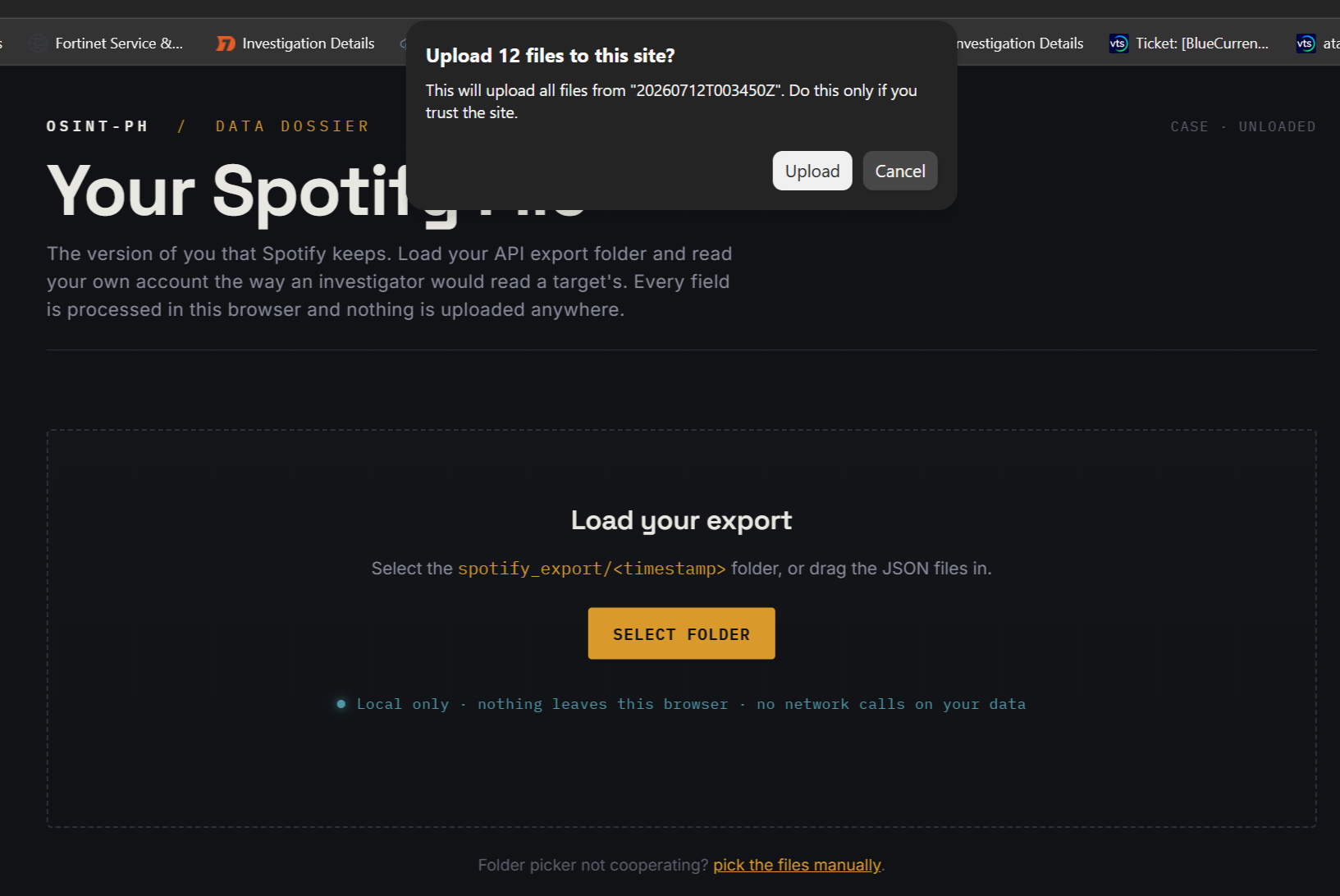
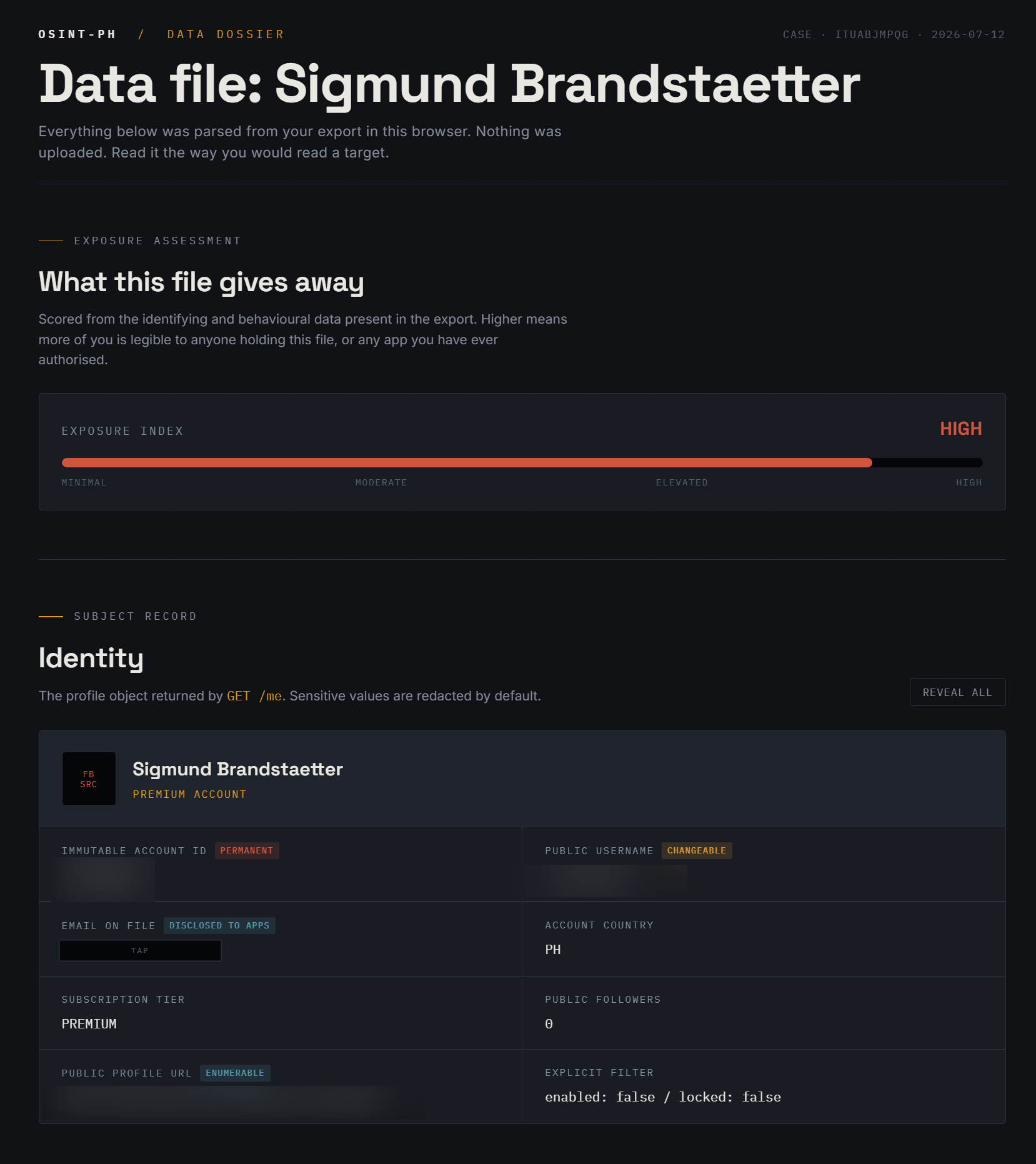
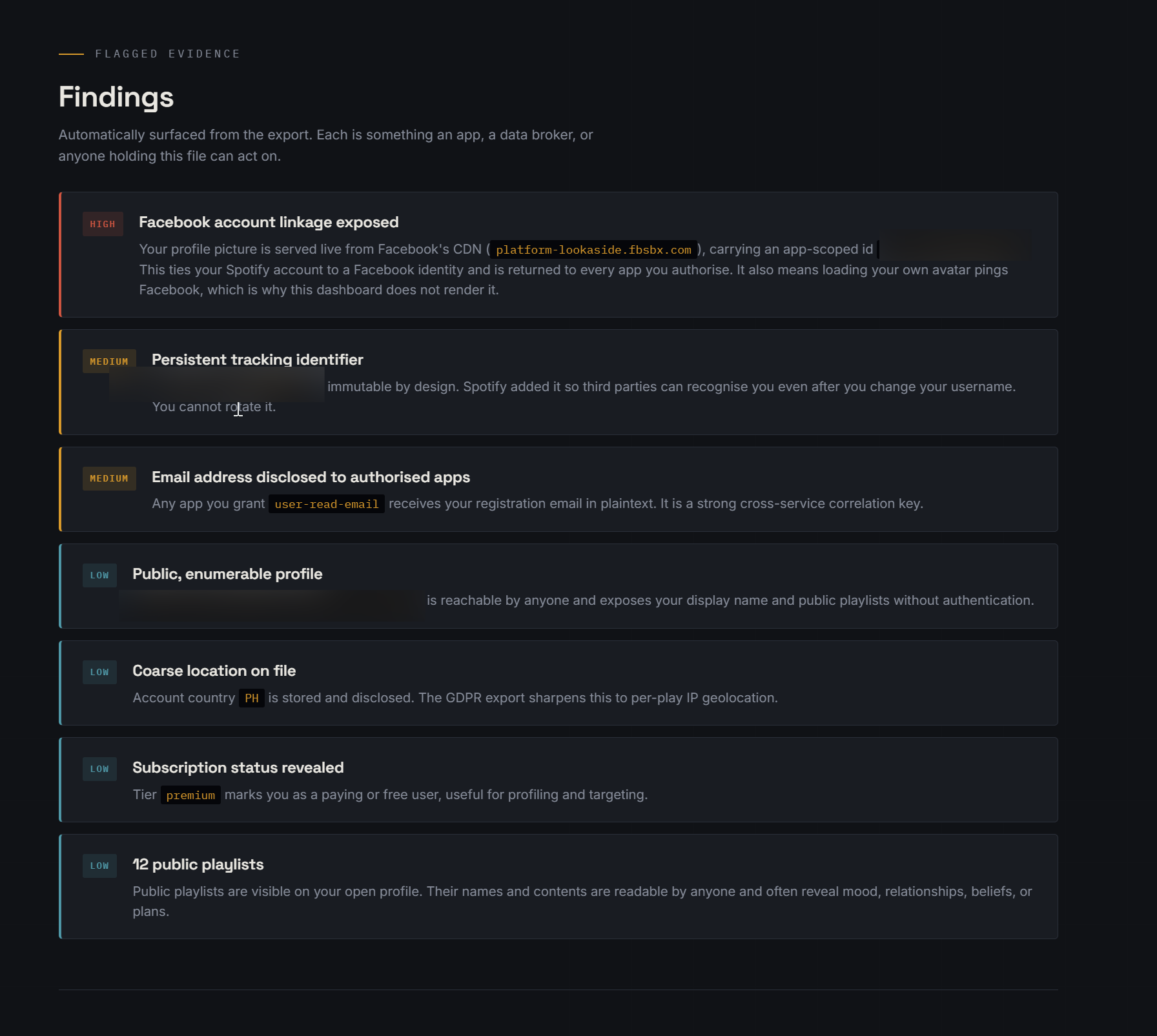
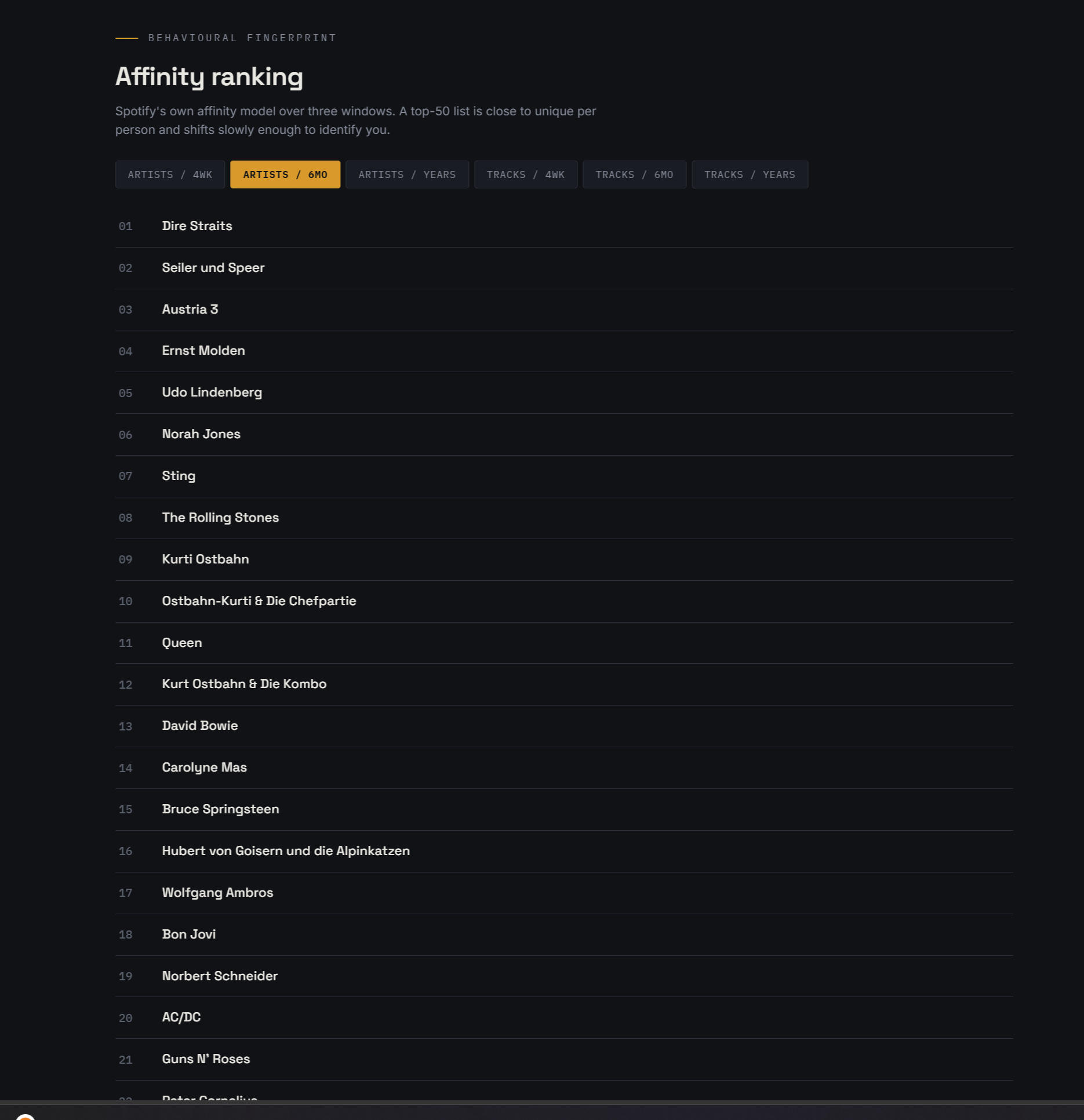
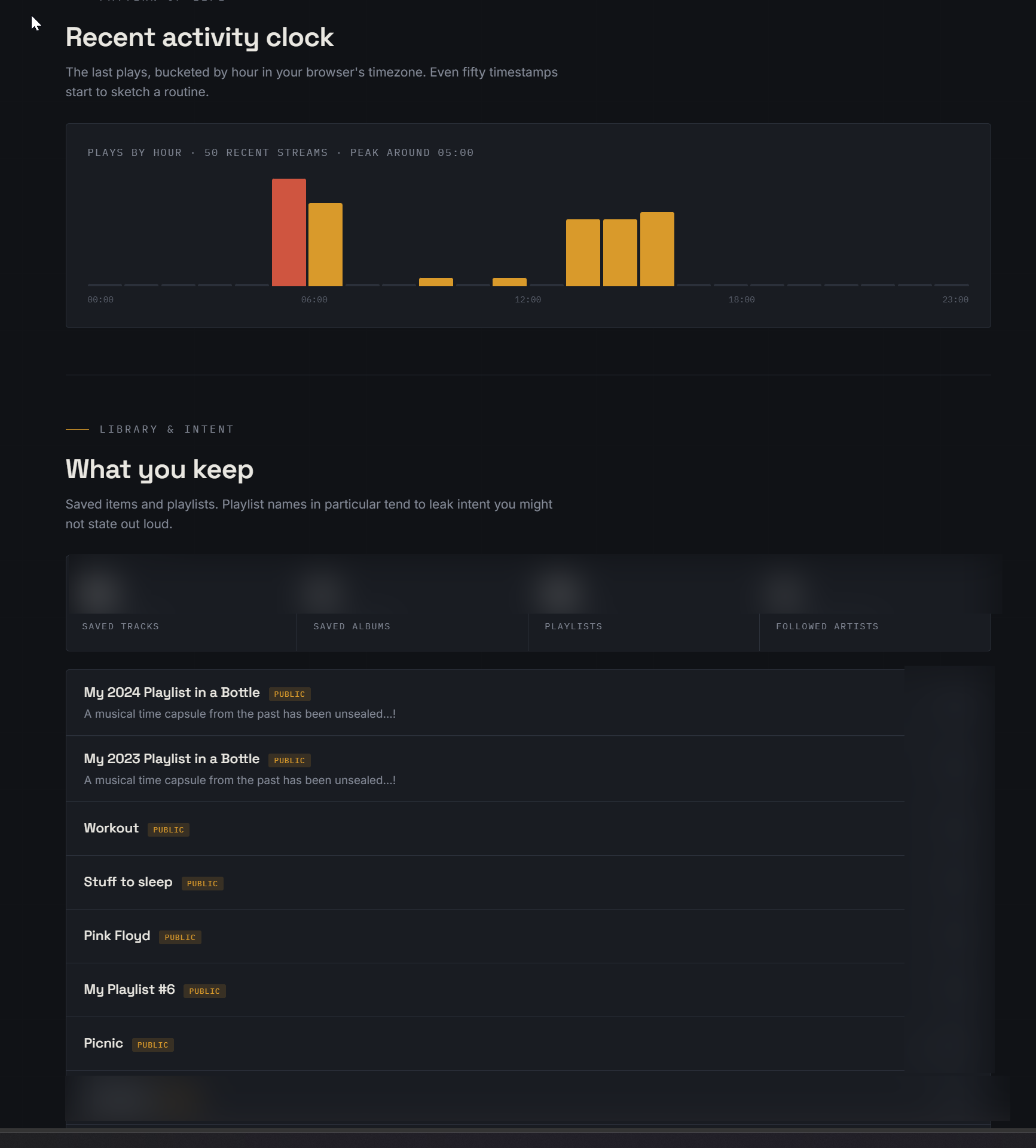
Reach out via the contact details below if you want the visualization code as well.
That is door one. Useful, quick, and firmly capped.
Now the interesting door.
Door two: the GDPR export, and the trap inside it
The API will never give you your listening history. For that you go through the data request, and there is a trap in the process that catches almost everyone the first time.

Go to spotify.com/account, open Privacy settings, and scroll to Download your data. You cannot do this from the phone app, it is web only. You will see more than one package on offer, and this is where people trip:
- Account data. Ready fast, often within a day. Contains roughly the last year of streaming history plus your playlists, library, and account details. Most people click this, see twelve months of plays, and assume that is everything. It is not.
- Extended streaming history. This is the one you want. It is your full lifetime of plays going back to the day you signed up. Spotify quotes up to 30 days to prepare it, because 30 days is the GDPR ceiling, but in practice it often arrives in a few hours. Request this one explicitly.
- Technical log information. A separate, quieter package. This is the one with the sharpest edges, more on it below.
Request the extended history, wait for the email, and download the zip. Inside is a set of JSON files (split into chunks of about 12 MB each) plus a PDF that describes the fields. Each play in the history looks like this:
{
  "ts": "2024-07-27T20:34:47Z",
  "platform": "Android OS 13 (samsung, SM-S911B)",
  "ms_played": 235422,
  "conn_country": "PH",
  "ip_addr": "112.198.x.x",
  "master_metadata_track_name": "Some Track",
  "master_metadata_album_artist_name": "Some Artist",
  "master_metadata_album_album_name": "Some Album",
  "spotify_track_uri": "spotify:track:...",
  "reason_start": "trackdone",
  "reason_end": "fwdbtn",
  "shuffle": false,
  "skipped": true,
  "offline": false,
  "offline_timestamp": null,
  "incognito_mode": false
}
Here is that same record read the way an investigator reads it, field by field, because this is where the privacy story actually lives.
ip_addr. Every single play carries the IP address you streamed it from. Not once at login, every play. Run a few thousand of these through a geolocation lookup and you have a movement history: which city you were in, on which date, roughly. For anyone who travels, and I spend my life between two countries, this is a location log dressed up as a music log. The conn_country field gives you the coarse version of the same thing.
platform. Historically this string held real detail: operating system, OS version, and phone make and model. Older records will show you every device you ever streamed from and when you switched between them. Spotify coarsened this in late 2023 to plain values like android or windows, but the old granular strings stay in your history forever, so a long-term account is a hardware ownership timeline.
ts plus ms_played. Timestamp and how many milliseconds you actually listened. Together these are a minute-by-minute activity log going back years. When you were awake, when you were asleep, when you were commuting, which days you went quiet. Pattern-of-life analysis does not need anything fancier than this.
offline_timestamp and incognito_mode. Even the "private" signals are logged. There is a field recording when you used offline mode, and a boolean recording whether a play happened in a private session. The private session flag being stored at all is worth pausing on: the history remembers that you tried not to be remembered.
reason_start, reason_end, skipped, shuffle. Behavioural texture. Why each track started and stopped, whether you skipped it, whether you were on shuffle. Fine grained enough to model taste and mood, not just what you played but how you engaged with it.
The technical log package
The extended history is the big one, but the technical log information package is the sharp one. Community analysis of these exports has turned up an authentication log that stores the unique device identifier of every device used to sign in, on Windows that is the machine SID generated when the OS was installed, alongside full, unmasked IP addresses. The IPs in the streaming history are often partially masked. The ones in the technical logs frequently are not. There is also a Recipients.json inside this package listing the third parties Spotify may share your data with, which is its own interesting read.
One small mercy showed up in the same analysis: search queries appear to be retained for only about 90 days, which matches Spotify's stated retention policy. So the service is not keeping everything forever. But plays, IPs, and device fingerprints going back to account creation are a different category from a three-month search buffer.
What people actually build on this export
Once you have the export, it is just JSON, which means you own the analysis. This is where the tool you pointed me at fits: the Spotify-Jellyfin-Export project on the Binary Kitchen git server takes Spotify data and reshapes it for a self-hosted Jellyfin music server, part of the broader move people make when they decide to stop renting their library and start owning it. I could not read that specific repo's source directly for this post, its host sits behind an anti-bot wall, so I am pointing at it as an example of the pattern rather than documenting its internals line by line. The pattern itself is common and worth knowing: parse the Streaming_History JSON, resolve the tracks, and rebuild your listening world somewhere you control.
That same export feeds a whole category of self-analysis. A few directions that are easy to build yourself once the data is on disk:
- Movement mapping. Extract
ts,conn_country, andip_addr, geolocate the IPs, and plot where you were over time. This is the single most eye-opening thing to do with your own file, and it is a five-minute script. - Pattern of life. Bucket plays by hour and weekday to surface your real routine. It is uncomfortably accurate.
- Library reconstruction. Rank tracks and albums by total
ms_playedto find what you genuinely listen to most, then use that to rebuild a real owned collection, on Jellyfin or anywhere else, instead of the version Spotify's algorithm shows you.
A data-handling caveat, since we are doing this from a privacy angle and it would be silly to ignore it: your export is one of the most sensitive files you own. It is a multi-year location and behaviour log with your email and account IDs baked in. Keep it encrypted, do not hand the raw zip to a random "upload your Spotify data for fun stats" website, and if you do use a browser-based analyzer, confirm it processes locally and nothing leaves your machine.
Hardening: what you can actually turn off
Pulling your data is only half the exercise. The other half is shrinking what gets collected in the first place. Practical, in your account settings:
- Delete what you can reach. You can remove playlists, unsave tracks, and edit your profile directly. Where you can see and change the data yourself, Spotify keeps it only as long as you choose to.
- Opt out of tailored ads. In Privacy settings. It does not reduce the number of ads on free tiers, but it does cut how much of your behaviour feeds ad targeting. Less relevant to you on Premium, still worth setting.
- Unlink Facebook if your account is connected. That link pulls in your Facebook name, picture, and friend list on top of everything else.
- Turn off "recently played artists" visibility if you would rather your listening not be public by default.
- Use the erasure right. Beyond what you can delete in the UI, you can formally request deletion of other personal data. What they are legally allowed to hold onto varies, but the request is yours to make.
The point
Wrapped shows you a friendly, rounded-off version of yourself once a year. The extended export shows you the version Spotify actually keeps: every play, every device, every IP, every timestamp, stretching back to the day you signed up. For most people that history is more precise than anything they would willingly hand to a stranger, and it has been quietly accumulating the whole time.
The good news is that the same regulations that force the company to collect it responsibly also force it to give you a copy. So pull it. Run the script for the live snapshot, file the request for the full vault, and read your own file the way you would read a target's. It is the fastest privacy education you will get this year, and the subject is you.
The script above is read-only and touches only your own account. If you adapt it, keep it that way, and keep your export encrypted at rest.
Coming Next
Once I got a chance to review the nearly 20 years of spotify data, and created some automaion and scripts to present it in a better way, I will write a follow up article to demonstrate just how much Spotify colllects, and surely shares, about you. It is something we usually would not worry about or even think about, but once you see it with your own eyes, oh well, it is actually quite massive.
Reach out if you have questions or comments or what to collaborate
Session ID: 059db238ab37c3d92615c5cc24b694da29c598cc13e27886053722404118e14271