93 Minutes on npm: Inside the Bitwarden CLI Supply Chain Attack
On April 22, 2026, for about an hour and a half, if you ran npm install -g @bitwarden/cli, you got malware.

On April 22, 2026, for about an hour and a half, if you ran npm install -g @bitwarden/cli, you got malware.
Not a typosquat. Not a sketchy fork. The real package. Same scope your CI pipeline has trusted for years. Same maintainer signals. Same download URL. It shipped from the @bitwarden npm namespace with valid provenance, and it carried a credential harvester that went hunting for basically every developer secret you've ever loaded into a shell.
This comes after the very recent Axios supply chain attack, guess we are going to see a lot more of these for the rest of the year.
Bitwarden caught it and pulled the release in roughly 93 minutes, 5:57 PM ET to 7:30 PM ET, per their own forum post. That’s a small window for a package that pulls ~70,000 weekly downloads and over 250,000 a month. It’s also more than enough time to compromise CI runners, developer laptops, and anything they can reach.
If you’re a Bitwarden user who’s only ever touched the desktop app, the browser extension, the mobile app, or the self-hosted server: you’re fine. None of that was touched. Vaults were not accessed. This was a hit on the command-line tool, distributed through npm, and it targeted developers, not consumers.
But for the people in scope, this one is interesting for reasons that go well beyond “another npm package got popped.”
What Actually Happened
The malicious version was @bitwarden/[email protected]. It replaced the normal CLI entry point with a loader and bolted on a preinstall hook so the malicious code would fire automatically the moment anyone installed or updated the package. You didn't have to run bw for anything to happen. npm install was enough.
Researchers at JFrog, Socket, OX Security, Endor Labs, and StepSecurity all published near-simultaneous breakdowns. They line up on the same technical picture.

Two files were added to the package that didn’t belong there:
bw_setup.js— a small (~130 lines), mostly readable loader.bw1.js— a ~9.7 MB obfuscated payload.
bw_setup.js is the Trojan. Its job is to check whether the Bun runtime is already installed on the machine. If not, it downloads a platform-specific Bun 1.3.13 binary straight from GitHub's official release endpoint (https://github.com/oven-sh/bun/releases/...), drops it on disk, chmods it executable on Unix, and uses it to run bw1.js. That choice isn't an accident or just for fun. Bun gives the attacker Bun.gunzipSync() and other APIs for unpacking embedded blobs, and it moves execution off the Node.js code path most defenders instrument first. Meanwhile, bw_setup.js itself stays short and plausible enough to survive a quick eyeball review.
bw1.js is where the real work happens. It's a heavily obfuscated bundle, a 43,436-entry string lookup table, a seeded scramble routine for the juiciest strings (C2 domain, file paths, regex patterns), and six embedded payload blobs that do the actual collection, propagation, and exfiltration. Endor Labs called it "one of the more capable npm supply-chain payloads published to date," which is a polite way of saying the authors didn't phone it in.
One behavioral detail that certainly is worth flagging: before doing anything else, bw1.js checks whether the host's locale is Russian. It looks at the JavaScript Intl API, Unix LC_* and LANG variables, and — on Windows — the relevant env vars gated on SystemRoot being set. If it finds ru anywhere, it exits cleanly with code 0. No theft. No worm. Nothing. That's a standard CIS exclusion, a commonly observed fingerprint of Russian-origin crimeware trying to stay off domestic radars. It doesn't prove attribution beyond doubt, but it's a pretty good indicator.
How the Package Got Poisoned
This is the part that keeps application security people up at night. And not only application security people.
The compromise didn’t come from a weak maintainer password or a leaked npm API key sitting in someone’s dotfiles (something we see way too often for comfort). According to StepSecurity and independent analysis cited by Endor Labs, the attackers got in through Bitwarden’s own CI/CD pipeline, specifically via checkmarx/ast-github-action, a GitHub Action from Checkmarx that Bitwarden's repository references. Checkmarx, a security vendor, was itself compromised the day before as part of a broader campaign that had already poisoned their KICS Docker images and VS Code extensions. From there, the attackers had a foothold inside any repo that ran that Action.
The published workflow history shows what came next. On a non-main branch, publish-cli.yml was rewritten five times in a row. The final version checked out the repo, set up Node, ran npm i -g npm@latest, and executed npm publish on a pre-staged tarball, scripts/cli-2026.4.0.tgz, that had been dropped into the repo earlier in the chain. The workflow used id-token: write, which means it exchanged a GitHub OIDC token for a short-lived npm auth token via npm's trusted publishing mechanism. Then it published. Then the workflow runs, the branch, and the release tag were all deleted, leaving only the package on npm.
Security researcher Adnan Khan called this out on X: he believes it’s the first known compromise of a package published via npm trusted publishing, the mechanism that was supposed to replace long-lived tokens and reduce exactly this kind of risk.
It’s worth sitting with that. Trusted publishing isn’t broken, the OIDC handshake worked as it should. What broke is that a malicious workflow, staged inside a legitimately trusted repo through a trusted Action, got to invoke that handshake. Short-lived tokens don’t help if the attacker is the one minting them through your own CI. The attack didn’t bypass the control; it used the control for its own malicious purpose.
There’s also a small but telling forensic artifact: the root package.json advertised 2026.4.0, while the embedded build/bw.js metadata still said 2026.3.0. A clean release wouldn't have that skew. Anyone pinning and diffing packages before install would have caught it. Almost no one does.
What It Stole
Once bw1.js started running, it fanned out across three parallel collectors.
The filesystem sweep went after the predictable high-value stuff: SSH private keys, .git-credentials, .npmrc, .env files, shell histories, AWS credential and config files in ~/.aws/, GCP credentials managed by gcloud, Azure credentials managed by azd, and a comprehensive pile of token files. On top of that, per Socket's analysis and CyberKendra's writeup, it specifically targeted AI coding assistant configuration files , like ~/.claude.json, ~/.kiro/settings/mcp.json, and other MCP server configs. That's a relatively new target surface. A developer's AI assistant config often contains API keys for multiple services chained together, and those keys frequently have broad scopes because the assistant needs them to do useful work.
The shell collector explicitly ran gh auth token to grab the user's GitHub CLI token, then scanned process.env for anything matching ghp_[A-Za-z0-9]{36} (GitHub classic PAT pattern) or npm_[A-Za-z0-9]{36,} (npm token pattern).
Then the cloud collector used any credentials it found to reach outward. AWS SSM Parameter Store, AWS Secrets Manager, Azure Key Vault, GCP Secret Manager. The payload doesn’t just grab credentials; it uses them. If an infected developer’s AWS key had Secrets Manager read access, those secrets are assumed compromised too.
When GitHub tokens were found with workflow-write scope, the malware weaponized them. It added a new GitHub Actions workflow to repos the token could reach, something like .github/workflows/format-check.yml, that runs on trigger, captures all secrets available to the workflow (toJSON(secrets)), and uploads them as an artifact called format-results. StepSecurity summarized the implication bluntly: a single developer running the affected CLI can become the entry point for compromising every CI/CD pipeline their token can reach.
Exfiltration and the Worm
Stolen data was AES-256-GCM encrypted with a symmetric key, which was itself RSA-wrapped with a hardcoded attacker public key. Hybrid encryption, done properly. Even if you find the exfiltrated blob sitting in a public repo, you can’t decrypt it without the attacker’s private key.
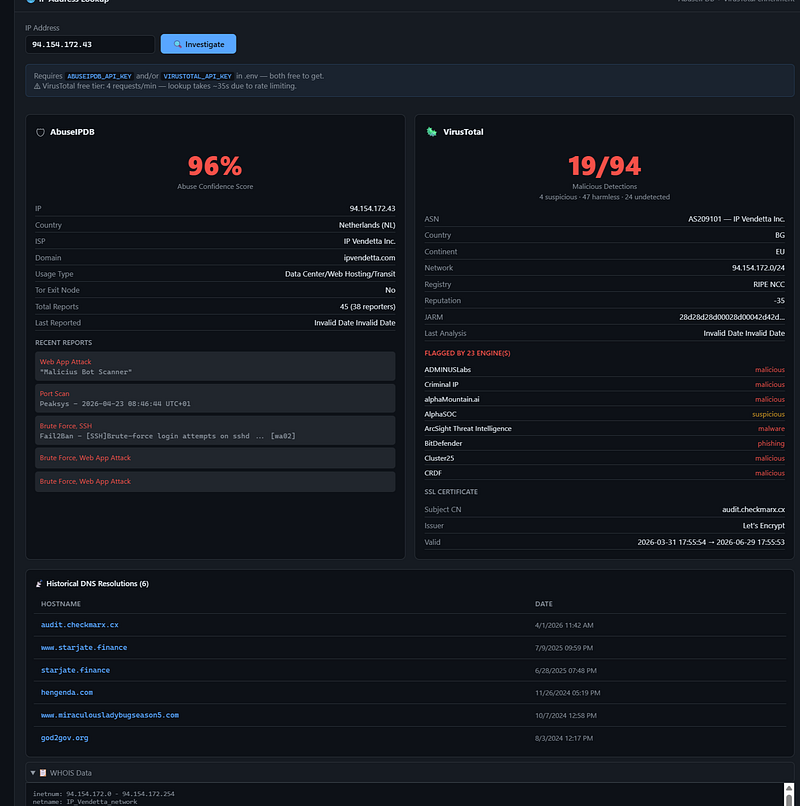
The primary exfil channel was audit.checkmarx[.]cx/v1/telemetry, a domain that typosquats the real checkmarx.com and was designed to look like legitimate telemetry from a security tool. Nice try. Resolves to 94.154.172.43. Block it.
The fallback channel is what gives this malware its name. If the primary endpoint is unreachable, the payload uses a stolen GitHub PAT to create a new public repository on the victim’s GitHub account. Repo names are generated from two Dune-themed wordlists, sardaukar, fremen, atreides, harkonnen, mentat, sandworm, ornithopter, heighliner,with a numeric suffix. The repo description is hardcoded: Shai-Hulud: The Third Coming. Encrypted results get committed as results/results-<timestamp>-<counter>.json batches, up to 30 MB each.
If the victim has no GitHub org memberships, the malware also encodes the stolen token into the commit message using a LongLiveTheResistanceAgainstMachines: prefix, essentially dead-dropping the credential back to the attacker publicly so other infected machines can pick it up. There's also a "Butlerian Jihad" manifesto, a reference to the Dune books' anti-machine uprising — that gets appended to ~/.bashrc and ~/.zshrc on infected systems for persistence and, apparently, ideological flavor.
The whole thing self-propagates. Stolen npm tokens with publish permissions get used to republish every package the victim maintains, downloaded, tampered with (payload copied to dist.js, loader rewritten as setup.mjs, preinstall script added, patch version bumped), and pushed back to the registry. That's the worm piece. That's why researchers called it "Shai-Hulud: The Third Coming" — this is the third major iteration of a self-replicating npm worm we've seen in the last year.
The Blast Radius
Bitwarden’s statement is reassuring on the specific point that matters most to most readers: no vault data was accessed, no production systems were touched, and non-CLI clients (desktop, browser, mobile, server, Snap) were never in scope. If you’re a regular Bitwarden user, your passwords are safe.
For developers who installed 2026.4.0 during that 93-minute window, though, the assumption has to be that every credential present on the affected machine is burned. That includes:
- GitHub PATs and OAuth tokens (rotate all of them, not just the obvious ones)
- npm tokens, especially any with publish scope or 2FA bypass
- AWS access keys, and anything they could read from SSM/Secrets Manager
- GCP service account keys and anything exposed via Secret Manager
- Azure credentials and Key Vault secrets
- SSH private keys
- Any API keys in
.envfiles or shell environment - AI assistant credentials (Claude, Kiro, other MCP-enabled tools)
- Session tokens in shell history
The blast radius isn’t just the individual machine. If that machine’s GitHub token had access to organization repos, you have to audit those repos for injected workflows — look for .github/workflows/format-check.yml or anything doing toJSON(secrets) that shouldn't be, and review workflow runs in the last 48 hours for unexpected format-results artifacts. If that machine's npm token could publish packages, those packages need to be checked for unexplained patch-version bumps and preinstall: node setup.mjs hooks.
Why This One Matters
Supply chain attacks on npm are not new. Shai-Hulud, LiteLLM, Trivy, and now Checkmarx and Bitwarden have been hit in the last year. The attackers have gotten better. This campaign specifically, tracked variously as TeamPCP and now as a likely Shai-Hulud evolution, has been running since at least March 2026 and is clearly operating at a level of tradecraft that deserves attention.
A few things stand out about the Bitwarden incident.
First, it’s the first known compromise of a package published via npm trusted publishing. That mechanism was the industry’s answer to years of pain around leaked long-lived tokens. It turns out that if the attacker owns your CI workflow, OIDC doesn’t save you, it just shortens the token’s lifespan. That’s still better than nothing. But it’s not the “solved problem” some of us wanted it to be.
Second, the compromise hit a security tool through another security tool. Checkmarx sells supply chain security products. Bitwarden runs those products as a customer. The attackers rode the trust relationship from vendor to customer to npm, and the end targets are every developer who touches @bitwarden/cli in a build pipeline. There's an uncomfortable lesson in that for anyone still treating "is it from a security vendor?" as a risk-reduction signal.
Third, the payload targets AI coding assistant configs. That’s a relatively new pattern, and it’s going to get more common fast. Developers are loading more API keys into their MCP servers and AI agent configs every month, usually without thinking hard about blast radius. An attacker who lifts a Claude or Kiro config can sometimes chain into half a dozen services before they run out of cached tokens. The era where AI configs get treated with the same rigor as production secrets probably needs to start now.
Fourth, the self-propagation piece makes this a worm, not just a stealer. Containment isn’t just “pull the package.” Any account with publish rights and the malware present has already been used to infect downstream packages. The full map of affected packages hasn’t been published anywhere I’ve seen.
If You Ran It
The vendor guidance is consistent across JFrog, Socket, Endor Labs, and Bitwarden’s own notice. The short version:
bash
npm uninstall -g @bitwarden/cli
npm cache clean --force
# find and delete any leftover bw1.js and bw_setup.js
Then rotate. All of it. GitHub PATs, npm tokens, SSH keys, AWS/GCP/Azure credentials, anything in .env, and any API keys loaded into AI configs. Don't just rotate the ones you think were "sensitive" as the payload didn't discriminate and neither should you.
Search GitHub for repos with the description Shai-Hulud: The Third Coming under your org's user accounts. That's a direct IOC. Check ~/.bashrc and ~/.zshrc for any heredoc block containing LongLiveTheFighters, Butlerian, or an unusual echo << 'EOF' block — that's the persistence injection. Audit GitHub Actions in your org for unexpected format-check.yml files or workflow runs with format-results artifacts in the last 48 hours.
Going forward, pin your CLI dependencies to specific versions. Enable ignore-scripts in CI where you can. Use StepSecurity's Harden-Runner or equivalent to get egress monitoring on GitHub Actions. Review which third-party Actions your workflows pull in, pinned by SHA, not by tag, and treat every one of them as part of your attack surface. Because it is.
And the uncomfortable one: accept that “trusted publisher,” “provenance attestation,” and “verified maintainer” are necessary but not sufficient. They stop entire categories of attack. They don’t stop this one.
Clean install, rotate, audit, move on. That’s this week. The next one is coming.
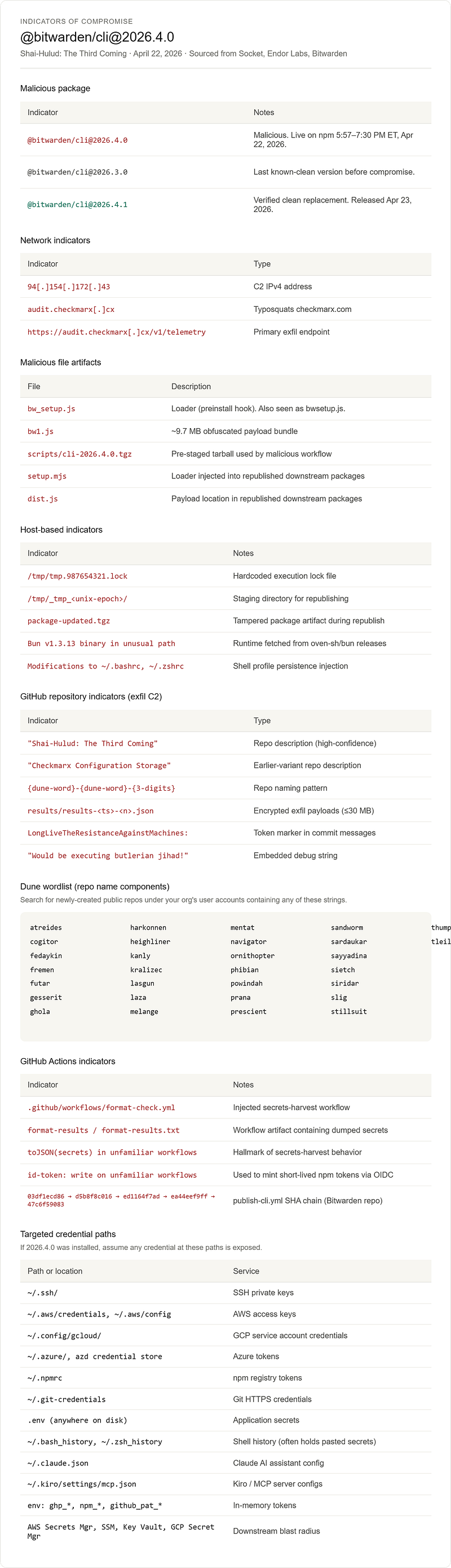
Indicators of Compromise (IOCs)
The following indicators are compiled from Socket’s published IOC list Socket, Endor Labs’ workflow forensics, and Bitwarden’s incident statement. All have been confirmed by multiple primary research sources.
Hunt Commands
# Check shell profiles for persistence injection
grep -nE "bw1|checkmarx|butlerian|shai-hulud|tmp\.987654321|LongLiveTheResistance" \
  ~/.bashrc ~/.zshrc ~/.profile 2>/dev/null
# Check for the lock file
ls -la /tmp/tmp.987654321.lock 2>/dev/null# Check for residual payload files
find / -name "bw1.js" -o -name "bw_setup.js" -o -name "bwsetup.js" 2>/dev/null# Check installed npm package version
npm list -g @bitwarden/cli
npm view @bitwarden/[email protected] # confirm if you ever pulled it# Check npm cache for the malicious tarball
find ~/.npm/_cacache -name "*bitwarden*" 2>/dev/null# Search GitHub (replace ORG) for exfil repos
gh search repos --owner ORG "Shai-Hulud: The Third Coming" --json name,description,createdAt
gh search repos --owner ORG "Butlerian" --json name,description,createdAt# Audit GitHub Actions for injected workflow
gh api -X GET "repos/ORG/REPO/contents/.github/workflows/format-check.yml" 2>/dev/null
gh run list --repo ORG/REPO --limit 100 --json name,conclusion,createdAt | \
jq '.[] | select(.name | contains("format"))'
A note on file hashes
I deliberately haven’t included SHA-256 hashes in this table. The primary research vendors (Socket, Endor Labs, JFrog, OX Security) didn’t publish a single canonical hash list at time of writing, and the hashes that have circulated on Twitter/X vary depending on whether they were taken from the npm tarball, the unpacked bw1.js, or the embedded payload blobs. Publishing unverified hashes pollutes threat intel feeds and can cause false negatives when the file is repackaged. If you need hashes for SIEM rules, pull them directly from the Socket package overview page or compute them yourself from a quarantined copy of @bitwarden/[email protected] retrieved via npm's deprecated-version mechanism.
You have thoughts on this that you want to share, or you have questinos?
Reach out!
Reach out if you have questions or comments or what to collaborate
Session Messenger: 059db238ab37c3d92615c5cc24b694da29c598cc13e27886053722404118e14271